Sequential Transactions
Sequential Transactions enable cost, accounting and budget transactions in invoices to run in the background at a specified time or period.
Path: System > General Usage > Objects > Background Transaction
Sequential transactions are defined in the transaction category detail. Whether a transaction category will be processed sequentially, that is, in the background, depends on the "Let Accounting, Budget, Cost transactions run in the background" option on the transaction category definition screen. If this option is selected, no accounting, budget and cost transactions will be performed during invoice recording. It then performs these movements in a specified period or date.

When and on which date or period the Accounting, Budget and Cost transactions will be carried out are described by Timed Tasks.
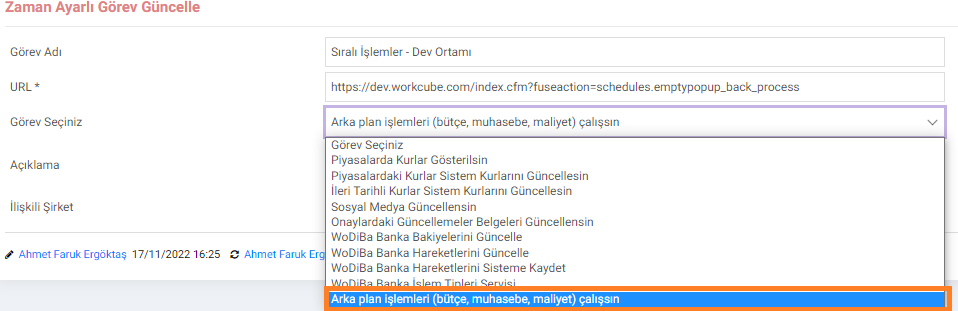
As can be seen in the image, timed tasks are called "Background Processes". A default task has been added named "let it run (budget, accounting, cost)". It works just like timed tasks defined for withdrawing exchange rate information. How often it will run or at what time of day it will run is determined from the timed task detail.
Whether the timed task is running in the background and which document is moving can be tracked on the Background Process page.


As can be seen in the example above, INVOICE2022/12 Document has been recorded with a transaction category that performs background processing, and has not yet made any Budget, Cost and Accounting transactions. When Budget, Accounting and Cost transactions run, the relevant icons will turn green. Now, let's wait for our Scheduled Task to run and check whether our document makes budget, cost and accounting movements in the background.

As can be seen in the image above, the Scheduled Task ran in the background and some movements occurred in the document. Accounting and Cost transactions worked and accounting voucher was created in the background. At the same time, it entered the cost calculation by adding the cost record to the product cost history.
On the budget side, the reason why it appears in red is that no budget movement has been made in this document. Likewise, if the product used in the relevant invoice was a product whose cost was not tracked, no cost movement would be made in the background and the cost column would be highlighted in red.
There may be more than one item of product in an invoice document. There may not be a budget or cost process for all of these products. For this reason, each item in the invoice is shown on a separate line in the product list, and the budget, cost and accounting columns appear in green or red depending on these lines.