Maintenance Plans
Maintenance Plans are records entered to ensure that assets in need of maintenance are constantly operational.
Path: CRM > Service-Warranty > Service > Maintenance Plans
You can list, add and update on the Maintenance Plans page.
Listing Maintenance Plans
You can list your maintenance plans by clicking the “search” icon on the page.
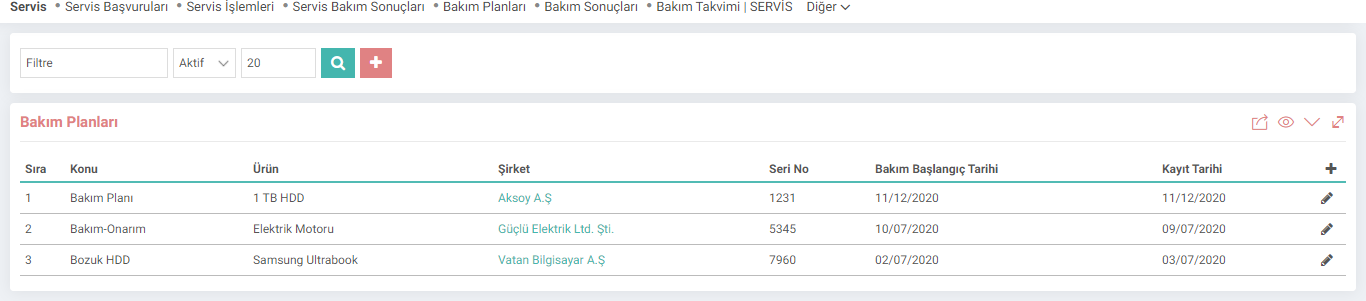
Maintenance Plans; It will be listed with information such as Subject, Product, Company, Serial Number, Maintenance Start Date and Registration Date.
Adding a Maintenance Plan
To add a Maintenance Plan, click on the "+" icon on the listing page. The registration screen will appear;

The Active box must be checked. Otherwise, the maintenance plan will not appear.
Save your maintenance plan after the fields on the screen are filled.
Maintenance Plan Detail
To go to the Maintenance Plan detail, click on the "Update" icon at the end of the line of the relevant maintenance plan on the listing page. You will see the update screen;

In this screen, in addition to the fields on the registration screen, there is the "Station Maintenance" section. In this section, you can define the maintenance type and write how often the maintenance will take place. For example; Periodic maintenance is arranged for the machine that is under maintenance. This periodic maintenance will be carried out for 1 day every 6 months. In such a case, a definition is made as in the image.
Do not forget to update your plan after making the relevant changes.
Feedback
4.3.2.1.2. Service Operations
Service Management; maintenance, repair, technical support, etc. regarding after-sales products and services. It covers the processes. With the Workcube Service Module, you can see which type of service was provided to which customers regarding which product or solution, which service ended in what situation, etc. You can control the situations.
4.3.2.1.1. Service Applications
Service management; maintenance, repair, technical support, etc. regarding after-sales products and services. It covers the processes. With the Workcube Service Module, you can see which type of service was provided to which customers regarding which product or solution, which service ended in what situation, etc. You can control the situations.
Service Management
Workcube Service Management; By providing a complete and end-to-end solution for all your processes, from work orders, materials and asset management to contracts, from warranty tracking to invoicing, it ensures that you or your partners to whom you direct services provide timely and consistent service to their customers.
4.3.2.1. Service-Warranty Parametric Definitions
Service management; maintenance, repair, technical support, etc. regarding after-sales products and services. It covers the processes. With the Workcube Service Module, you can see which type of service was provided to which customers regarding which product or solution, which service ended in what situation, etc. You can control the situations.
4.3.2.1.3. Service Maintenance Results
Service Maintenance Results is the screen where the results of entered service applications are recorded and checked. You can access the maintenance result page from the path shown below. Maintenance results can also be entered within the service application.