Intranet Operations
Intranet, which we can define as a private network or private web within the company, built on communication and communication, provides socialization between employees of companies, uninterrupted information sharing and cooperation between companies where internal communication and information sharing are based. In the intranet environment, employees/users can access various data and related information from a single interface and perform many operations.
Path: Top Menu >Intranet
Intranet is the communication, management, It allows you to carry out all your activities required for demands, training and development on a single platform to which all employees are connected. With this platform, which contains all the data about your company from A to Z, you will create a corporate memory specific to your company. By keeping this corporate memory alive, you can increase continuous development and clarity towards your company, employees, partners or customers.
You can reach the Intranet main screen by clicking on the Intranet button in the upper left corner of the Workcube main screen.

When you access the Intranet main screen, you will be greeted by the following screen. Explanations about the basic functions on this screen are given below, but you can find detailed information for each function on its own page - as associated content.
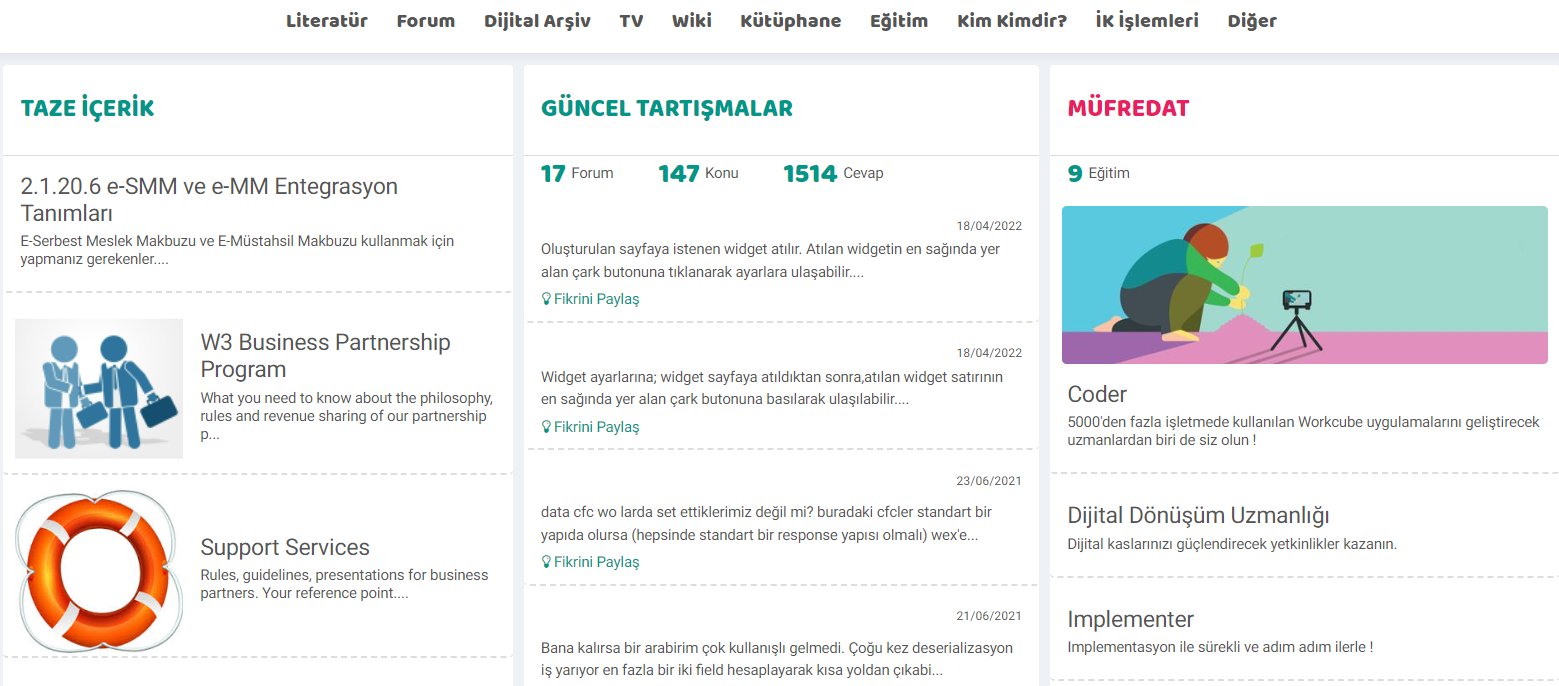
Regardless of the size of your company, with the Workcube Intranet application, employees can follow the company's vision online on the same platform and help it gain a social identity with its shared structure. You can follow the fresh content added to Wiki or Literature with the sections divided into 3 sections on the main screen, and you can see and evaluate your company's current discussions in the middle section. You can see the contents of your company curriculum with the Curriculum located on the far right and within the Training function.
The general functions of the intranet, located at the top of the main screen, are as follows:
- Literature The application allows you to reveal company culture and values, and to convey priorities and company policies quickly and effectively to your employees, partners and customers.
- Forummakes it easier for you to bring your employees, customers and partners together and build a strong collaboration with the application. You can open discussion threads for current business or project ideas in the forum section, and brainstorm on the subject from here, ensuring that the quality of the subject and therefore the project or work it is related to increases.
- Digital Archive application allows you to digitally store, classify and deliver all your original information/documents to users all over the world. You can store and create your company archive with a wide range of document type options that you can edit how you share with authorizations.
- With TV , you can add video content to explain and support all issues related to your company. You can increase clarity and keep development alive by presenting video content that may be useful to your employees, customers or partners.
- Wiki is your company's digital encyclopedia. It is your company guide created with content containing all information from A to Z. You can create resources that present all aspects of your company culture by enriching it.
- LibraryWith books, CDs, drawings, templates, etc. in your business. You can record all your physical archives, and with its powerful usage tracking function, it allows you to record and track all kinds of information about library materials such as book name, publication date, department used.
- With the Education application, you can create an online training platform with your company's curriculum and offer it to your employees. You can plan your training with titles such as Curriculum, Contents, Classes, Lessons, Exams, and contribute to the development of your employees for your work quality.
- With the Who Is Who? section, you can search and find every person in your company's communication network who has encountered your company.
- HR Transactions This is the area where all requests needed by employees regarding Human Resources and transactions containing employee information are located. Here, employees can apply for requests, which will appear on the manager's approval screen.
- Other Transactions where usage and accessibility are important, apart from general intranet functions, are included here. From here, the employee can make many requests. For example; requests, approvals, evaluations, correspondence.

Kütüphanede bulunan kitaplar için bu ekrandan kategoriler oluşturularak kitaplara daha hızlı erişilmesi ve düzeni sağlanır.
xml_is_all_lang Bütün Dillerdeki İçerikler Gelsin mi?
Feedback
بوابتي
تندرج عائلة أعمال My Portal ضمن شبكة الإنترانت. تتم إدارة المعلومات الموجودة على الشبكة الداخلية وتنفيذ المعاملات من خلال الوحدات الموجودة ضمن عائلة الوظائف هذه.
الأرشيف الرقمي
باستخدام تطبيق الأرشيف الرقمي داخل Workcube Intranet، يمكنك الوصول إلى جميع معلومات الشركة ومستنداتها ومقاطع الفيديو والصور وما إلى ذلك. ويتم تخزين جميع المحتويات رقميًا وفرزها وتسليمها مركزيًا للمستخدمين حول العالم. باستخدام الأرشيف الرقمي، يتم عرض أصولك الرقمية على منصة مشاركة وتخزين آمنة داخل Workcube.
الأدب
تطبيق Literatür الموجود داخل شبكة الإنترانت، والذي يمكننا تعريفه على أنه شبكة خاصة أو شبكة خاصة داخل الشركة توفر الاتصال والتواصل، يمكّنك من الكشف عن ثقافة الشركة وقيمها ونقل الأولويات وسياسات الشركة إلى موظفيك وشركائك وعملائك بسرعة وفعالية.
كتاب الزائر
باستخدام كتاب الزيارة في جدول أعمال Workcube؛ هوية الزائر، سبب الزيارة، مدة الزيارة، الخ. يمكننا تسجيل وتتبع التفاصيل مثل:
مكتبة
قسم المكتبة داخل الإنترانت هو قسم يمكنك من خلاله إضافة الكتب والمجلات والأصول المماثلة رقميًا في شركتك وحجزها للاستخدام. بفضل المكتبة، يمكنك تخزين محتوى مفيد من شأنه أن يساهم في ثقافة شركتك.