Travel Requests
Employees can request travel. You can approve or reject employee travel requests on Workcube.
The first step to follow to create a Travel Request is HR-HR > Personnel Payroll > Wage Management and Personnel > Travel Request by clicking the "+" icon on the Travel Requests Creation screen. must be entered.

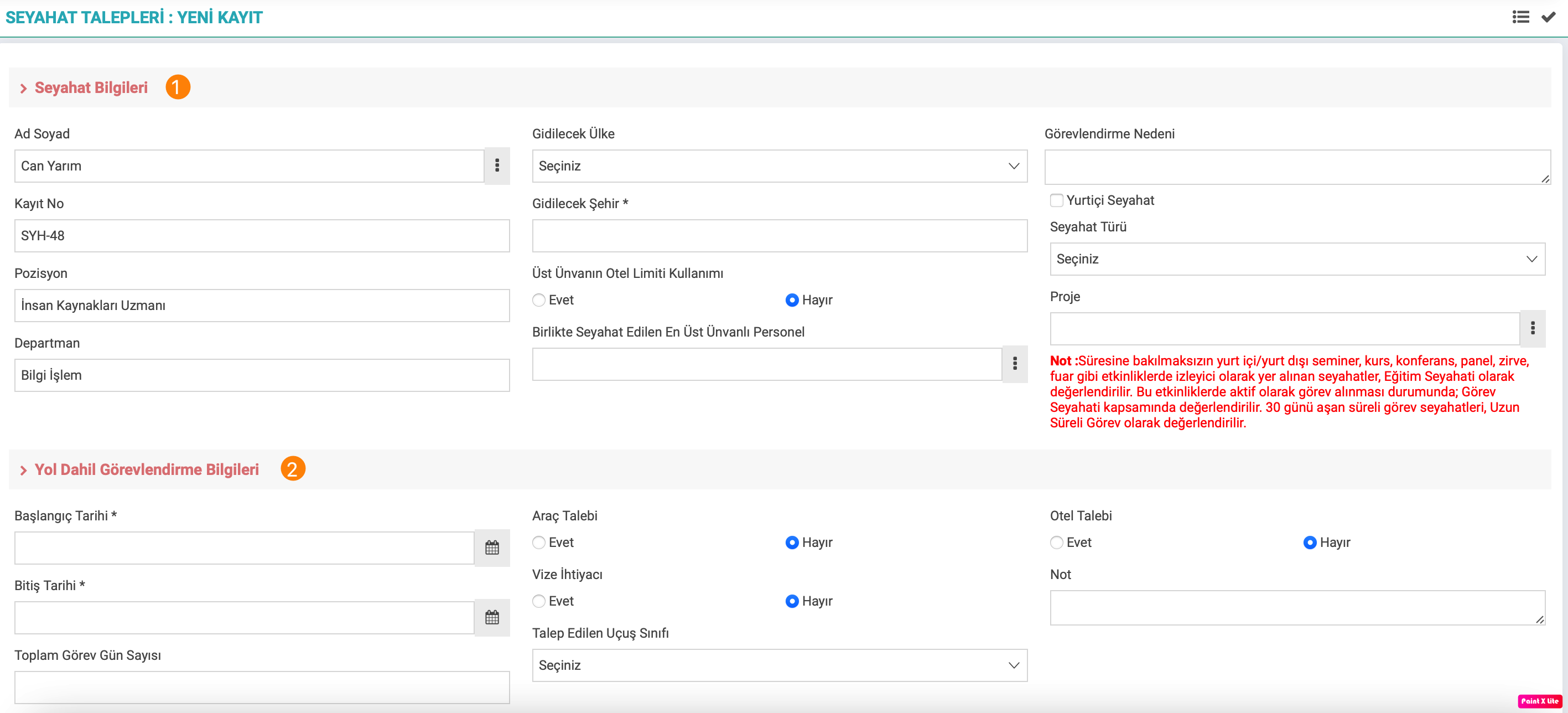
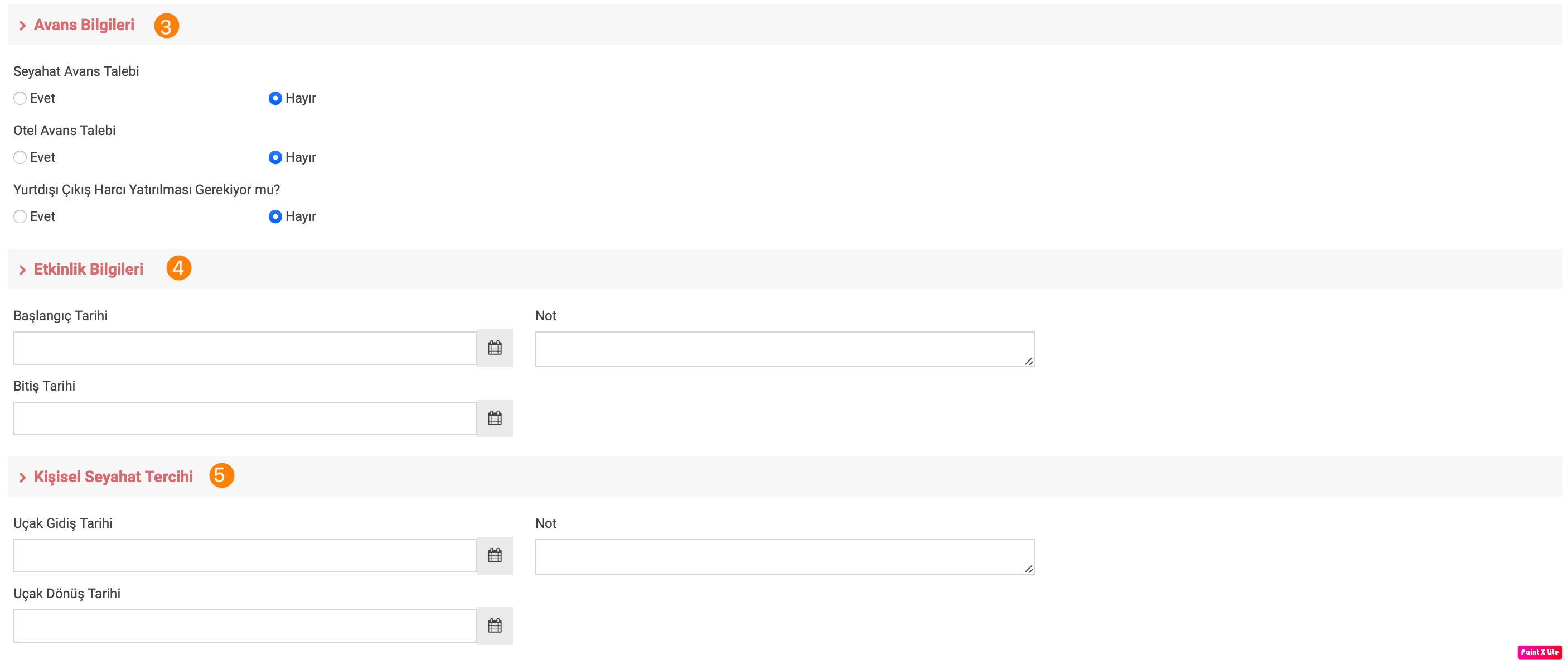
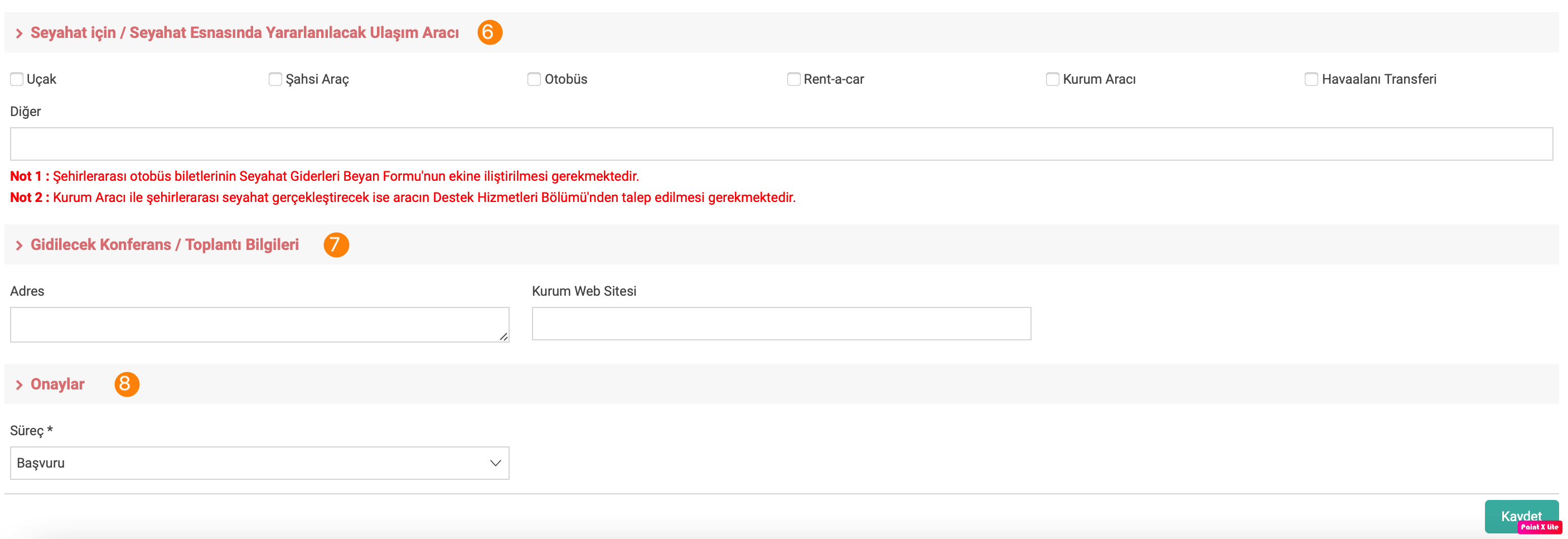
- Travel Information: The fields in the relevant section are as follows;
- Name and Surname: The employee's name and surname information comes automatically.
- Registration No: System automatic number
- Position: The employee's position is automatically assigned.
- Department: The employee's department is automatically assigned.
- Destination Country: It refers to the area where the country to be visited will be selected.
- City to Go: It refers to the area where the city to be visited will be selected.
- Usage of the Parent Title for Hotel Limit: There are two options as Yes/No and this area refers to the area from which to choose.
- Personnel with the Highest Title Traveling with: It refers to the field where the employee will be selected if there is an employee with a higher position to travel with.
- Reason for Assignment:It refers to the field where the employee's reason for duty is written.
- Travel Type: It refers to the area where the type of travel the employee will travel will be chosen.
- Project: If the employee is traveling within the scope of a project, it refers to the area where the project will be selected.
- Assignment Information Including Route: The fields in the relevant section are as follows;
- Start Date: It refers to the field where the start date of the trip will be selected.
- End Date: It refers to the field where the end date of the trip will be selected.
- Total Number of Duty Days: It refers to the field where the number of days of the trip between the start and end dates is written.
- Vehicle Request: There are two options as Yes/No.
- Visa Request: There are two options as Yes/No.
- Requested Flight Class: It refers to the field where employees choose which class of flight ticket they want in case they use aircraft as a means of transportation.
- Hotel Request: There are two options as Yes/No.
- Note: It refers to the field where the employee making a request or related to the employee can add a note to the travel application.
- Advance Information: The fields in the relevant section are as follows;
- Hotel Advance Request: There are two options as Yes/No.
- Is it Required to Pay Foreign Exit Fee?: There are two options as Yes/No.
- Event Information: The fields in the relevant section are as follows;
- Getting Started Date: It refers to the field where the start date of the event is selected.
- End Date: It refers to the field where the end date of the event is selected.
- Note: It refers to the field where the employee or the employee making a request can add a note about the event.
- Personal Travel Preference: The fields in the relevant section are as follows;
- Flight Departure Date: It refers to the field where the departure date of the aircraft is selected.
- Aircraft Return Date:It refers to the field where the return date of the aircraft will be selected.
- Note: Note about the employee or the travel preference of the employee making the request.
- Means of Transportation to be Used for/During Travel: It refers to the area where the means of transportation to be used during the travel will be selected or written in writing.
- Conference/Meeting Information to Be Attended: The fields in the relevant section are as follows:
- Address: It refers to the field where the address of the conference/meeting to be attended will be written.
- Institution Website: It refers to the field where the website of the conference/meeting to be attended will be written.
- Approvals: It refers to the field showing the process of the application.
Viewing Travel Request I
Path: HR-HR > Payroll > Compensation Management and Personnel > Travel You can access the requested information by selecting the relevant fields on the Requests page and clicking on the "Magnifier" icon.
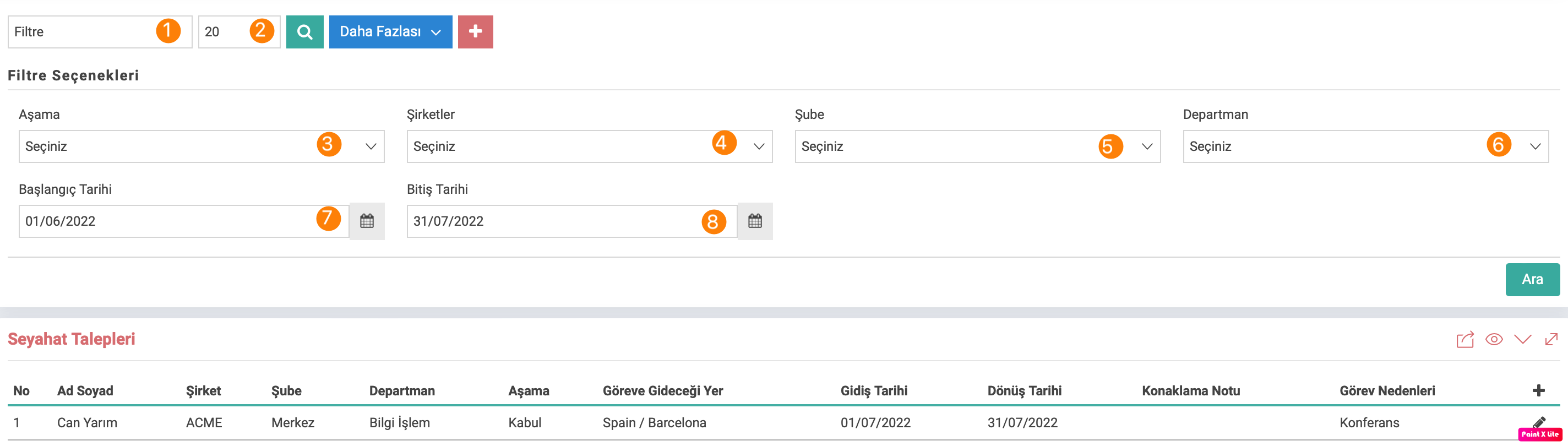
- Filter: When the employee's name and surname is entered in the relevant field, it refers to the field where only the travel requests of the relevant employees will be listed.
- Listing Number: It refers to the number in the listing of deductions in the relevant field.
- Stage: It refers to the area where applications are selected to be listed according to their stages.
- Companies: It refers to the area where the relevant company or companies are selected.
- Branches: It refers to the area where the relevant branch is selected.
- Department: It refers to the area in which the relevant department is selected.
- Start Date: Refers to the field used to list employees according to their start dates according to their applications.
- End Date: Refers to the field used to list employees according to their end dates according to their applications.
Attention: Clicking on the More area opens filter options.
Feedback
3.11.1. My Travel Requests
Workcube My Travel Requests is a function where travel information, assignment including travel, advance payment information, event information, personal travel preferences, meeting/conference to be attended and approval transactions can be made for the employees in your organization.
3.3.4. Wage Management and Personnel
Under the Wage Management and Personnel solution, there are HR functions such as wage - allowance information, overtime, advance requests, employee entries and exits and wage regulations. Along with these functions, wage management and personnel aspects of human resources are managed.
Self Service Other Transactions
In the Self-Service Other Transactions application, many requests such as purchasing, internal request, payment, personnel, travel, budget transfer can be made. Correspondence and confirmations are displayed and the request is approved or rejected.