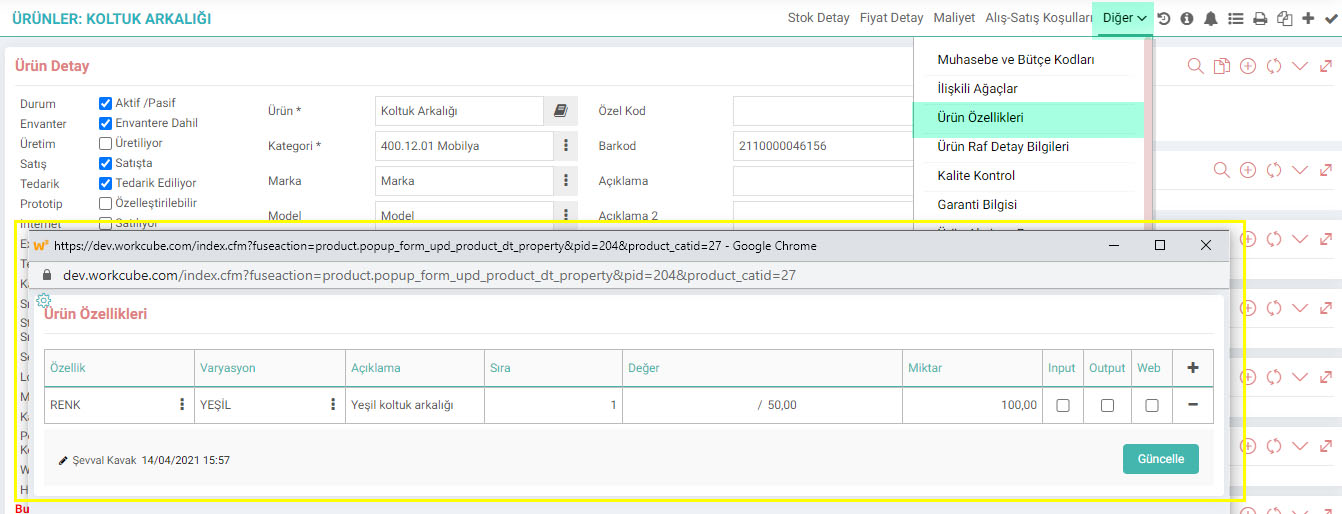
. يجب وضع التعريفات التالية بشكل صحيح.
محطات العمل
محطة العمل هي وحدة إنتاج حيث يتم تنفيذ وظيفة واحدة أو أكثر من نفس النوع معًا وحيث يعمل واحد أو مجموعة من العمال / الآلات. تقع المحطات ضمن تصميم الإنتاج.
المسار: ERP > الإنتاج > تصميم الإنتاج > المحطات
إذا كنت تريد الإدارة بطريقة مجزأة، فيكفي تحديد المحطة الأم عند تحديد المحطة.
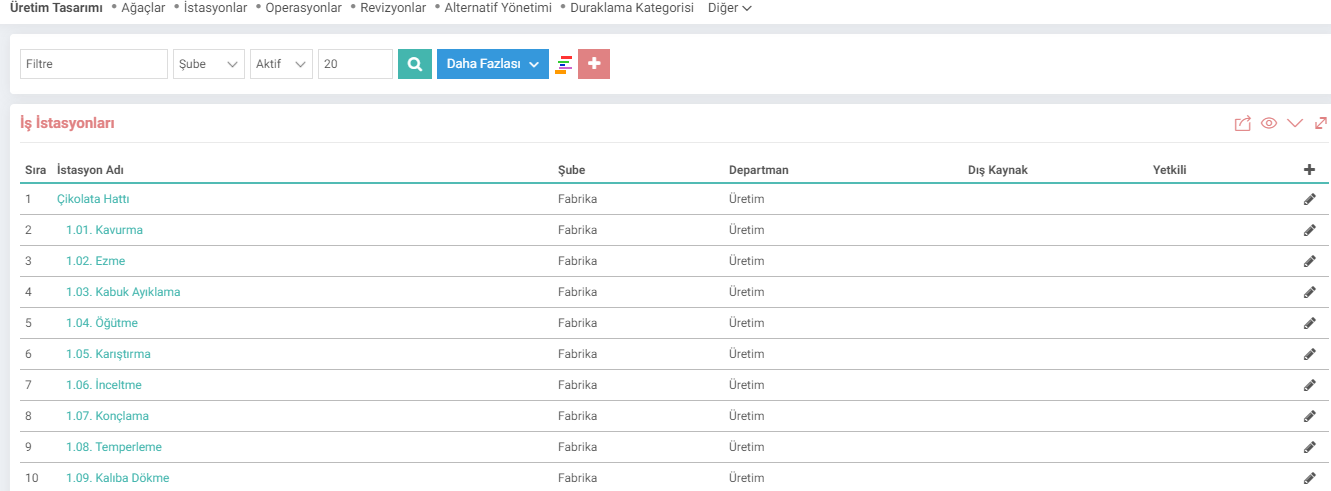
تتم إضافة المحطات المحددة عند تصميم شجرة المنتج؛

تعريفات العملية
هذه هي تعريفات العملية التي يتم تنفيذها في محطات العمل وتمكين المنتج من أن يكون جاهزًا. أثناء تحديد العملية، يمكنك تحديد رمز العملية، وتكلفة التشغيل، وعدد الدقائق التي تستغرقها، وقدرة المحطة/الساعة.
المسار: ERP > الإنتاج > تصميم الإنتاج > العمليات

أيضًا كيفية تنفيذ العملية والمعلومات ودليل المستخدم وما إلى ذلك، إذا كان هناك أي منها، يمكنك إضافتها إلى ملفك الشخصي. تعريف العملية. على سبيل المثال: يمكننا أن نعطي بعض الأمثلة على عمليات مصنع الأثاث على النحو التالي.
01 - عملية القطع
02 - عملية الخياطة
03 - عملية الصباغة
04 - عملية التجميع
05 - التعبئة عملية
برنامج العمل
يجب تحديد برنامج العمل في الإنتاج. يمكنك حفظ جداول العمل الخاصة بك بناءً على عملك وفرعك ومستودعك، بمساعدة هذه المعلمة.
المسار: الموارد البشرية - الموارد البشرية > كشوف المرتبات للموظفين > الحضور والتحكم > جدول العمل

فئات الإيقاف المؤقت
يتم تحديد التعريفات التي تم إجراؤها في فئات الإيقاف المؤقت عند إضافة أنواع الإيقاف المؤقت. وتصنف الأسباب التي توقفت بسببها خط الإنتاج.
المسار: لوحة التحكم > النظام > المعلمات > إيقاف مؤقت الفئات

إيقاف مؤقت الأنواع
أنواع الإيقاف المؤقت يمكنك تحديد المواقف التي يتعطل فيها الإنتاج بسبب أنواع الإيقاف المؤقت. الوجبات، الاستراحات، أعطال الآلات، المشاكل الكهربائية، ذوي الاحتياجات الخاصة، إلخ.
المسار: تخطيط موارد المؤسسات > الإنتاج > تصميم الإنتاج > الإيقاف المؤقت الأنواع

تعريفات مراقبة الجودة
تمكنك تعريفات مراقبة الجودة من تحديد معايير الجودة الخاصة بك. يمكنك حفظ التعريفات بالضغط على أيقونة “+”.
المسار: لوحة التحكم > النظام > المعلمات > مراقبة الجودة تعريفات

يتم إدخال تحديدات المعيار المحدد بواسطة أيقونة "+" في نهاية سطر التعريف المحفوظ كنتيجة لمراقبة الجودة.
يمكن إجراء هذه الاختيارات على شكل تسامح أو قبول أو رفض. للقيام بذلك، يجب تحديد "خيار التسامح والقبول والرفض" من إعدادات XML في النافذة المنبثقة ذات الصلة.

التعريفات الواردة هنا مأخوذة من صفحة أخرى > مراقبة الجودة في الجزء العلوي الأيمن في تفاصيل المنتجات التي يتم مراقبة جودتها و"مراقبة الجودة" في تفاصيل شجرة المنتج. يتم إجراء الارتباط على الصفحة.
أداء الجودة
يتم تحديد التعريفات التي سيتم إجراؤها في هذا المجال عند إضافة نتائج مراقبة الجودة. باستخدام رمز اللون، يمكنك اختيار اللون الذي ستكون عليه المعلمة عند إجراء التحديد.
المسار: لوحة التحكم > النظام > المعلمات > أداء الجودة

يمكن الوصول إلى المعلمات المحددة بالنقر فوق "الجودة" في صفحة عمليات الجودة. يتم استخدامه عند إدخال معلومات التحكم في النافذة المنبثقة التي تفتح.
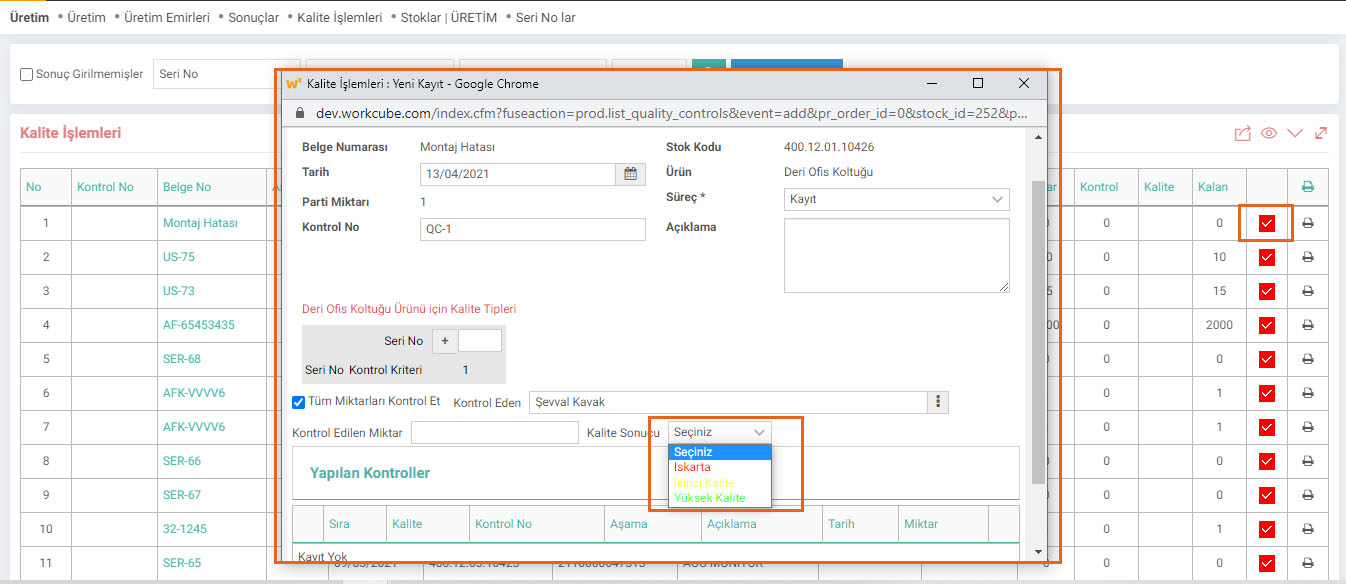
مستوى التفتيش
يتم تعريف مستوى التفتيش في النظام على أنه مستوى مراقبة الجودة. يمكنك تحديد عدد مستويات التحكم التي ستؤديها في هذا المجال.
المسار: لوحة التحكم > النظام > المعلمات > مستوى الفحص

يمكنك ضبط مستويات الفحص المحددة في تفاصيل المنتج الذي يتم مراقبة جودته في صفحة أخرى > مراقبة الجودة. ويتم استخدامه في صفحة "مراقبة الجودة" في تفاصيل شجرة المنتج.

مصدر عدم المطابقة
تم تحديد مصادر عدم المطابقة في هذه الصفحة. نتيجة لمراقبة الجودة، يتم تحديد أي من تعريفات مصدر عدم المطابقة التي تم إجراؤها عند تسجيل عدم المطابقة.
المسار: لوحة التحكم > النظام > المعلمات > عدم المطابقة المصدر

أنواع الإدخال الأساسية
المسار: لوحة التحكم > النظام > المعلمات > الإدخال الأساسي الأنواع

أسئلة المنتج البديل
تماشيًا مع التعريفات المتغيرة التي ستضعها وحدة تخطيط الإنتاج في أشجار المنتجات (سؤال بديل ومنتج بديل)، والعملاء من خلال B2B وB2C أو مستند مع سلة يمكن إنشاء قالب مثل سجلات مواصفات المبيعات والمشتريات بما يتماشى مع الأسئلة والأجوبة البديلة في السجلات. من أجل استخدام شاشة "تشكيل المواصفات من الأسئلة البديلة"، تتم إضافة أسئلة بديلة من وحدة تصميم الإنتاج.
المسار: ERP > الإنتاج > تصميم الإنتاج > أسئلة المنتج البديل

تمت إضافة الأسئلة هنا ERP > يتم تحديده في شاشة الإنتاج > تصميم الإنتاج > الإدارة البديلة.

ميزات الإنتاج
إضافة ميزات وأشكال مختلفة إلى المنتج بمساعدة هذه المعلمة.
المسار: ERP > الإنتاج > تصميم الإنتاج > ميزات الإنتاج
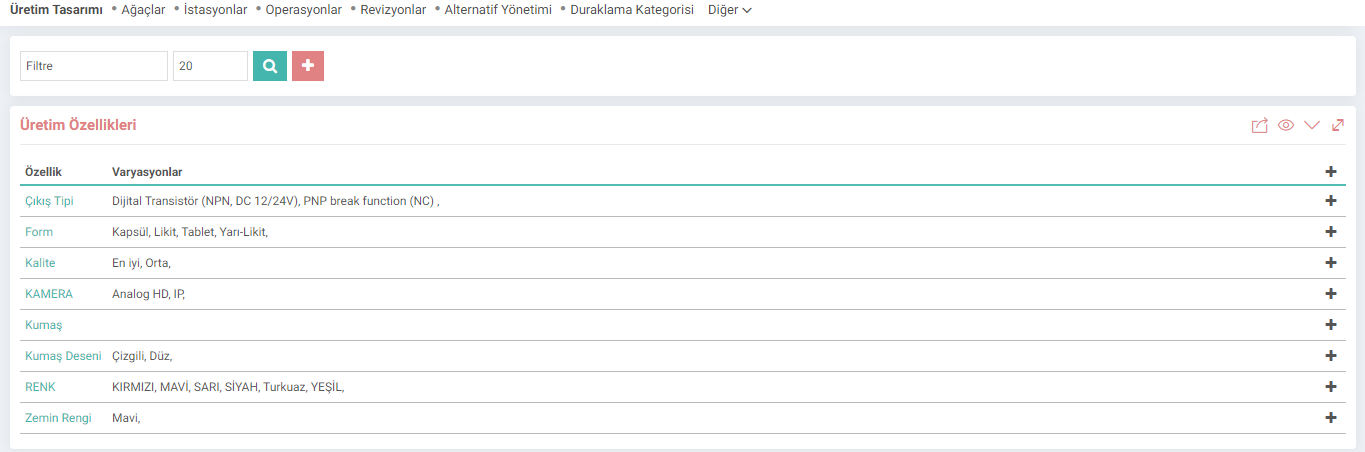
يتم تحديد التعريفات المحفوظة في صفحة أخرى > ميزات المنتج في تفاصيل المنتج. على سبيل المثال ؛ إذا كنت شركة تنتج مساند الظهر وترغب في إضافة أشكال مختلفة وفقًا للألوان، فيمكنك الاختيار من الصفحة ذات الصلة؛