الاستخدام المشترك
قد تكون جميع الأصول المادية المملوكة للشركة، مثل الآلات والمعدات والمباني والمركبات وأصول تكنولوجيا المعلومات، متاحة للاستخدام المشترك. تسهل الشركات تتبع الأصول المادية عن طريق الاحتفاظ بسجلات عن الموظفين الذين استخدموها وفي أي نطاق زمني.
المسار: PAM > الأصول > الأصول المادية > الآلات والمعدات والمباني وأصول تكنولوجيا المعلومات والمركبات
لحجز الأصول المادية من صفحة الاستخدام المشترك، يجب عليك أولاً الدخول إلى تفاصيل الأصول المادية، يجب تحديد مربع " الاستخدام المشترك ".

يتم وضع الأصول المادية التي تم تحديد مربع الاستخدام المشترك عليها في صفحة الاستخدام المشترك وتصبح متاحة للحجز.
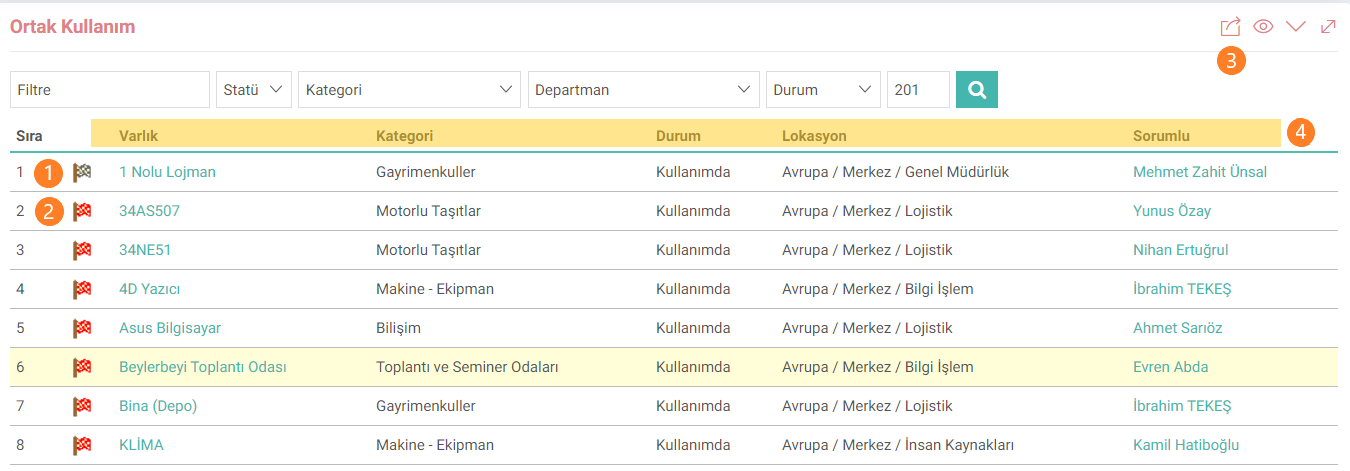
1: يشير إلى أنه تم حجز الأصل المادي. (العلم الأسود)
2: يشير إلى أن الأصل المادي قابل للحجز. (العلم الأحمر)
3: يمكن تنزيل قائمة الاستخدام الشائع أو طباعتها بتنسيق Excel أو Word أو pdf.
4: تأتي البيانات الموجودة في حقول الأصول والفئة والحالة والموقع والمسؤول من تفاصيل الأصول المادية.
لعرض سجل حجز الأصول المادية في القائمة، انقر فوق أيقونة العلم الموضحة في الحقل رقم 1. يمكن إنشاء حجز جديد عن طريق الضغط على الأيقونة الموجودة في الحقل رقم 2 في صفحة التاريخ التي تفتح.

العملية: هذا هو الحقل الذي يتم فيه اختيار عملية الحجز.
البداية والنهاية: هذا هو الحقل الذي يتم فيه تحديد التاريخ والوقت الذي سيتم فيه الحجز.
الضابط: يتم اختيار الموظف الذي تم الحجز له من هذا الحقل.
الوصف: المتعلقة بالحجز. هذه هي المنطقة التي يتم فيها إدخال الشروحات الإضافية.
ملاحظة: يعتمد إدخال تاريخ البدء والانتهاء في صفحة الحجوزات على إعدادات XML. من صفحة "الحجوزات"، انتقل إلى إعداد XML وانقر على "هل يجب أن يأتي تاريخ البدء؟" و"هل يجب أن يأتي تاريخ الانتهاء؟" يجب تحديد الإعدادات كـ "نعم".

بعد الانتهاء من سجل الحجز، سيتم إدراجه في منطقة التاريخ.