Common Use
All physical assets owned by a company, such as machinery, equipment, buildings, motor vehicles and IT assets, may be available for joint use. Companies make it easier to keep track of physical assets by keeping records of which employees used them in which date range.
Path: PAM > Assets > Physical Assets > Machinery-Equipment & Buildings & IT Assets & Motor Vehicles
To reserve physical assets from the common usage page, you must first In the physical asset detail, the "Common Use" box must be checked.

Physical assets whose Common Use box is checked are placed on the common use page and become available for reservation.
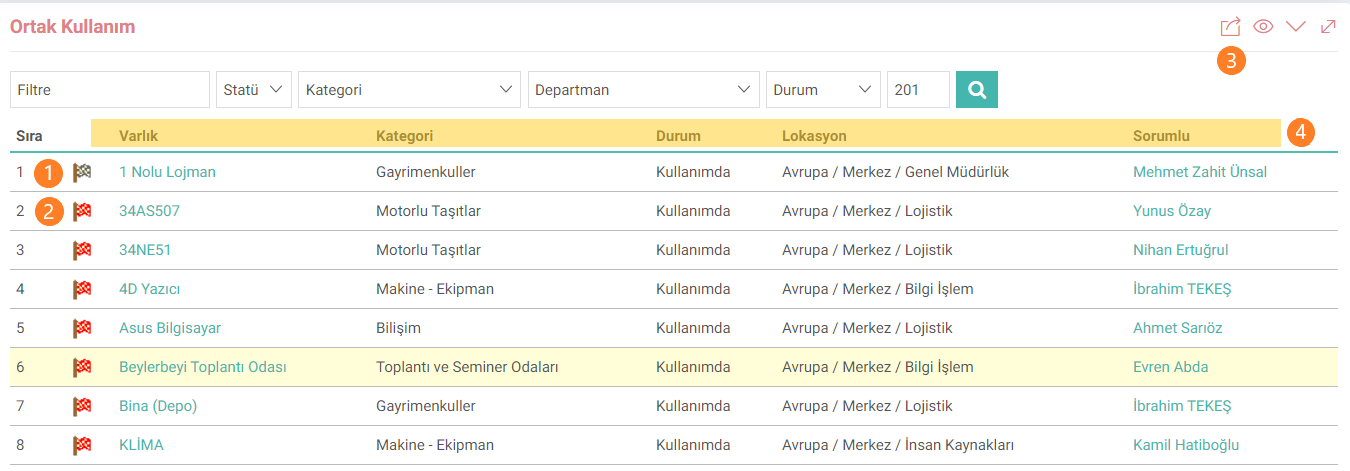
1: Indicates that the physical asset has been reserved. (Black Flag)
2: Indicates that the physical asset is bookable. (Red Flag)
3: The common use list can be downloaded or printed as excel, word, pdf.
4: Data in the Asset, Category, Status, Location and Responsible fields come from the physical asset detail.
To view the reservation history of the physical assets in the list, click on the flag icon shown in field number 1. A new reservation can be created by clicking on the icon in field number 2 on the history page that opens.

Process: This is the field where the reservation process is selected.
Start and End: This is the field where the dates and times between which the reservation will take place are selected.
Officer: The employee for whom the reservation is made is selected from this field.
Description: Reservation related This is the area where additional explanations are entered.
Note:Entering the start and end date on the reservations page depends on the XML settings. From the Reservations page, go to the XML setting and click “Should the Start Date Come?” and “Should the End Date Come?” settings must be selected as “Yes”.

After the reservation record is completed, it will be listed in the history area.
