Defining Production Workstations / Work Centers
Station; It is the area where a given job is carried out by machines/workers on the production line.
Path:ERP > Production > Stations
It refers to the special production units on the workshop/factory floor where production processes take place. In Workcube Workstations, upper and lower stations can be defined hierarchically. For this reason, by carefully defining a work center, workstations connected to this work center can be defined.
When adding a Station in Workcube, it is necessary to define which branch, department and warehouse that station is connected to.
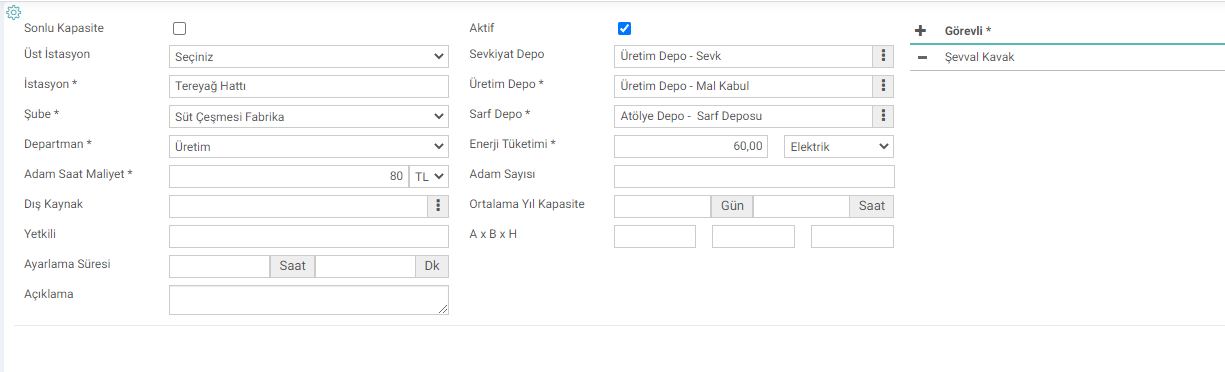
- Station Name: The name of the station to be recorded is entered. For example; Cutting, Sewing
- Upper Station: Can be selected if the station is connected to a work center or an upper station. First, the parent work center or station must be defined.
- Branch and Department: The purpose of selecting the branch and department is to ensure that each branch and the authorized persons in the branch follow the production orders at the stations affiliated to their own branch.
- Average Year Capacity: Annual working hours of the station in terms of days and hours. capacity.
- Station Hour Cost: One hour average overhead cost of the station.
- Station Man/Hour Cost: Average 1 hour cost of the employee or employees working at the station.
- External Source: If the workstation you define is sub-production If the work you have done belongs to a subcontractor or a 3rd party institution, you can choose the relevant company in this field.
- Adjustment Time: In cases where setup is required before the station goes into active production, this adjustment period must be entered. Planning and calculations are made by including this time in the total production time
- Finite Capacity: Checking the Finite Capacity checkbox ensures that if an open work order is planned for the relevant workstation on the specified date, it is checked to ensure that it is not rescheduled. It prevents opening work orders at the same station and on the same dates.
Workstation Warehouse Definitions;
- Consumable Warehouse: Consumable warehouse is the warehouse where the spent raw materials will be drawn when we finalize a production order. It is not mandatory to select the consumable warehouse when defining a workstation. But choosing gives you an advantage. If there is a warehouse definition in the station detail, the system will display the warehouse area as full when entering the production result. If it is not in the station detail, you need to know and choose which warehouse you will consume from each time.
- Production Warehouse: Production warehouse is the warehouse where the product we produce will go when the production result occurs. Whichever warehouse you want the product to enter the stock should be selected as the production warehouse.
- Shipment Warehouse: If we do not want the product we produce to go directly to the production warehouse, if we want it to wait in an intermediate warehouse and enter our warehouse or stock as a result of quality approval and a related approval, then we can choose our shipping warehouse and send the product to the production warehouse after quality approval. When the shipping warehouse is selected, the system takes the produced product from the production warehouse and creates a delivery note to the shipping warehouse without “Receive” marked.
Note: The shipping warehouse must be selected for the products that will be quality checked.
After the station is opened, go into the details of the added station and add a sub-station from the "Sub-Stations"section

1- Make sure that the “Production” checkbox is checked in the Branch definition to which it will be connected.
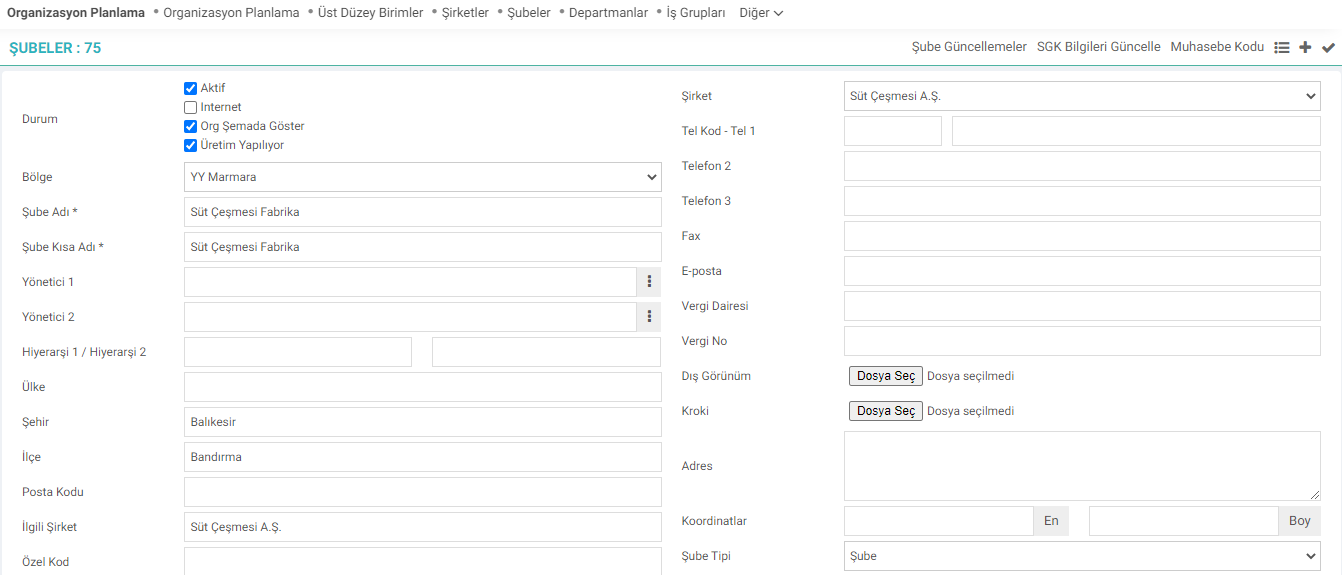
2-Make sure that the "Production in Progress" checkbox is checked in the relevant Department definition.

3-Open locations under the warehouse to be defined.

Type: If you cannot see the warehouse locations you have defined in the Shipment, Production and Consumable Warehouse areas, enter your employee card, click on the position and select the authority for the department you have opened for yourself from the Other > Settings > Branch Authorizations area.
Workstation Production Capacity Definitions

When you select the product produced at the workstation in the upper area and write how many units of that product are processed per hour at that station, the system automatically calculates the production capacity in 1 minute. When you click on the plus sign after selecting the physical asset and other information related to the product, the product information is automatically added to the bottom.
When you make any changes to the lines added at the bottom, simply click on the square icon at the far right of the relevant product line to save the changes.

Relationship between Production Workstations and Physical Assets
Physical assets used in production can be recorded and managed in the physical assets module in Workcube.
The concepts of physical assets and workstations can sometimes be confused with each other. For example: The CNC Machine is both a physical asset and a workstation in production. For this reason, it is likely that we will have workstations and physical assets with the same names.
- In order for this machine/equipment to participate in production processes, it must be defined as a workstation, but in order to be managed as a physical asset, it must be recorded separately in the physical assets module.
- It is also possible to have more than one physical asset in a workstation.
- Making maintenance plans of the machine, managing different elements such as embezzlement, leasing, etc. are provided from the physical assets module.
- With Workstation. To establish the relationship between physical assets, the relevant physical asset(s) can be selected on the workstation.
- In order for this selection to be made, the machines or equipment must first be registered in the Physical Assets module.
- Physical assets used in the workstation can be selected by clicking on the Magnifying Glass icon in the "Related Physical Assets" Section on the workstation screen.
Definition of Production Operations
Operations are carried out on the workstations, the process that ensures the product is ready.
When defining an operation, you can record the operation code, unit operation cost, how many minutes an operation takes, and explanations about the operation. In addition, information about how the operation is performed, user manual, etc. If available, you can add the relevant document to your operation definition.

After defining the operation, the workstations associated with this operation and the capacities of these stations for this operation are defined.
For example: Drilling is an operation. Drilling is a process performed on the “Multi-Drilling” Workstation, and it seems that 1000 drilling operations can be performed per hour in the Multi-Drilling Workstation.

Ürünün üretim aşamalarının gerçekleşeceği her bir iş için istasyon tanımı yapılmalıdır. Ürün ağaçlarında kullanılmak üzere bu istasyonların toplu olarak aktarılması için kullanılır.
Var olan iş istasyonlarına yansıtma oranlarını aktarmak veya değişen yansıtma oranlarını toplu olarak güncellemek için kullanılır.
is_prod_date Son Üretim Tarihini Göster
is_prod_amount Kalan Üretim Emri miktarını Göster
is_show_comment Açıklama Göster
Feedback
2.3.1.5.2. Production Line Monthly Report
This is a report where you can view the stations' malfunctions, production times, planned quantity, production quantities and plan compliance rates according to the planned quantity, according to the production results within the specified date range.
2.3.3.4. Production Planning Reports
There are seven reports in the standard reports associated with the Workcube Production Planning module. Thanks to these reports, detailed situation analyzes are reported on the production planning module screens.
14.3.8. Production Design Import
Product Design refers to the basic parameters that must be included in the product card in order to produce a product. With the Workcube Product Design module, workstation definitions, operation definitions, associating operations with workstations and product trees, etc. are added to products. parameter is defined. These parameters can be transferred to the system via import.
2.3.1.5.1. Production Line Personnel Numbers Report
Based on the production results of the stations, information on how much time the personnel spent between the determined dates can be obtained.
Production Design
Many parametric definitions such as your workstations, operation types, work programs, pause types, product trees, product features, quality achievements are made from the Production Design module.
stations
Edited Function: ERP > Production > Production Design > Design improvements have been made in Stations listing and Station capacity definition physical asset selection.
Workstations Description Information