IT Assets
An unlimited number of mobile phones, computers, servers, licenses, etc. that are actively used by Technical Support Departments in businesses. Records can be tracked in detail through the IT assets module.
Software/hardware is purchased due to reasons such as lack of coordination between departments and project changes, and then remains idle. Or, it may not be recorded in any system whether the purchased mobile phones/computers are still in use and, if so, to which employee they belong. Therefore, detailed information regarding the IT inventory is required. With IT Asset Management, you not only identify and prevent risks, but also maximize the company's efficiency.
You can transfer your records collectively into Workcube at the initial stage with an Excel document that you will prepare in the specified format from the Control Panel > System > Import > Physical Asset Transfer page.

You can list your IT Assets on the relevant module page, and you can add new records and update existing records in IT. You can do this with the add and update buttons on the assets page.
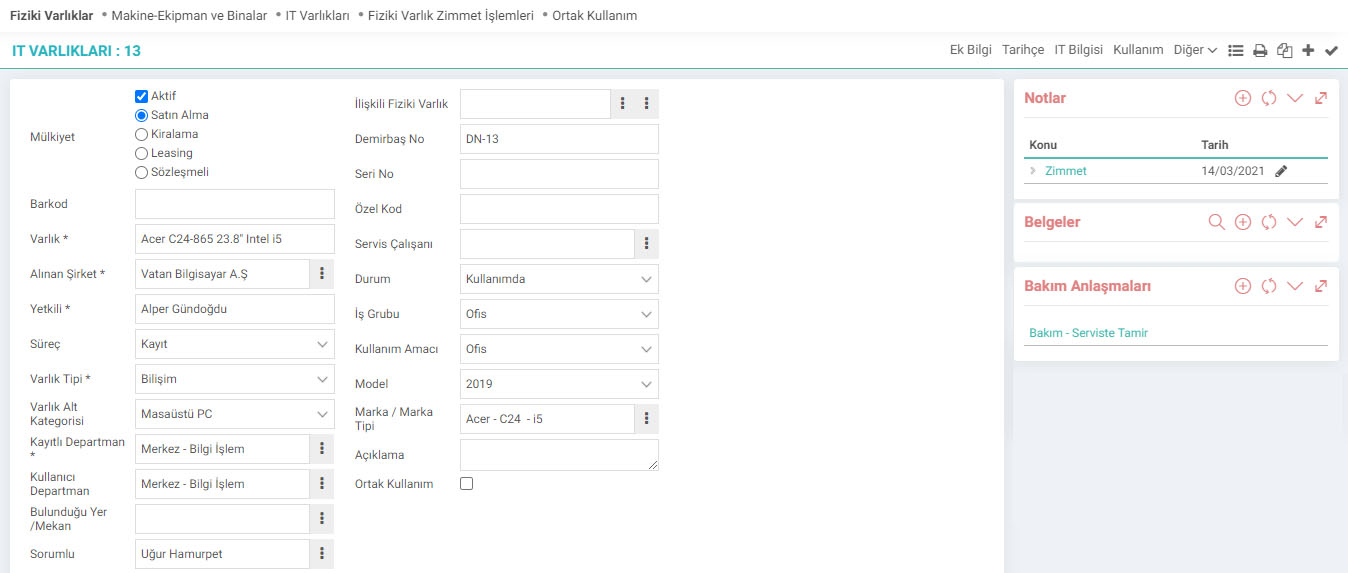
Type: If you want the department information to come depending on the responsible person, select "Should Department Information Be Received Depending on the Responsible?" in the XML settings and set it to "Yes"
Note: Perform the PAM definitions on the parameter page according to your company's needs and criteria. If the property type is rental or contract, additional detailed information appears on the pages depending on the selection.
For example; If Property Type “Renting” is selected, the following fields will additionally appear on the screen. If "Contractual" is selected, a "Maintenance Expense" section will appear in addition to the rental.


What Information Can I Track?
- Following is provided according to property types.
- Rental information is tracked.
- Contract start, end and renewal times are tracked.
- The company and its officials from whom the purchase or lease is made are tracked.
- With process monitoring, registration, approval and warning stages are designed.
- The entity category and subcategory structure is established.
- Registered department and using department information is kept.
- Responsible appointments are made. Responsible history is kept.
- Embezzlement transactions are carried out.
- Relationships can be established with other defined entities.
- Common areas are determined. Reservation options are offered.
- Barcode, Serial Number, Asset Number and Special Codes can be tracked.
- Warranty tracking, service and service employee information is kept.
- Model, brand and brand type breakdowns and information are kept.
- Status, intended use, usage work group information are tracked.
- Fault tracking, maintenance agreements, maintenance plans, maintenance results and expenses are tracked.
- IT information (Processor, Hard disk, Memory, etc.) is recorded and monitored.
- Cash register, IP information, adding notes and associating with the existing document are performed and displayed.
- The defined cash register and business group are selected and associated with the defined branch and type.
- Five different additional features are added to the cash register, information and expenses can be filtered and listed.
- Task assignments are made for your IT Assets and task histories are tracked.
- Digital documents can be added, scanned documents are associated.
- All IT Assets are displayed, saving in Word, Excel and PDF formats is possible.

Ek bilgiler, ekranlar üzerinde yapılan kayıtlara ait, o kayda ilişkin detay ya da spesifik olarak eklenmesi gereken bilgiler için kullanılan bir fonksiyondur.
Teknik Destek Departmanının cep telefonu, bilgisayarlar, sunucular, lisanslar vb. varlıkları detaylı olarak kayıt altına alması ve listelemesi için kullanılır.
Teknik Destek Departmanının cep telefonu, bilgisayarlar, sunucular, lisanslar vb. varlıkları detaylı olarak kayıt altına alması ve listelemesi için kullanılır.
İş süreçlerinin tasarım ve akışlarını oluşturur.
Kaydedilen belgelerin çıktılarının alınması için kullanılır. Standart şablonlar seçilebilir ya da özel şablonlar eklenebilir, ayrıca şablonlar yetkiye bağlanabilir.
Teknik Destek Departmanının cep telefonu, bilgisayarlar, sunucular, lisanslar vb. varlıkları detaylı olarak kayıt altına alması ve listelemesi için kullanılır.
Çalışanların görevleri nedeniyle kendilerine verilen fiziki varlık zimmetlerinin kayıt altına alınması için kullanılır.