Interactions
Companies interact with customers to obtain customer information, meet customer requests and expectations, etc. Establishing relationships for reasons is achieved through two-way interactions.
Customers can be contacted via telephone, call centers, direct marketing, internet and dealer portal sites.
Interactions in Workcube can be used with the interaction business object. Process definition-authorization, parametric definitions and data entries are required for the use of the business object.
- If not available, process definition and authorization are made on the Control Panel > BPM > Processes > Interaction page. All standard processes have been defined in Workcube. If there are stages other than registration in the process to be used, they should be defined. Authorizations are given by adding users to stages.

Attention: When adding a process, make your Related Company definitions and fuseaction definitions. Otherwise, it will appear unauthorized to the relevant process.
Interaction Categories
Categories can be defined according to the types of communication established with the customer. Categories can be created based on website, telephone, event or product-service groups. Interaction Categories definitions are made on the Control Panel > System > Parameters page under the Call Center heading under the CRM heading.

Adding Interaction and Interaction Detail
Path: CRM > Sales and Marketing > Sales Opportunities > Interactions
You can search the Interactions page and view the requests you have received over the phone. Instead of your customers, you can enter it as a new interaction by clicking on the "+" icon.
Customer interactions can be recorded automatically through sites working with Workcube site management.
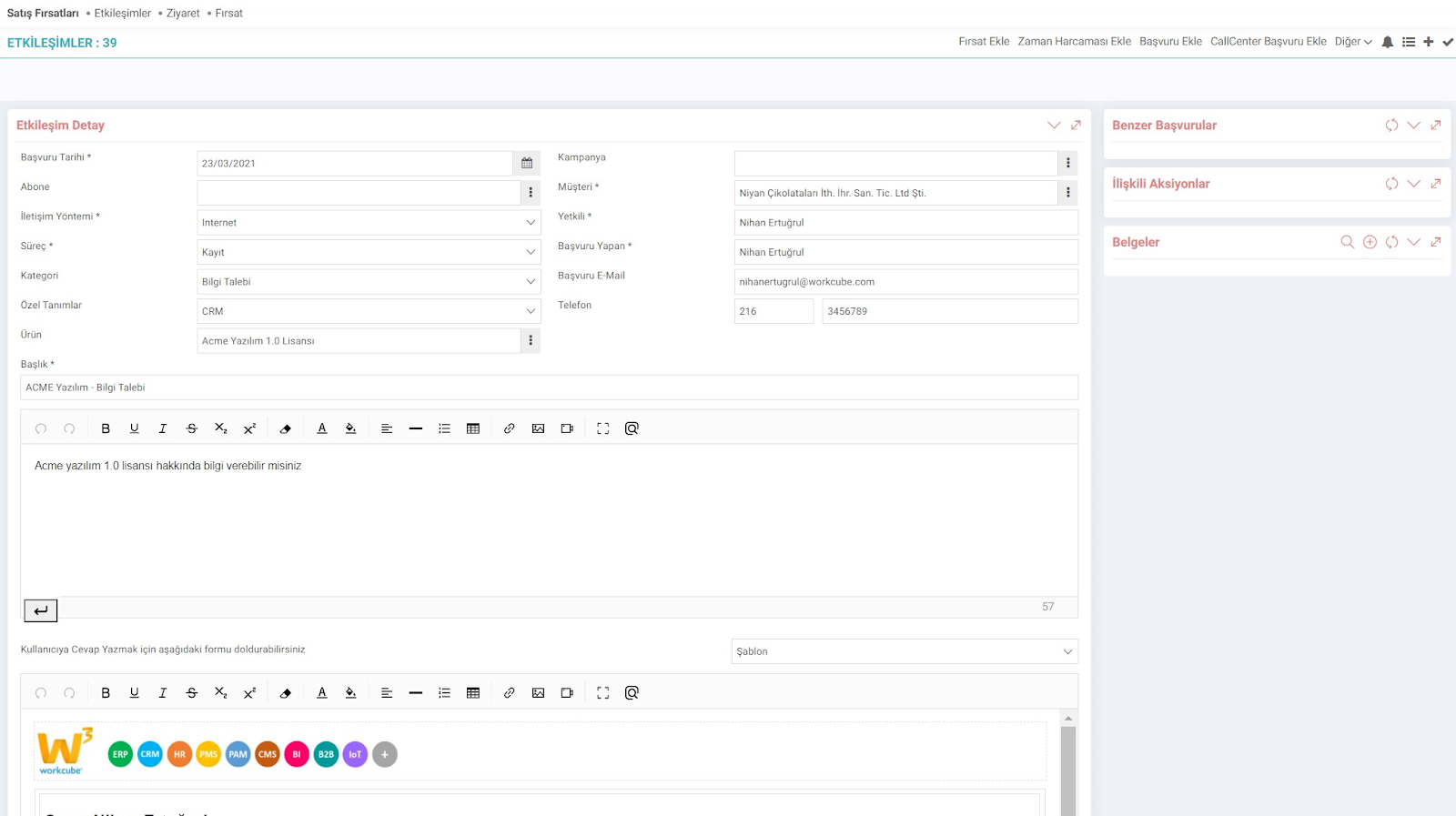
There is a forum area right below the detail page where the user can reply. You can make feedback from here, and you can also create automatic responses for these responses from the Control Panel > System > General Settings > Document-Form Templates page.
Responses to incoming customer requests can also be answered via e-mail via Workcube.

The opportunity, application or job related to the request from the interaction detail can be added. Time spent interacting with the customer or supplier through any communication channel is entered. In this way, how much time the call center team spends on which types of interactions and employee performance results can be obtained.
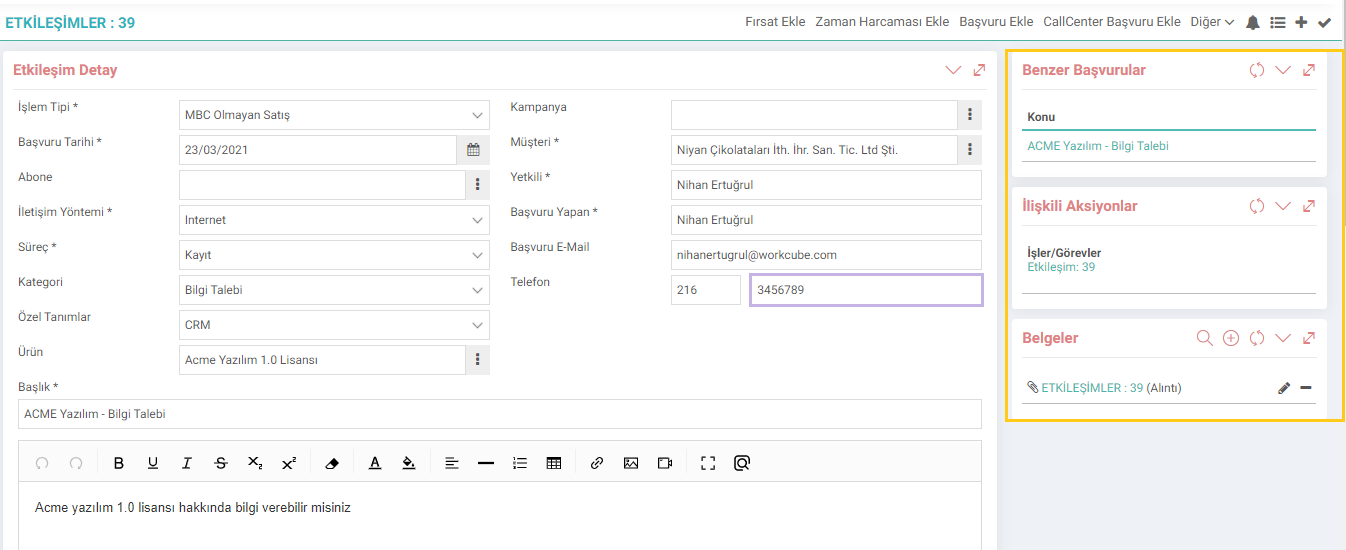
Similar Applications: If similar applications have been received from the same Customer, they are listed in this field, so that the number of times the same request has been received or previous responses can be examined.
Related Action: The jobs opened regarding the incoming interaction are under actions.
Documents: Requests created by the customer can be sent with images. These images can be viewed both from the interaction detail and from the Digital Archive.
At the same time, you can share these added documents with your Dealers or Customers via B2B/B2C.
Note:You can make the following settings with the help of Control Panel > System > Page Settings > XML Settings If selected, it will make the sender e-mail address appear in the sent e-mail.
2 - Should the Send Mail Button be Active?
If Yes is selected, the "Update and Send E-mail" option will appear on the page.
3 - Show Interaction Number in the Email
If Yes is selected, the interaction number will be visible in the email.
Detailed reports about the Interaction Report > Standard Reports > Interaction Content Report,
Detailed reports about Time Expenditures You can review it via Report > Standard Reports > Time Expenditure Report.

Bir kişi ya da firma ile hangi kanal üzerinden haberleşildiği ya da geldiğinin tanımları yapılır.
Gelen etkileşim taleplerini ne hakkında olduğunu belirleyerek sınıflandırma yapmak için kullanılır.
Tip alanından seçim yapılarak çeşitli sayfalara işleyişe özel parametrik tanımların yapılmasını sağlar.
Etkileşimler müşterilerle yapılan tüm iletişimleri (e-posta, telefon görüşmeleri, toplantılar vb.) kaydetmenizi sağlar. Satış fırsatları özelinde etkileşimler, potansiyel müşterilerle yapılan görüşmeleri, teklifleri, demo taleplerini ve diğer tüm iletişimleri takip etmenize olanak tanır. Bu sayede, satış sürecindeki tüm adımları izleyebilir, müşteri ilişkilerinizi yönetebilir ve satış performansınızı artırabilirsiniz.
Etkileşimler müşterilerle yapılan tüm iletişimleri (e-posta, telefon görüşmeleri, toplantılar vb.) kaydetmenizi sağlar. Satış fırsatları özelinde etkileşimler, potansiyel müşterilerle yapılan görüşmeleri, teklifleri, demo taleplerini ve diğer tüm iletişimleri takip etmenize olanak tanır. Bu sayede, satış sürecindeki tüm adımları izleyebilir, müşteri ilişkilerinizi yönetebilir ve satış performansınızı artırabilirsiniz.
İş süreçlerinin tasarım ve akışlarını oluşturur.
Belge şablonları bilgi kayıt, ekleme, cevap ve takip notlarının hızlı, kolay ve standart kalitede girilmesini sağlamak amacıyla kullanılır.
x_show_authorized_stage Filtrede ve Listede Sadece Yetkili Olunan Süreçler Gelsin
x_control_ims Şirket Akış Parametresindeki Satış Bölgelerine Göre Müşteri Erişim Kontrolü Yapılsın mı Seçeneği Etkileşim Listeleme İçin de Çalışsın mı?
Feedback
Agentic WAI and Interactions
Added Function: In interactions coming from the web or different Customer Touch Points, the customer can search the web from the domain connected to the prospective customer's e-mail and find the company and check the data. Can add corporate account registration. With this development, AI is combined with Agentic processes in Workcube, one of the examples of transition to agentic robotic applications.