Protein Friendly URL ve Meta Tanımları Oluşturma
Protein altyapısında sayfa bazlı SEO ve sosyal medya meta yönetimi için geliştirilmiş olan Meta Helmet sistemi, tüm meta verilerini tek merkezden yönetmeyi sağlar. Bu yapı sayesinde her friendly URL’e özel title, description, keywords, Open Graph (OG) ve extra meta tanımları kolayca yapılabilir.
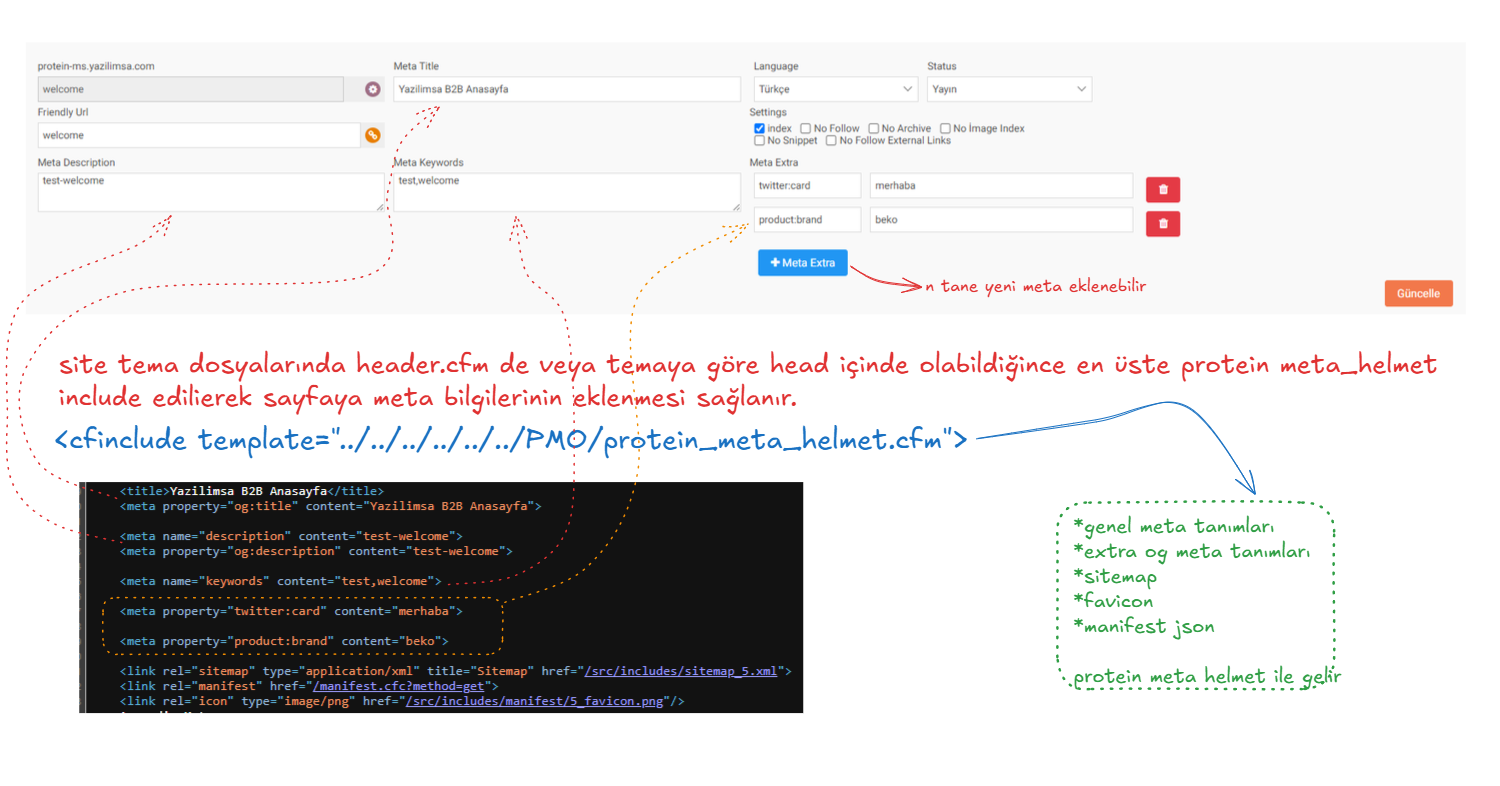
1️⃣ Meta Yönetim Ekranına Erişim
Sayfadaki veya belgenizdeki (örnek: ürün kartı, içerik detayı) “Protein Friendly Url” butonuna basarak meta ve friendly URL yönetim ekranı açılır.
Bu ekranda aşağıdaki alanlar bulunur:
- Meta Title: Sayfa başlığı (tarayıcı sekmesi ve OG title)
- Meta Description: Arama motoru ve OG açıklaması
- Meta Keywords: SEO anahtar kelimeleri
- Meta Extra: İstenilen kadar ek meta etiketi eklenebilen dinamik alan
“+ Meta Extra” butonuna basarak yeni satırlar eklenebilir. Her satır iki inputtan oluşur:
- property → meta adı (örnek: twitter:card, og:image, product:brand)
- content → meta değeri (örnek: summary_large_image, https://cdn.site.com/image.jpg, Protein)
Kaydedilen veriler tabloda META_EXTRA_DATA kolonunda array JSON olarak saklanır:
[ {"property":"twitter:card","content":"summary_large_image"}, {"property":"og:image","content":"https://cdn.site.com/uploads/product_123.jpg"}, {"property":"product:brand","content":"Protein"}]2️⃣ Tema Entegrasyonu
Meta Helmet verileri sitenin tema yapısında header.cfm veya tema head kısmında çağrılır:

Bu include, sayfa yüklenirken meta verilerini Friendly URL kaydından okuyarak otomatik olarak bölümüne yazar.
3️⃣ OG (Open Graph) ve Extra Meta Tanımları
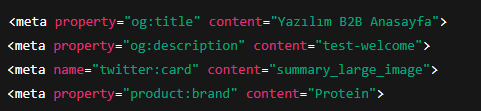
Meta Helmet, sayfadaki sosyal medya paylaşım kartlarının doğru şekilde görünmesini sağlayan Open Graph (OG) etiketlerini ve isteğe bağlı özel meta tanımlarını oluşturur.
Aşağıda gerçek örnek bir çıktı gösterilmiştir:
4️⃣ Protein Helmet ile Gelen Otomatik Tanımlar
protein_meta_helmet.cfm dosyası, sadece meta alanlarını değil; aynı zamanda site genelinde olması gereken temel bağlantıları da otomatik olarak oluşturur.
- Sitemap bağlantısı:

- Favicon tanımı:

- Manifest dosyası:

Bu tanımlar sistem tarafından otomatik oluşturulduğu için ayrıca müdahale edilmesine gerek yoktur.
5️⃣ Uygulama Akışı
- Friendly URL kaydı oluşturulur veya güncellenir.
- Meta alanları doldurulur (title, description, keywords, meta extras).
- Tema
header.cfmdosyasındaprotein_meta_helmet.cfminclude edilir. - Sayfa render edildiğinde kısmına otomatik olarak meta etiketleri eklenir.
6️⃣ Sosyal Medya Desteği
Meta Helmet sayesinde sayfalar şu platformlarda doğru önizleme oluşturur:
- Facebook / LinkedIn / WhatsApp: OG (Open Graph) etiketleriyle
- Twitter / X:
twitter:*meta etiketleriyle - Pinterest / Discord: OG verilerini otomatik okur
6️⃣ Schema Markup Desteği
Protein ile yapılmış sayfalara veya widgetlara "Schema Markup" özelliği atanabilir. Schema Markup alanı, arama motorlarının web sayfanızın içeriğini daha iyi anlamasına yardımcı olan yapılandırılmış veri işaretlemeleri eklemenizi sağlar. JSON-LD formatında eklenen bu özellik sayesinde, arama motorları sayfanızın ne hakkında olduğunu daha net bir şekilde kavrar ve bu bilgiyi arama sonuçlarında zengin snippet'ler (rich snippets) olarak gösterebilir. Örneğin, bir makale için yayın tarihini ve yazarını, bir ürün için fiyatını ve incelemelerini, bir etkinlik için tarihini ve yerini doğrudan arama sonuçlarında sergileyerek kullanıcıların dikkatini çekebilir ve tıklama oranınızı artırabilir.
Yukarıdaki seçenekler, sayfanızın içeriğinin türünü (makale, blog yazısı, ürün, etkinlik vb.) belirtmenize olanak tanır ve seçiminize göre uygun schema.org şeması otomatik olarak oluşturularak sayfanıza entegre edilir. Bu sayede, teknik bilgiye ihtiyaç duymadan arama motoru optimizasyonunuzu önemli ölçüde geliştirebilirsiniz.
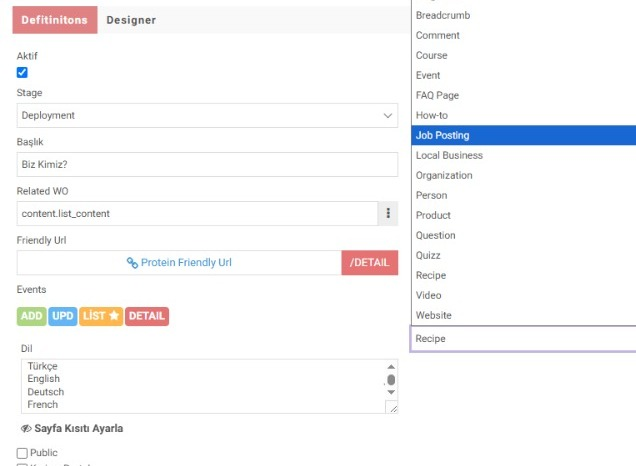
Page Designer'da veya bir page içerisinde kullanılan widgetlara schema markup verilebilir.
Dikkat: Protein geliştiricileri cf_puxi etiketi kullanarak sayfadaki veya widgetlardaki elementleri oluşturduklarında Workcube Protein json-ld datasını otomatik create ederek sayfaya basmaktadır.
Feedback
Yapay zeka ile SEO Meta Data oluşturma
Protein ile yaptığınız web siteleri ve e-ticaret sistemlerinde sayfalara, ürünlere, içeriklere friendly URL bazında yapay zeka ile meta data verileri oluşturma özelliği getirildi. İçeriği tarayarak en uygun meta tanımları artık WAI yapıyor. Bu özelliği kullanmanız için Workcube'ünüzde Gemini API'nizin aktif olması gerekiyor. Güncel Workcube'de Friendly URL sayfasına girerek deneyimleyebilirsiniz.