Accident-Penalty Management
With Accident-Penalty management, you can control the accident-penalty of company vehicles, easily view which vehicle caused which accident and which penalty it received, and regularly follow the accident-penalty of the vehicles from a single center.
Companies can use this module to keep accident and penalty records of company vehicles and control them.
Note: Before using the Accident-Penalty Module, all parametric definitions to be used within the company regarding Accident-Penalty must be made under the Physical Assets heading in Control Panel > System > Parameters.
Accident Record. Add
Path: PAM > Assets > Motor Vehicle Management > Accident Record
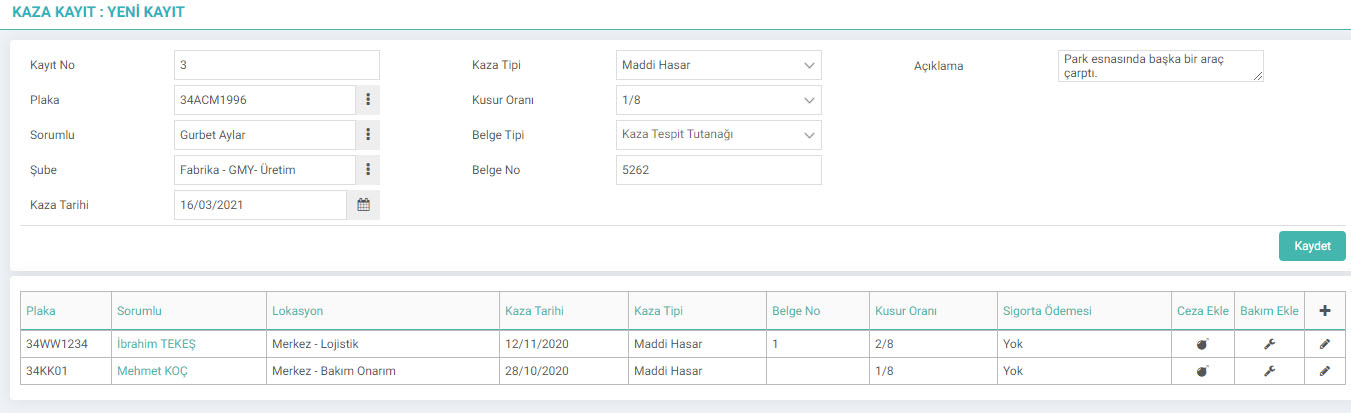
Accident Type definitions Control Panel > System > Parameters > Accident Types page.
Defect Rate definitions Control Panel > System > Parameters > Defect Rate Types page.
Document Type definitions Control Panel > System > General Settings > Document Types It is done from page .
Accident Search
Path: PAM > Assets > Motor Vehicle Management > Accidents

One of this page It can list the accident records of the vehicle. You can also enter insurance, maintenance or penalty records related to the accident.
To the right of the listed records;
- You can also add the Penalty Record from the Penalty Record icon. When you click on the
- Maintenance Plan icon, the Maintenance Plan addition page appears. The maintenance plan you added is listed on the Maintenance Plan page and appears in the Maintenance calendar. When you click on the
- Insurance Information icon, the "Insurance Information Entry" page regarding the accident opens.
Adding a Penalty Record
Path: PAM > Assets > Motor Vehicle Administration > Penalty Record

If the imposed penalty is related to an accident, the vehicle is defined in the Accident Relationship field. After selecting Accident Relationship, "Plate", "Responsible", "User Branch" fields are automatically taken from the accident record. If the penalty is not related to an accident, do not make a selection in this field.
Payer field refers to the party who will make the payment. If the accident occurred due to the driver's fault, check the person box; if it occurred due to the company's negligence, check the company box.
Penalty Recorded Region field refers to the side where the penalty is recorded. If the accident occurred due to the driver's fault, check the Driving License box, if it occurred due to the negligence of the company, check the License box.
Note: Penalty Type definitions are made on the Control Panel > System > General Settings > Penalty Types page.
After filling in all the fields, click the “Save” button. After registration, the penalty record is displayed in the list at the bottom of the page. To update the penalty record, you must click on the "Update" icon on the right side of the penalty record.

The penalty record update page is the same as the record addition page. Alternatively, you can define a document from the "Documents" field. After making the necessary updates, you can complete the update by clicking the "Update" button. To delete the Penalty Record, you must click the "Delete" button on the update page.
Penalty Search
Path: PAM > Assets > Motor Vehicle Management > Penalties
Easily access recorded fines by filtering on the Penalties screen.
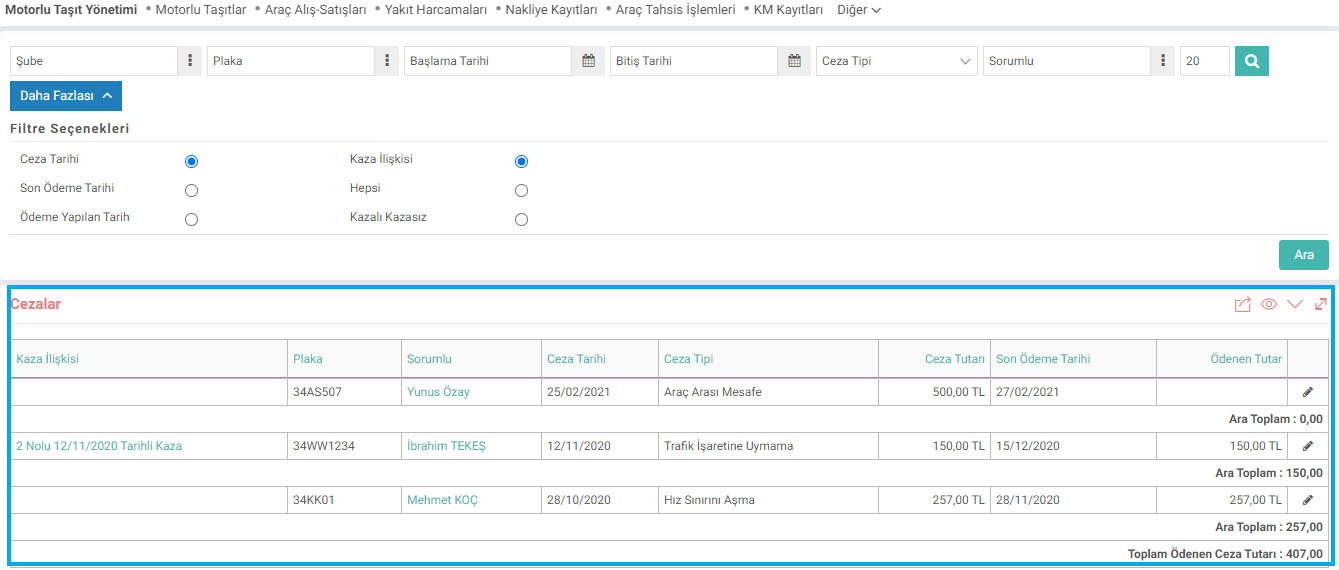
The Accident Relationship field allows us to search among the criminal records by making a distinction such as "Penalty records issued due to an accident ->Accident", "Penalty records issued for traffic offenses without an accident->Non-Accident" or "All Penalty Records->All". It allows.
After filling in the fields we want to filter, click the "Search" button to search. Search results are at the bottom of the page “Accident Relationship”, “License Plate”, “Responsible”, “Date of Penalty”, “Type of Penalty”, “Penalty Amount”, “Final Payment Date” will be listed with the “Amount Paid” fields.