Production Processes
With the Production Module, you can modify your production to meet the changing conditions and needs of your business and follow the production process of your orders coming from different points. You can manage your stocks more effectively and easily eliminate delays in production processes by identifying them.
Workcube Production Module; It includes screens where the personnel in the field, at the machine, can see and list the production orders related to the operator, make the necessary preparations, and record the results regarding the relevant production orders. These screens are as follows;
Quality Operations
Serial Numbers
Production Results
Production Orders
Production Orders
Path: ERP > Production > Production > Production Orders

The order number is entered by selecting it in the production order detail. The production start, pause and finish page is as follows;

Order No:Production order number goes in this field.
Order No: The order number to which the production order is related goes in this field.
Main Order No: If the production order is a semi-finished product, it is attached. The order number of the product is shown.
Station Name:Station name where production takes place
Warehouse: The warehouse where production takes place
Produced Product Name: Produced product name
Produced Product Spec: Spec name
Ü.E. Quantity: Quantity planned to be produced in the production order
Remaining: Quantity not entered from the production order
Unit: Quantity of the product produced
When you click on the “+” button, the following fields open;
Start Production: Production is the starting button. To start production with this button, the employee, physical entity and serial number must first be entered. With the start process, the stop production and end production button will be active.
Stop Production: When there is any pause in production, when this button is pressed The pauses defined in ERP > Production > Production Design > Pause Types will open in the pop-up window and the selection will be made.
When this button is pressed, the start production button will continue production.
End Production: When the End Production button is pressed, it creates a production result for the production order it is related to and it will automatically create stock receipts as a result of the production it creates.
The serial number selected here will be assigned to the serial number in the detail of the production result. It will assign working time to the employee and physical asset in relation to the production result.
Physical Asset: Related physical assets in the station detail are displayed.
Serial Number: The serial number entered in the production order detail is displayed. As a result of production, this serial number will be assigned to the result.
Production Results
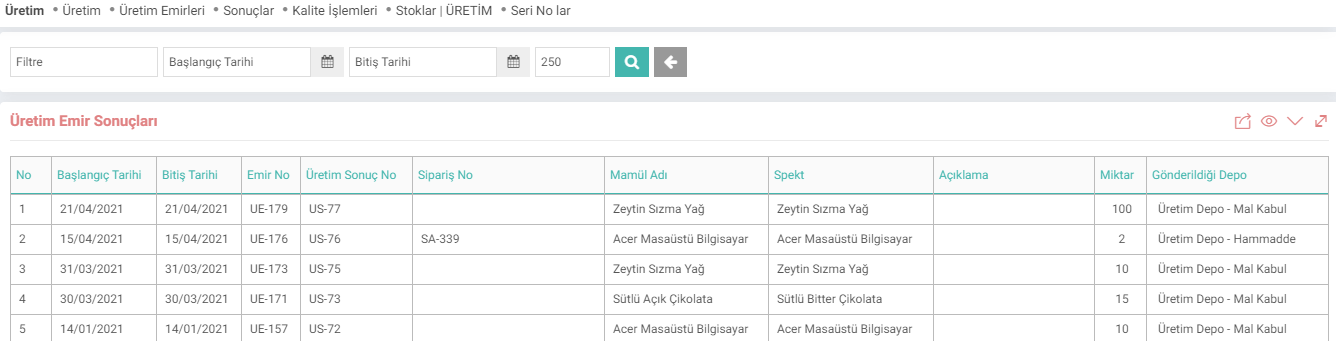
Path: ERP > Production > Production > Results
In production results, the production results of the station where the person works are displayed. Production start and end dates bring the production result dates where the start and end times are recorded in line with the counters taken from the previous production screen. (Dates in the production order will be planned dates, and those in the result will be actual dates.)
Inventories
Path: ERP > Manufacturing > Production > Inventories | PRODUCTION
This page shows the stocks in the raw material warehouse in the detail of the station where the user in the system is responsible.

Serial Numbers
Path: ERP > Production > Production > Serial Numbers
Raw material in the station associated with the production result filter from the W3 serial lot transactions page on the serial numbers screen Products with serial numbers in the warehouse arrive.

What is the Difference of the Production Module from the Production Planning Module?
The Production Module includes screens where the personnel in the field and at the machine can see and list the production orders related to it, make the necessary preparations, and record the results regarding the relevant production orders.
The Production Planning Module includes screens where the planning and finalization of production orders can be achieved. Contains. The Production Planning Module includes functions that will enable the planning unit to create production demands for orders, calculate material needs and create purchase requests to initiate the supply chain.
Under the Production Planning Module, production can be finalized and the necessary stock movements can be carried out automatically without using the Production Module.
Feedback
Operator - Time Expenses
Added Function: The operator time expenditure record function has been added to the Operator - Station page.
Requirements for use: After starting the production order on the Operator - Station page, time expenditure can be recorded by clicking on the time expenditure icon, selecting the personnel from the list page and entering the time spent.
Benefit: By entering the time expenditure on the panel screen, you can go to the production results > Time expenditure window. Multiple personnel time expenditure entries can be made on a single screen without the need for