Service Maintenance Results
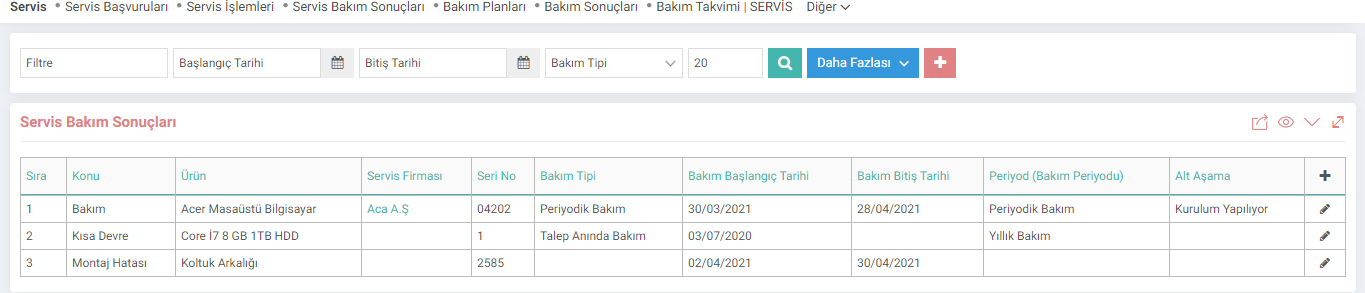
Service Maintenance Results is the screen where the results of the entered service applications are recorded and checked. You can access the maintenance result page from the path shown below. Maintenance results can also be entered within the service application.
PATH: CRM > Service-Warranty > Service > Maintenance Results
You can list and update the saved maintenance results from this page or save a new maintenance result by clicking on the "+" icon.
Adding and Updating Maintenance Result

1-Subject: The subject of the added maintenance result is written.
2-Product: The product under maintenance is selected.
3-Serial Number: The serial number of the product is entered.
4-Service Company: If the maintenance is not done within your own organization, the Service Company is selected.
5-Service Person: It comes automatically depending on the selected service company.
6-Service Employee: The employee who will take part in the maintenance of the product is selected.
7-Service Employee 2: The other employee who will take part in the maintenance of the product is selected.
8-Maintenance Start Date: The date the product enters maintenance is entered.
9-Maintenance End Date: The end date of the maintenance. is entered.
10-Description: A description of the product entered as a result of maintenance is written.
11-Maintenance Type: Maintenance type is selected from this field. Maintenance Types are defined in Control Panel > System > Parameters.
12-Sub-Stage: The sub-stage of the service is determined. Sub-Stages are defined within the Parameters.
13-Support Document: In this field, the warranty/support document related to the maintenance result is added.
Then, you enter the maintenance result by clicking the "Save" button. To update, simply click on the "Update" icon at the end of the line after listing on the Maintenance Result screen. The screen that opens is the same as the recording screen. You can update it by making the necessary changes.

Servis Bakım Planları ve Servis Bakım Sonuçlarında kullanılmak üzere bakım tipleri tanımlanır.