Serial Number in Production Processes
Serial numbers; It is a tracking method that allows tracking and viewing the history of products produced, purchased, sold and in stock.
In Workcube, serial number tracking is provided in
- Production,
- Purchasing and sales,
- Import and export,
- Stock entry-exit and receipts,
- Service and warranty processes.
PRODUCTION
In two different areas within the production module. It can define Serial Number.
1- Factory Production Orders
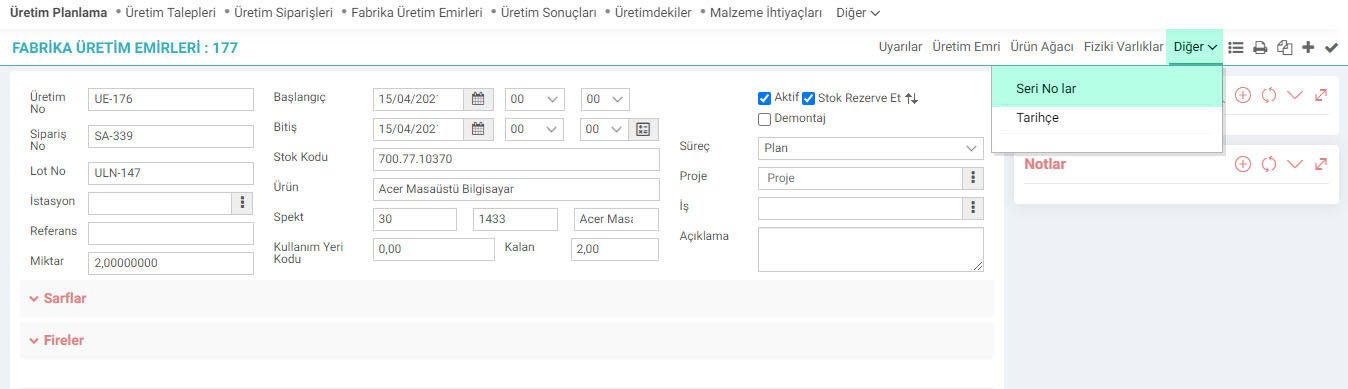
A production order is created from the ERP > Production > Production Planning > Factory Production Orders page. From the created Factory Production Orders detail, go to the
- Other > Serial Numbers page.
- This selection directs you to the Series and Lot Transactions page.
- Click on the “Guarantee-Serial Numbers” icon at the end of the line. If there is no record in the line, serial tracking in the product detail is not checked.
- Serial Number is specified in the Product Serial Number field on the Warranty Entry-Purchasing page and click save.
- The quantities of the series are displayed on the page that opens for the product. Changes in quantities can be made, press save.

2-Production Result
Go to the production result detail screen from the ERP > Production > Production Planning > Production Results page.

- Production Result > Serial Number button is clicked.
- Serial numbers are determined.
- Series and their quantities are checked and recorded.
ATTENTION!
Serial number In order to perform the tracking process, Control Panel > System > General Settings > Company Flow Parameters in
- Apply Warranty Tracking Repair and Serial Number?,
- Perform Serial Tracking - Return Check,
- Perform Serial Input and Output Check on Location Basis, check the boxes as yes.
It is necessary to determine whether serial number tracking will be done for all products produced, purchased and sold. (Products > Product Details > Serial Number > Tracking) If the Tracking box is not selected, serial tracking will not occur.