WorkBoard
WorkBoard application provides detailed reporting of active jobs of each employee in a business.
Path: PMS > Project Management > Project Management > Project WorkBoard
What are the benefits of the WorkBoard function?
- What are the benefits of the WorkBoard function for each employee? It provides the amount and list of active and overdue work on employees,
- The predicted time and total time spent for active work on employees,
- It provides reporting of the amount of work according to each category and stage.
As seen in the image on the WorkBoard page, employee, project, job, stage and category, etc. It makes it easier to track jobs within a certain date range with filtering options.
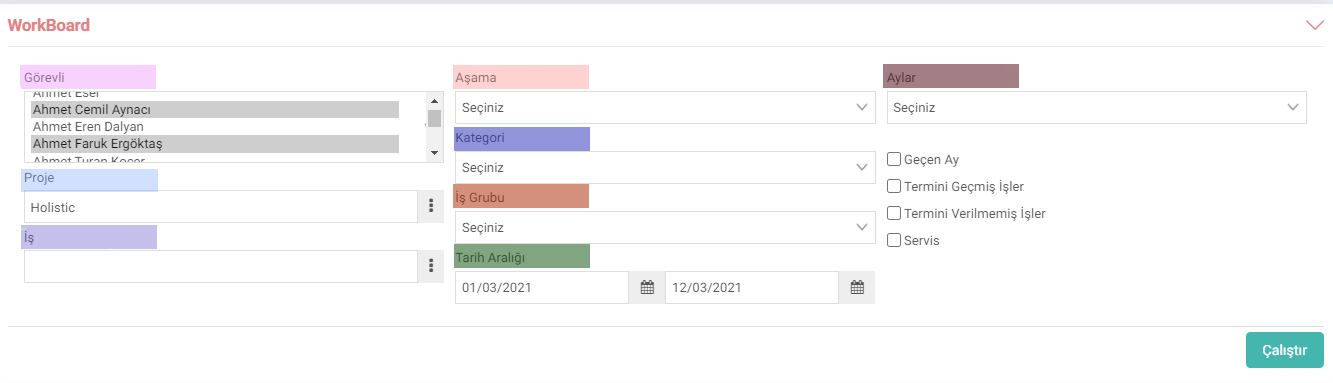
After making the relevant selections in the filtering field, the jobs are listed by clicking the "Run" button and graphics are obtained according to the category and stage of the jobs.

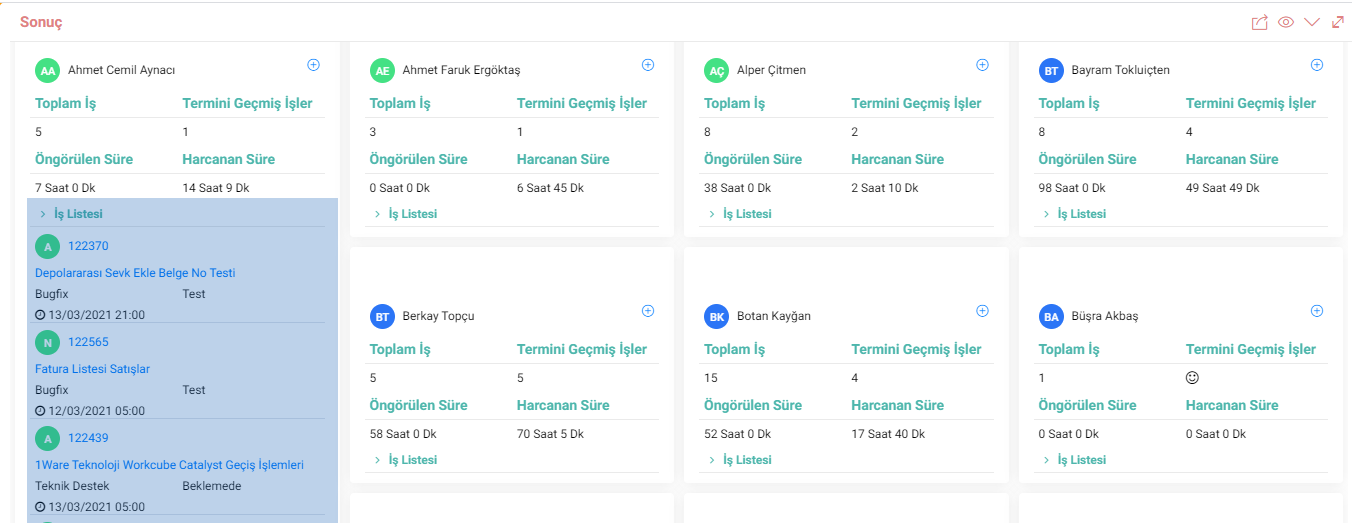
Employees' active work list has a collapsible feature. When clicked, the jobs on the employee are listed. The subject of these listed jobs, their stage and category, and their deadlines are displayed. At the same time, regulations and controls can be provided by going to the job details.
Feedback
Add Job to Workboard
- In the Workboard, the task adding screen can be opened in a new tab.
- Employee information is automatically provided in the employee field.