Purchase Invoice
Purchase invoice is the official and legal document that a business or taxpayers earning commercial income receive from the suppliers (sellers) from which it purchases goods or services. This document, which is a "sales invoice" for the seller, is called a "purchase invoice" for the buyer.
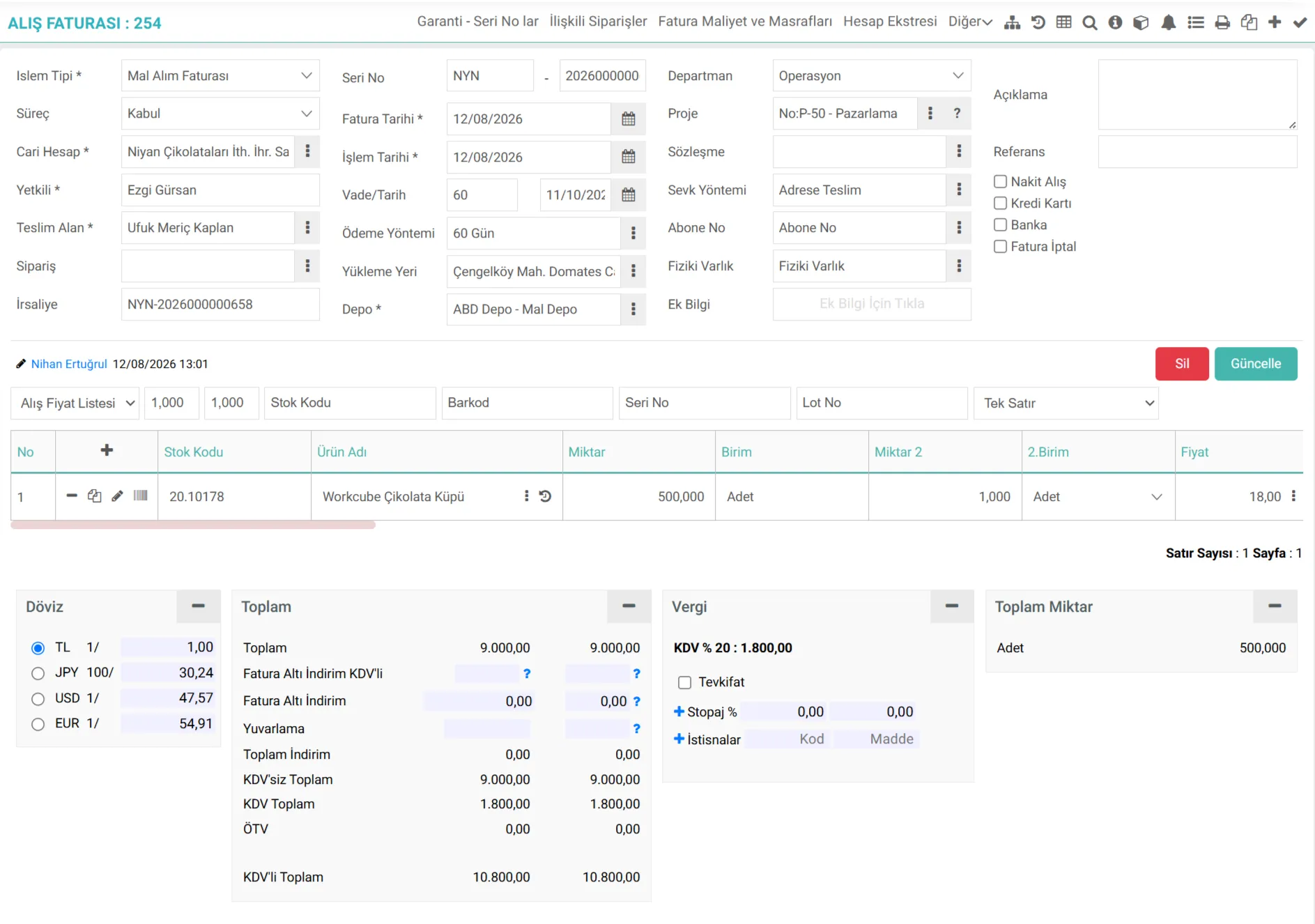
What is Workcube Purchase Invoice?
It is the basic business function that manages the processes of entering, controlling, approving and accounting of goods, services or fixed asset invoices received from suppliers into the Workcube ERP system. In the Workcube architecture, it establishes a financial and physical bridge between the supply chain (SCM), warehouse (WMS), finance, budget and general accounting modules.
Thanks to Workcube's flexible infrastructure, the purchase invoice can be created manually from scratch; It can be produced automatically by transferring e-invoices from approved supply contracts, purchase orders, warehouse accepted delivery notes or directly to the system. At the end of the process, while a financial current debt record is created, automatic journal vouchers are printed on the accounting side and warehouse stock costs are updated.
The Importance of Purchase Invoice for a Business
Faultless and instant management of purchase invoices on Workcube provides the following benefits to the business in terms of operational, financial and legal aspects:
- Precision Cost Tracking:The net costs of the purchased products (additional costs such as product price, customs, freight, insurance, etc.) are automatically distributed to the stock cards (according to the Cost method) and the cost of goods sold (COGS) is calculated correctly.
- Operational Efficiency and Error Prevention:Duplicate data entry is prevented thanks to delivery note-invoice matching. quantity and price discrepancies are systematically prevented.
- Cash Flow and Debt Management: Thanks to the payment terms, payment plans and exchange rates attached to the invoice, the future cash outflow projections and payment orders of the business are automatically shaped.
- Legal Legislation and e-Transformation Compliance: VUK It offers an accounting integration that is fully compatible with standards, VAT Withholding, SCT applications and e-Invoice/e-Archive legislation.
Process Flow / Life Cycle in Workcube
The end-to-end life cycle of a purchase invoice from its entry into the system to its accounting and cost distribution is in the table below. summarized:
Stage | Module / Document / Business Object | Description |
|---|---|---|
1. Source Document | Order & Delivery Note | The order approved by the purchasing department and the delivery note accepted by the warehouse constitute the source of the invoice. |
2. E-Invoice Receipt | e-Government / Incoming e-Invoice | The e-invoice XML data sent by the supplier is entered into the system. It is converted into an invoice with a single click by matching the current account and stock card. |
3. Invoice Record | Purchase Invoice | Invoice is created by entering invoice number, serial number, transaction category, VAT, SCT, withholding tax, if any, and payment plan details. |
4. Stock Entry | Warehouse / (Invoice with delivery note) | If the invoice is recorded directly as a delivery note invoice, instant stock entry and stock movement recording is made to the relevant location in the warehouse. |
5. Accounting | Accounting Voucher & Current Transaction | When the invoice is posted, the current account is debited. A journal voucher in accordance with VUK standards is automatically created in the background. |
6. Cost | Cost Integration | Additional expenses such as import file closing, customs charges or shipping invoices are allocated to product costs on the original invoice. |
Purchase Invoice What Should Be Considered When Managing Transactions?
A. Accounting Period and Date Consistency
The date on which purchase invoices are entered must be consistent with the accounting period in which the business is actively operating. According to VUK, invoices must be issued within 7 days from the delivery of goods or performance of services. Invoices that exceed this period or are attempted to be issued in closed accounting periods will cause financial reporting errors.
A direct warning will be given in cases where there is a difference between the accounting period in which the transaction is intended to be made and the active period of the user.
B. Distribution of Additional Expenses to Stock Costs
Only the product purchase price does not reflect the real cost. Invoice items such as freight, customs clearance and insurance should also be added to the stocks as costs. In order for the costs in Workcube to work properly, it is important to select the transaction categories in the invoice lines correctly.
Best Practice: In cases such as import or service procurement, the cost should be reflected in the relevant invoice lines when processing additional expense invoices.
C. Definition of Withholding and Special Consumption Tax Account Codes
In purchases of services or goods where partial withholding is applied (for example, cleaning, security or subcontracted labor), the invoice must be entered into the system with withholding. If withholding definitions or VAT/SCT templates do not match the correct accounting codes in the system, it will result in debit-credit inequality.
Operational Risk: Incorrect tax codes cause incorrect declarations (VAT-2, Muhtasar) and penal sanctions. Line-based tax control must be performed before invoices are recorded.

Otel, tatil köyü, pansiyon, vb. konaklama tesislerinde verilen geceleme hizmetlerinde kullanılan vergi türü tanımları yapılır.
Faturanın standart muhasebe kodları girilir.
BSMV, Banka ve Sigorta Muameleleri Vergi tanımları yapılır.
Tevkifat oran tanımları yapılır.
Fatura iptal nedenlerinin tanımları yapılır.
Kredi kartı işlemleri için ödeme yöntemlerinin tanımları yapılır.
İşlemlerde kullanılacak olan muhasebe hesapları ile birlikte KDV Oranları tanımlanır.
Gelir Vergisi Stopaj oranları tanımlanır.
Özel Tüketim Vergisi oransal ve tutarsal olarak tanımlanabilir.
İşlemlerde kullanılmak üzere sabit kullanılan ödeme yöntemleri tanımlanır.
Ek bilgiler, ekranlar üzerinde yapılan kayıtlara ait, o kayda ilişkin detay ya da spesifik olarak eklenmesi gereken bilgiler için kullanılan bir fonksiyondur.
Özel İletişim Vergisi oranları tanımlanır.
Alış Faturası, satın alınan mal veya hizmet karşılığında, satıcının kestiği faturaları girmek için kullanılır.
Alış Faturası, satın alınan mal veya hizmet karşılığında, satıcının kestiği faturaları girmek için kullanılır.
İş süreçlerinin tasarım ve akışlarını oluşturur.
Bu sayfanin cf_big_list_search'ü olusturulmustur.
Bu sayfanin cf_big_list_search'ü olusturulmustur.
Bu sayfanin cf_big_list_search'ü olusturulmustur.
Bu sayfanin cf_big_list_search'ü olusturulmustur.
Bu sayfanin cf_big_list_search'ü olusturulmustur.
Bu sayfanin cf_big_list_search'ü olusturulmustur.
Bu sayfanin cf_big_list_search'ü olusturulmustur.
Bu sayfanin cf_big_list_search'ü olusturulmustur.
Bu sayfanin cf_big_list_search'ü olusturulmustur.
Bu sayfanin cf_big_list_search'ü olusturulmustur.
Kaydedilen belgelerin çıktılarının alınması için kullanılır. Standart şablonlar seçilebilir ya da özel şablonlar eklenebilir, ayrıca şablonlar yetkiye bağlanabilir.
xml_control_ship_amount İrsaliye Miktarı Kontrolü Yapılsın
xml_acc_department_info Muhasebe Fişi İçin Departman Seçilebilsin
xml_control_ship_date İrsaliye Tarih Kontrolü Yapılsın
xml_control_order_date Sipariş Tarih Kontrolü Yapılsın
xml_upd_row_project Belgedeki Proje Satırlara Yansıtılsın
xml_show_cash_checkbox Nakit Kasa İşlemi Gelsin
xml_show_ship_address Yükleme Yeri Gösterilsin mi?
xml_show_contract Sözleşme Gösterilsin mi?
xml_serialno_control Seri No Kontrolü Zorunlu Olsun mu?
xml_paymethod_control Ödeme Yöntemi Zorunlu Olsun mu?
xml_shipmethod_control Sevk Yöntemi Zorunlu Olsun mu?
xml_control_ship_row İrsaliye Satır Kontrolü Yapılsın
xml_get_branch_from_department Şube Bilgisi Depo Şubesinden Alınsın
xml_show_process_stage Süreç Gösterilsin mi?
Kaufrechnung - Kategorien der Transaktionen
İşlem kategorileri bir iş objesinin muhasebe, bütçe, cari işlem, maliyet, stok gibi ardıl işlemlerini set etmek için Workcube de kullanılır. Bu iş objesinde aşağıdaki işlem kategorileri ve ardıl işlemler set edilerek kullanılabilir.
Kullanılabilir İşlem Kategorileri
Ardıl İşlem Prosesleri
- laufende Transaktionen
- Buchhaltungsprozess
- Budgettransaktion soll durchgeführt werden
- Kostentransaktion ausführen
- Führen Sie die Kostenverarbeitung aus den Kostenbeträgen im Beleg aus.
- Kostentransaktion für Zeilen mit Beträgen ausführen
- Lagerbestandsbewegung ausführen
- Null-Bestandskontrolle ausführen
- Als Standartoption festlegen (Default)
- Rabatte bei Buchhaltungstransaktionen ausschließen
- Projektbasierte Buchhaltung durchführen
- Führen Sie eine lagerbasierte Buchhaltung durch
- Projekt-basierte Budgetierung durchführen
- Kontenbasierte Gruppierung durchführen
- Verwendung bei Partner
- Verwendung bei Public
- Kontokorrenten Transaktion basierend auf Laufzeit und Fremdwährung ausführen
- Führen Sie laufende Transaktionen auf der Grundlage der Zahlungsmethode durch.
- Aktuelle Konto Transaktion basierend auf dem Projekt in der Reihe durchführen
- Chargen-Nr. anwenden
- MwSt. als Ausgaben von der Steuerbasis abziehen
- Spesen Spezielle Kommunikationssteuer
- SCT als Aufwand anerkennen
- Transaktionen für zukünftige Monate und Jahre auflaufen lassen
- Posten Sie den Budgetplan nach Abgrenzungstransaktion
- Nehmen Sie eine Budget Reservierung vor
- Bank und Versicherungstransaktionssteuer erfassen
- ?
- Alle Nutzer
- Einbegriffene Verarbeitung
- Bilanzierung der Herstellungskosten der verkauften Waren
- Einbehaltene Beträge sollten auf Rückrechnungen nicht anerkannt werden
Feedback
Kosten und Spesen in Rechnung stellen
Funktion hinzugefügt/bearbeitet: ERP > Vertrieb > Rechnung > Kaufrechnungsdetails > Rechnungskosten und -aufwendungen in den XML-Einstellungen im Popup „Sollten Ausgaben als zusätzliche Kosten entsprechend der Produktauswahl verteilt werden?“ wurde hinzugefügt.
Was für die Verwendung zu tun ist: Wenn Sie Kosten auf Produktbasis verteilen möchten, sollte XML als „Ja“ ausgewählt werden.
Vorteil: Nachdem die XML-Einstellungen vorgenommen wurden, wurden für jede Zeile separate Beträge eingegeben, sodass zusätzliche Kosten auf Zeilenbasis zugeordnet werden konnten.
Spalten zum Einbehalten von Einkaufsrechnungen
Edited Function: In the ERP > Sales-Distribution > Invoice > Purchase Invoice business function, withholding columns have been added to the authorization group if the work is done according to the branch.
Purchase Invoice Debit Credit Inequality
Edited Function:The situation where the debit and credit inequality is not given when the current or product accounting accounts are missing in recording the purchase invoice has been adjusted.