Contact Search
Customer-Supplier module functions are used to register potential customers and suppliers with which an institution wants to have a relationship, to recognize the interlocutors, and to follow all relationships and communications with customers and suppliers.

How to Use?
You can filter in the area at the top of the page. Members are listed according to their active-passive status, address, telephone, name and surname, etc. You can filter by information. If you click on the "Search" button without making any selection, all contacts will appear.
At the bottom of the page, members are listed depending on your search selection. Members; Name-Surname, Position, Company, Member Category, City, Tel, Mobile Phone, Member Type, Tax Number, E-Mail and Status fields are listed.
If there is no record when searching by entering the customer name, the system will give a "No Record" warning. In this case, the "Save as Corporate Member" and "Save as Individual Member" options will appear to enable you to save the relevant customer.
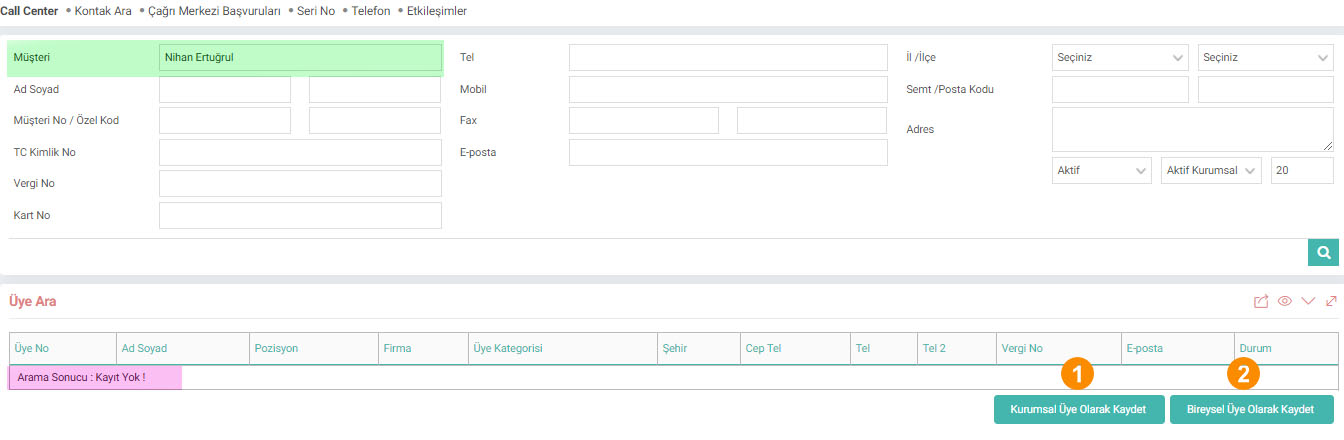
1-Save as a Corporate Member: When you click on this button, the system will direct you to the Corporate Account registration screen. The information you enter in the filtering field (EX: Customer Name) will be filled automatically.
2-Save as an Individual Member: When you click on this button, the system will direct you to the Individual Account registration screen.
is_company Firma
xml_customer_card_filter Kart No'ya Göre Filtre Yapılsın