Outgoing Money Transfer
Outgoing Money Transfer is one of the basic financial liability management processes that ensures that money transfers (Money Transfer, EFT, FAST, etc.) made from your business's bank accounts to suppliers, employees or third parties are recorded in the system accurately, completely and on time. Money transfers made by the business from its own bank accounts to the accounts of creditor parties in return for goods or services purchases, raw material supplies, debt payments or advance transfers are subject to bank transactions. A recorded outgoing remittance document; It reduces your company's debt balance by debiting the supplier's or creditor's account (since payment has been made). It automatically assigns offset/payment voucher records to the relevant bank and current account codes (e.g. 320 Vendors Debtors / 102 Banks Creditors) on the general ledger side.
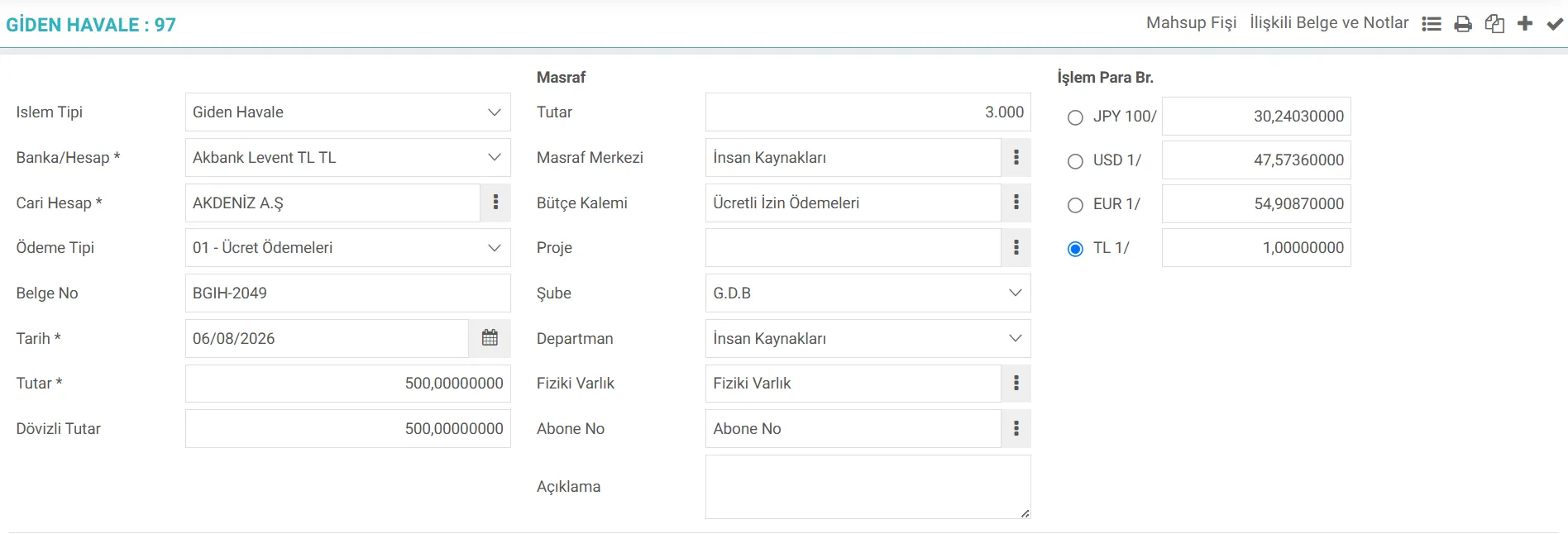
What is Workcube Outgoing Money Transfer?
Workcube Outgoing Money Order; It is a business object in which all cash outflow operations such as EFT, Wire Transfer and Swift made from bank accounts of businesses to current accounts (vendors, business partners, individual consumers) or employees (salary, advance, allowance, etc.) are recorded, monitored and automatically accounted for.
Thanks to Workcube's flexible architecture, this business object supports both single outgoing money transfer and multiple/bulk outgoing money transfer processes. The system eliminates EFT and correspondent bank expenses incurred during bank transfers by directly associating them with budget items and cost centers at the time of transfer, without the need for any additional transactions. Outgoing Money Transfer object; It works fully integrated with Finance-Accounting, CRM (Customer Relations), SCM (Supply Chain), HR (Points and Salary Payments) and Project Management modules.
The Importance of Outgoing Remittance Management for a Business
An effective outgoing remittance management is of critical importance for the financial health and operational speed of businesses. The main benefits of the Workcube Outgoing Money Transfer business object to businesses are as follows:
- Real-Time Cash Outflow Tracking:It ensures that capital and cash flow planning (cash projection) proceeds without deviation by providing instant tracking of the money coming out of bank accounts.
- Supplier Relations and Credit Risk Management: Payments made to suppliers When it is processed into the system on time, the debt is closed; Thus, the commercial reputation with the supplier is protected and the blockage of new raw material/product supply processes is prevented.
- Current Reconciliation Facility: It prevents inconsistencies in end-of-period supplier reconciliations (BA/BS and debt balance).
- Open Invoice Closing and Aging Analysis: By matching which purchase invoice the money transfer was sent to, it is clarified which debt has been paid and which remains outstanding. It shows that the due debts are closed correctly in the aging reports.
- Financial Statement and Accounting Integration: It prevents human errors by eliminating the burden of manual accounting recording, and ensures that the balance sheet and expense/cost tables are kept up to date in real time.
Process Flow / Life Cycle in Workcube
Outgoing remittances The life cycle of operations on the system is shown in stages in the table below:
Stage | Module / Document | Description |
|---|---|---|
1. Instruction / Payment Planning | Finance / Purchasing / HR | Payment orders are created from current account payment plans, approved purchase invoices or HR salary score lists. |
2. Transfer Entry | Bank Module | Bank account, target current/employee, transaction date, document number and amount information are defined on the individual or bulk outgoing transfer screen. |
3. Exchange Rate and Expense Entry | Bank / Finance | If the transaction is in foreign currency, the exchange rate information is verified; EFT/Money Transfer commission expenses deducted by the bank are entered by selecting the budget item and cost center. |
4. Current Account Matching | Current Account | The system automatically matches the payment made with open invoices owed and closes current aging. |
5. Automatic Accounting | Accounting / Finance | As soon as the transaction is approved, a journal voucher is created in the background and legal accounting records are completed. |
Outgoing Transfer What Should Be Considered When Managing Transactions?
A. Complete Accounting Codes of Current Accounts
If the transaction category is making an accounting transaction, the accounting account code of the selected current for the relevant period must be defined in the system. Otherwise, the recording process will be interrupted since the accounting voucher cannot be issued.
B. Bank Account and Currency Type
The correct bank and branch account to make the payment must be selected. If the transaction is in foreign currency (USD, EUR, etc.), the currency type in which the recording is made and the CBRT exchange rate on the date of the transaction should be checked. If a task related to exchange rate information is added in the Robotic Tasks field, the robot will work regularly every day and the exchange rates will be automatically withdrawn from the Central Bank.
C. Legal Legislation and Exchange Rate Difference
According to VUK, foreign currency transactions are accounted for in local currency. Integrating exchange rate entries with the CBRT's daily exchange rates and printing the exchange rate information on the voucher line detail ensures that you do not receive errors in e-Ledger audits.
D. Invoice Closing Process
If the payment is made based on a specific invoice, the invoice closing process is opened after the document is saved, the relevant open purchase invoices must be selected. This process is essential for the accuracy of receivables aging reports. This function is opened from the company flow parameters. It can also be done manually if desired.
Feedback

Shall we talk about Workcube?
Call duration has expired.