Production Operations
Operations are the processes that are carried out at workstations and ensure that the product is ready. Updates can be made depending on the listing or selection criteria under Operations. Before using the operation list, XML settings must be made for the screen settings.
If specific settings have been made for a page, the XML settings of the page are created in Workcube. Depending on the XML settings, there may be differences such as fetching data, calculating, and displaying results on the page. You can check the xml settings when you want to analyze the page or understand how it works. It is the most important rule set in shaping the page. XML Settings of each page are on its own page.
Path: You can access the XML Settings by following the path ERP > Production Planning > Production Operations > Control Panel > System > Page Settings.
Production Operations List Settings
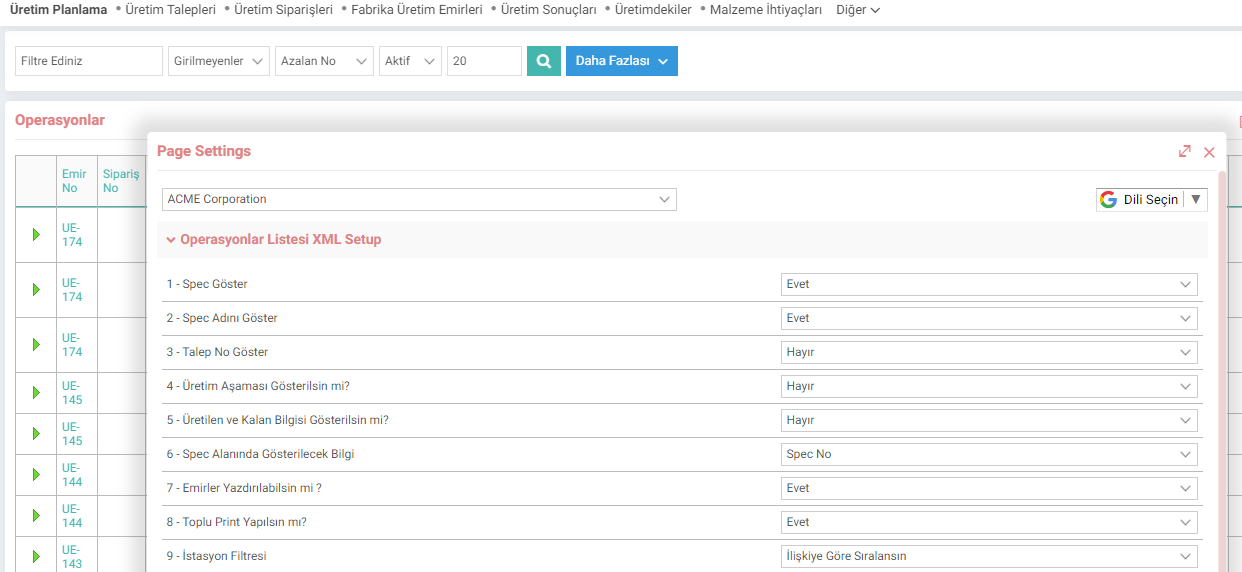
- Show Spec:
When yes, the spec column opens on the listing pages. - Show Spec Name:
To display the spec name on the Production Planning, Orders listing page. - Show Request Number:
Request number column opens on the operations listing page. - Show Production Stage?:
Select whether to show the stages on the filtering page. - Show Produced and Remaining Information?:
When Yes is selected, the produced and the remaining columns. - Information to be Displayed in the Spec Field:
Spec No / Spec Name is selected. - Can Orders be Printed?:
It is used to display print on the orders listing page. - Should Batch Print?:
When Yes is selected, the box will appear. A new print icon appears in the area where the signs are located and allows batch printing. - Station Filter:
When "Sort by Relationship" is selected, it groups the station filter based on the parent station. When "Sort by Name" is selected, it brings the station filter in alphabetical order.