Competition Management
It is important for companies to always analyze their competitors in order to compete with rival businesses under changing competitive conditions, to identify their strengths and weaknesses and to get one step ahead by making strategic moves. Competition management allows you to evaluate your own company's opportunities and get ahead by doing all these follow-ups and analyses.
Identifying Competing Businesses
While registering rival businesses with Workcube, it can be stated which branch or branches they are in competition with. In addition, documents related to competitor businesses can be added to the digital archive as documents in the Related Documents and Notes area.
Path: ERP > Sales-Distribution > Product and Stocks > Competitors
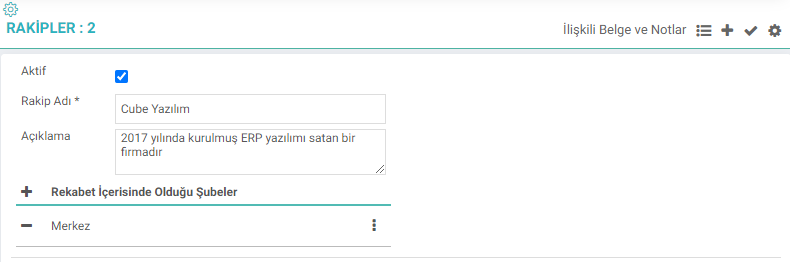
Competitor Name: Where the name of the competitor business is defined.
Description: While doing market research, you can enter the notes you took about the competitor business in this field and view them later.
Competing Branches: Which branch of our rival business competes with is selected from this field.
Related Documents and Notes: This is the field where documents and notes related to the rival business are added and updated.
Competitor. Prices
Following competitor prices is of great importance in order to create sales strategies and maintain a competitive advantage. With Workcube, businesses make their own price management practical while also recording their competitors' product/service prices, making it easier to track competitor prices.
Path:ERP > Sales-Distribution > Price Management > Competitive Prices
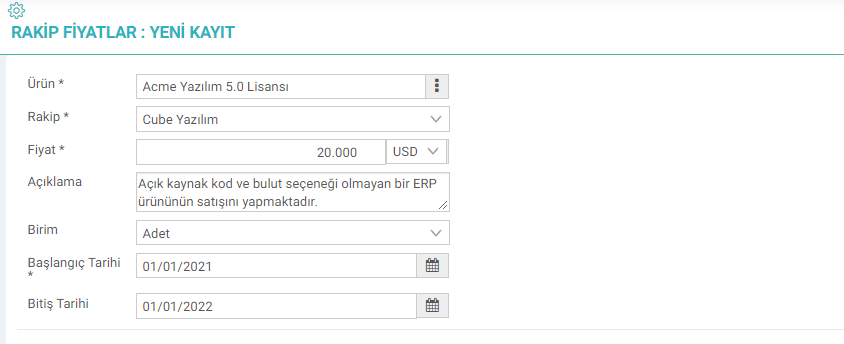
Product: Whichever product the rival business creates a competitive element with? is selected.
Competitor: This is the field where the competitor business is selected.
Note: Before making a selection in this field, it is necessary to define the competitor on the Competitors page.
Price: The price of the competitor product is defined in this field.
Explanation: Additional information about the competitive product. This is the field where explanations are entered.
Unit: The relevant unit in which the product is sold is selected.
Start Date & End Date: The date range for which the relevant price is valid is defined in this field.