Currency and Exchange Rates
In Workcube, each financial transaction and reporting works with 3 currencies simultaneously. System-Local Currency, Second Currency and Transaction Currency. The same currency can be used for 3 transactions, or a separate currency can be used for each transaction. Once different currency definitions are made, exchange rates can be entered manually or automatically withdrawn from the CBRT.
Path: Control Panel > System > Parameters > Currencies
All monetary transactions work with three currencies at the same time in W3.
System/Local Currency Unit: Every company is also a taxpayer. The currency in the taxable country is the System/Local currency. Accounting records and declarations must be calculated in local currency.
System 2. Currency: Companies sometimes want to record and report all their transactions in currencies such as USD or EURO, which are widely used in the world, and sometimes due to their foreign partnerships. The second currency is used for this purpose.
Transaction Currency:It is used to record each transaction in the currency in which it is made.
For example; Let's take a company operating in Türkiye. All transactions are always recorded in local currency. Thus, all accounting records are recorded in Turkish Lira. At the same time, if you consider that this company is based in Germany, it is required that every transaction be kept in Euro so that consolidation can be made with Germany. If this company exports or imports to the USA, these transactions will be in USD.
Currencies
The currencies to be used in the system are set. As many currencies can be defined as desired. The local currency is recorded as "1" and other currencies are recorded at the current buying and selling rates when first recorded. Effective Buying-Selling is used on the screens accessed by employees in applications such as ERP, CRM, HR. Partner rates are the rates used in dealer and supplier extranets, and Public rates are the rates used in online sales sites.
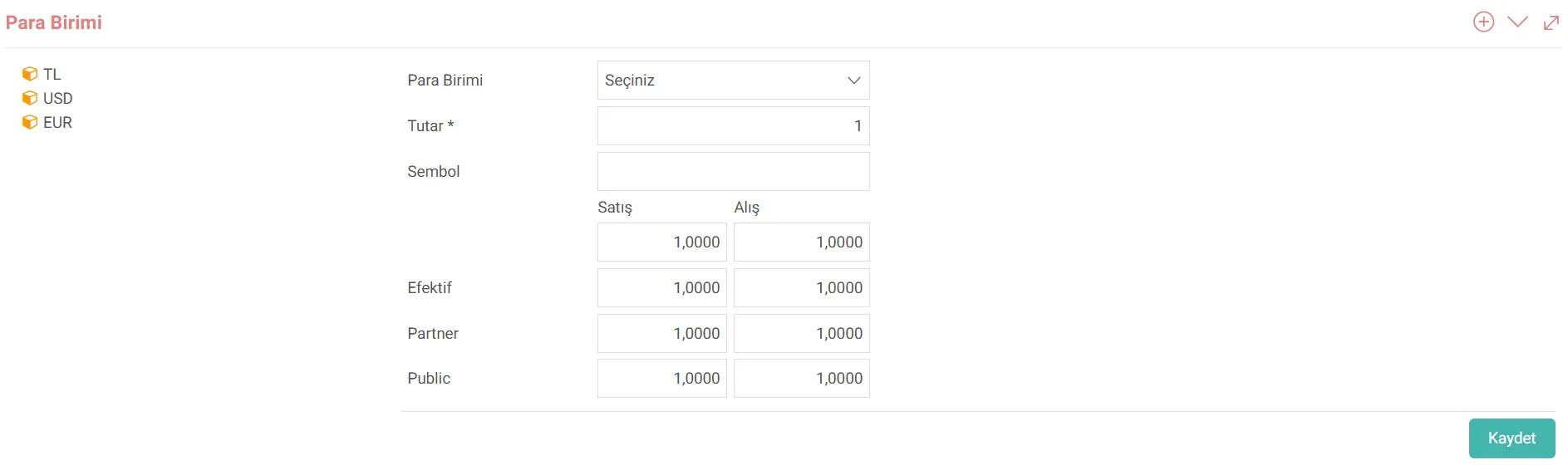
Attention: Commas must be used when defining Currencies.
Exchange Rates
Path: ERP > Finance-Accounting > Accounting Transactions > Other > Exchange Rate Information
Exchange rates can be recorded in the system in more than one way. It can be withdrawn automatically from the Central Bank, recorded daily manually, or forward and backward exchange rates can be entered.

Daily Exchange Rate Information
Daily exchange rate information can be added by clicking the "+" icon on the left side of the list screen.
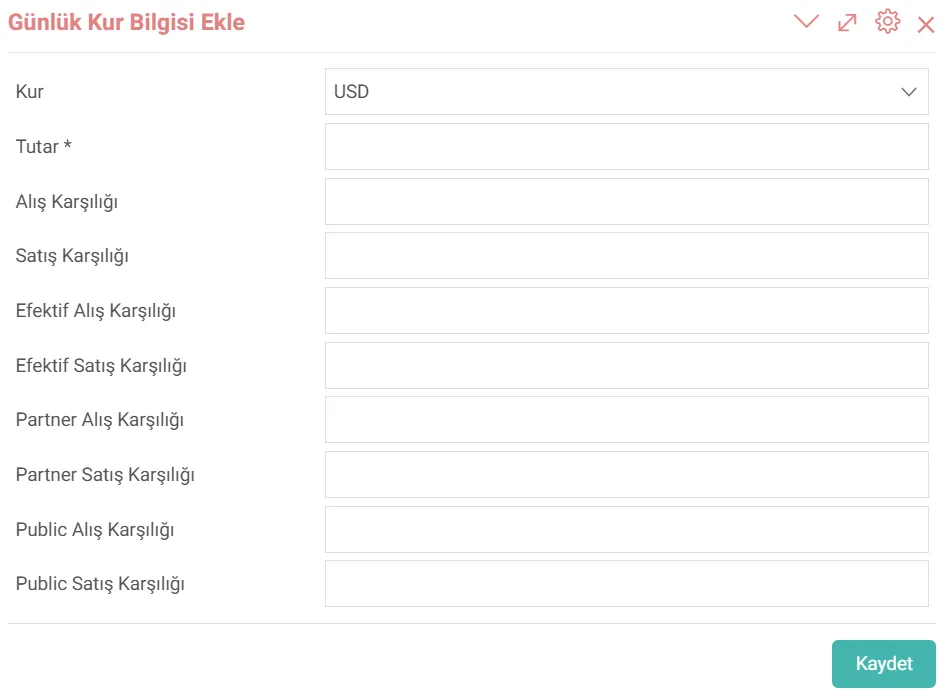
Forward/Backward Date Exchange Rate Information
Daily exchange rate information can be added by clicking the "+" icon located on the left side and in the circle on the list screen. When you want to add Forward/Backward dated exchange rate information, the date selection field appears. The starting date and time must be selected here.

Attention: When you add a forward-dated rate, the rates automatically start to be traded at the new rate on the relevant date and time.
The rates are automatically transferred to the system. Withdrawal
Path: Control Panel > System > General Settings > Robotic Tasks
With the robotic task feature in Workcube, Central Bank exchange rate changes can be withdrawn automatically. By selecting the recurrence date and period, exchange rate information is updated periodically. This function is recommended if the exchange rate you want to work with is in the CBRT. If it is not included in the CBRT, the exchange rate information to be used must be added manually.
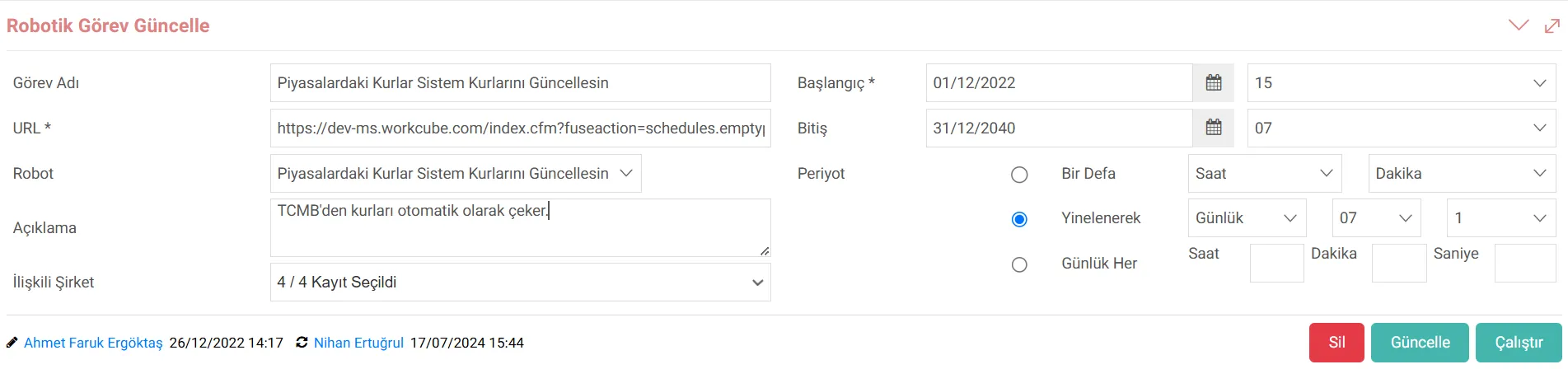
For standard tasks, selection must be made from the "Robot" field. WOs whose WO type is selected as Robot appear in the Robot field.
- Exchange Rates in the Markets Update the System Rates;
In certain periods, the exchange rates are automatically withdrawn from the CBRT and transferred to the system.
Type: When you want to make active transactions with the buying rates in the system, "The Rates in the Markets Update the System Rates. The "&is_purchase_act=1" parameter should be added to the address given in the "Update" option. After this, language set arrangements should be made in the relevant places in the system. - Show Rates in the Markets;
The Agenda page allows you to see the active exchange rates of the CBRT in the Markets object. It works in collaboration with "Let Rates in Markets Update System Rates". - Let Future Dated Rates Update System Rates;
The exchange rates entered using the forward/backdated exchange rate option on the Finance Exchange Rate Information screen will update the exchange rates in the system when their validity date and time arrive.

Muhasebesel işlemler ve Cari takibi için kullanılan para birimleri tanımlanır.
Önceden tanımlanmış ya da özelleştirilmiş otomatik çalışması istenen rapor vb. komutların tanımlandığı iş fonksiyonudur.
Feedback
Personal Agenda
Agenda is the information page that welcomes the user as soon as he logs in. Structurally, it is in the form of widgets. It contains user-specific information and general information. It comes as default at startup. All users can customize their Agenda page.
14.2.10. Robotic Missions
Robotic Tasks are commands that run at predefined times or within specific time intervals. It allows users to receive reports or send and receive data at specified periods.