الأجندة الشخصية
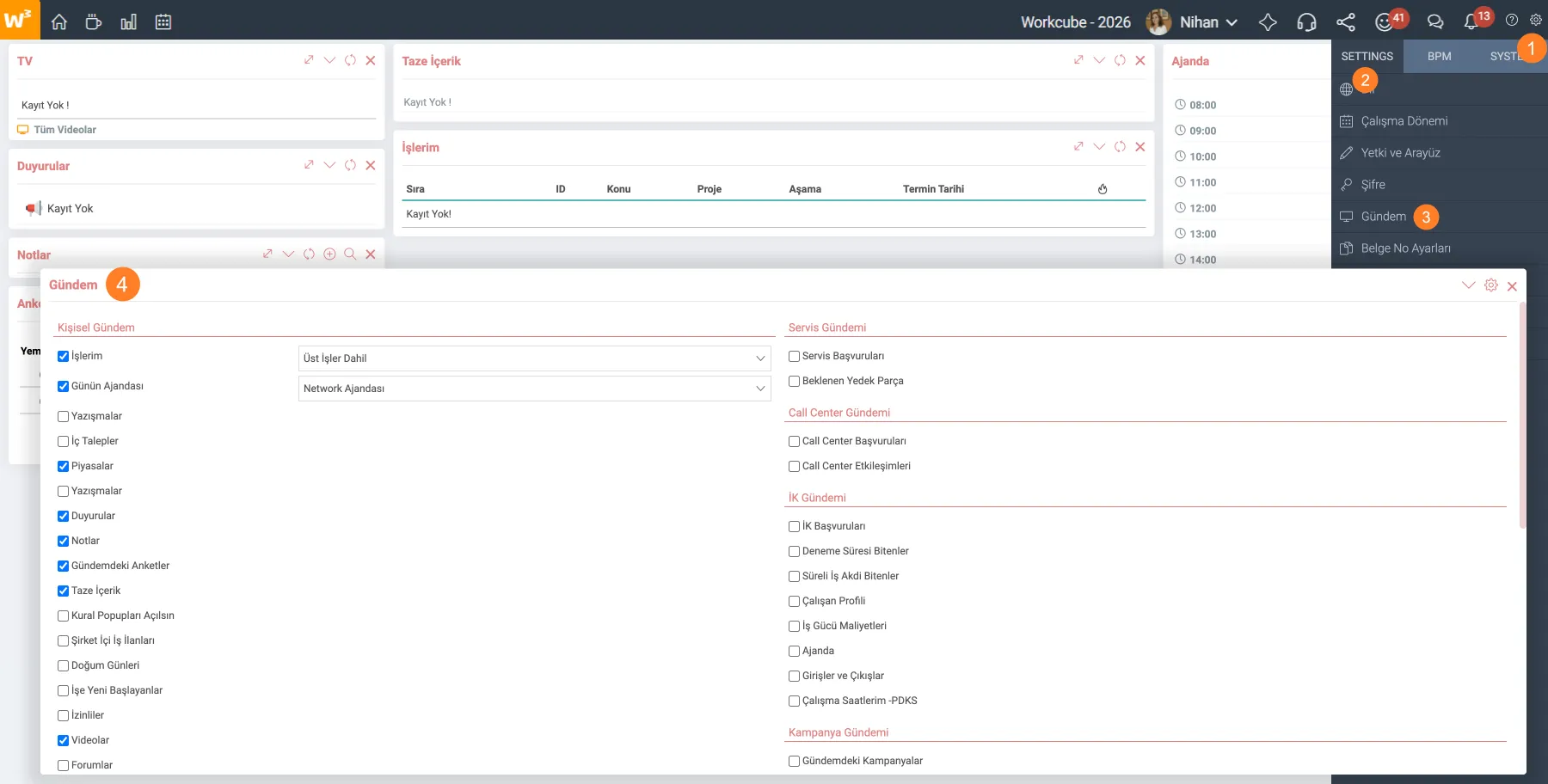
يحتوي Workcube على بنية الصفحة الرئيسية الخاصة بالمستخدم. أول ما يرحب بالمستخدم عند تسجيل الدخول إلى نظام Workcube هو صفحة "الأجندة". تتيح لنا صفحة جدول الأعمال رؤية كل عنصر نضيفه كعناصر واجهة مستخدم عندما ندخل إلى الصفحة الرئيسية لأول مرة. نظرًا لبنية صفحة جدول الأعمال، توجد مربعات الأدوات جنبًا إلى جنب وواحدة فوق الأخرى. يتم نقل "أعلى، أسفل، يمين، يسار" حسب الرغبة عن طريق طريقة السحب والإفلات.
المسار: لوحة التحكم > الإعدادات > جدول الأعمال
دليل لـ المبتدئين
يوفر هذا الدليل معلومات تفصيلية حول المستندات التي يجب على المستخدمين قراءتها قبل البدء في استخدام Workcube وما يجب الانتباه إليه عند تنفيذه.
وظائفي
صندوق الأدوات حيث يتم عرض الوظائف النشطة في شكل قائمة. إنه يعمل بتنسيق ترقيم الصفحات ويأتي مع عشرة سجلات افتراضيًا. يتم الترحيل بعد السجلات العشرة الأولى. في إعدادات جدول الأعمال، في قسم أعمالي، هناك خياران: "تم تضمين المهام العامة" و"تم استبعاد المهام العامة". عند تحديد خيار تضمين الوظائف الأصلية، فإنه يقوم أيضًا بإحضار سجلات الوظائف الأصلية (الحدث الرئيسي) المحددة في تفاصيل الوظيفة إلى القائمة. تؤثر التحديدات التالية في إعدادات XML على Widget-Box.
- فرز قائمة العمل
- هل يجب عرض نسبة الوقت المتبقي في "أعمالي"؟
- هل يجب عرض المعلومات في قائمة العمل؟
جدول الأعمال اليومي (جدول الأعمال)
يتم عرض الاجتماعات والزيارات اليومية القطعة مربع. يتم عرض المهام والأحداث التي يجب القيام بها خلال اليوم. يتم إدراج إدخالات جدول الأعمال مجمعة كل ساعة بين الساعة 8:00 والساعة 20:00.
ضمن إعدادات جدول الأعمال؛ هناك 4 خيارات: جدول أعمال Networg (افتراضي)، جدول أعمالي، جدول أعمال القسم، جدول أعمال الفرع. اعتمادًا على الاختيار الذي تم إجراؤه، تظهر السجلات على صفحة جدول الأعمال. يتم استخدام جدول أعمال الفرع في الأعمال التجارية القائمة على الفروع بحيث يتمكن كل فرع من رؤية عناصر المهام الخاصة به. يتضمن النظام أيضًا أجندة التدريب.
المراسلات
هذا عبارة عن صندوق عناصر واجهة المستخدم الذي يسرد المراسلات المستلمة أو المرسلة من قبل المستخدم الذي قام بتسجيل الدخول، المحفوظة في صفحة المراسلات. إنه يعمل بتنسيق ترقيم الصفحات ويعيد عشرين سجلاً لكل صفحة بشكل افتراضي.
الطلبات الداخلية
ويعود افتراضيًا إلى عشرة سجلات لكل صفحة. في تفاصيل الطلب الداخلي للموظف، يمكنك رؤية طلباتك الداخلية والنشطة في الحقل "إلى من". الطلبات المحلية بتاريخ تسجيل "قبل الآن" أي قبل الثانية التي تدخل فيها الصفحة، أو "بعد الآن" أي بعد الثانية التي تدخل فيها الصفحة، ويظهر تاريخ مستهدف (Taget_date) في صفحة جدول الأعمال.
الأسواق
يعرض أسعار العملات في الأسواق والمسجلة في النظام. من أجل الحصول على أسعار الصرف الحالية، يجب إضافة المهمة الآلية "إظهار الأسعار في الأسواق".
تلميح: المهمة الآلية "دع الأسعار في الأسواق تقوم بتحديث أسعار النظام" تسترد أسعار الصرف من CBRT.
الإعلانات
الإعلانات عبارة عن صندوق أدوات يعرض محتوى أقسام الموظفين في منصب معين أو الشركة التي يعمل فيها جميع الموظفين. تم إدراج آخر 10 سجلات نشطة وغير منتهية الصلاحية. لكي يظهر المحتوى في منطقة الإعلانات؛ يجب وضع علامة على "الإنترنت" و"الإعلان على الصفحة الرئيسية" في معلومات البث. بالإضافة إلى ذلك، يجب تحديد الصفحة الرئيسية في فئة المحتوى في المعلمات. يعمل بالتكامل مع لغة المحتوى ولغة النظام.
ملاحظات
صندوق الأدوات الذي يترك فيه الموظف ملاحظة لموظف آخر أو لنفسه. هو الجزء. عند إضافة الملاحظات، تظهر الملاحظات للمستخدم الذي تم كتابة اسمه في حقل "الملاحظة اليسرى". لا يوجد حد للقائمة في عرض الملاحظات. يتم عرض المستخدم الذي أرسل الملاحظة في قسم "ترك الملاحظة"، ويتم النقر على زر "رد"، ويتم كتابة ملاحظة في قسم "الوصف*"، ويتم إرجاع الرسالة إلى الموظف الذي أرسل الملاحظة عن طريق النقر على زر "حفظ". يمكن حذف الملاحظات في وقت لاحق.
استطلاعات الرأي على جدول الأعمال (استطلاع)
الاستطلاعات؛ تستخدم في إدارة المنتجات والتسويق وداخليا. يُعرض على المستخدم استطلاعًا واحدًا في كل مرة، مع طرح أول استطلاع مسجل أولاً. بعد الإجابة على الاستبيان، إذا كان هناك استطلاع آخر، سيظهر استطلاع جديد. تتم المشاركة في الاستطلاعات عن طريق تحديد الخيار المناسب والنقر على زر "التصويت". عندما لا يكون هناك المزيد من الاستطلاعات للإجابة عليها، يتم عرض نتائج الاستطلاعات التي تم الرد عليها. يعتمد ما إذا كان يمكن للمستخدم عرض الاستطلاع أم لا على الخطوات التالية في تسجيل الاستطلاع:
- منطقة البث
- تاريخ البدء والانتهاء
- الحالة
جديد المحتوى
هذه محتويات مكتوبة لمستخدمي Workcube لقراءتها إذا رغبوا في ذلك. يتم سرد المحتويات من الأحدث إلى الأقدم وتاريخ التحديث. تم إدراج عشر منشورات محتوى بتنسيق ثابت بدون ترقيم الصفحات. يجب تضمين منصب المستخدم في أنواع مناصب المحتوى الذي تم إنشاؤه. لا ينبغي تحديد خيار "الإعلان على الصفحة الرئيسية" في المحتوى. وإلا فإنه سيظهر في قسم "الإعلانات"، وليس في قسم "المحتوى الحديث". يعتمد عرض الصور المضافة في المحتوى على إعداد xml.
فتح القواعد المنبثقة
تظهر النصوص المحفوظة في قوالب نموذج المستند والتي تم تحديد مربع اتفاقية الترخيص الخاصة بها. هناك خياران "أوافق" و"إلغاء"، ولكن حتى إذا تم قبول القواعد، ستستمر النافذة المنبثقة في الظهور على الصفحة الرئيسية طالما تم تشغيل الخيار.
إعلانات الوظائف الداخلية
يظهر صندوق الأدوات الذي تظهر فيه إعلانات الوظائف المفتوحة داخل الشركة. إرجاع سجل بجميع إعلانات الوظائف المتاحة. ليس هناك ترقيم الصفحات أو الحدود. يتم إدراج السجلات التي تم إدخالها في صفحة "منشورات الموارد البشرية" والشبكة الداخلية المحددة.
]أعياد الميلاد
صندوق الأدوات حيث يتم إدراج الموظفين الذين لديهم أعياد ميلاد. لا يوجد ترقيم صفحات أو حدود للسجلات.
الوافدون الجدد
صندوق الأدوات حيث يتم عرض الموظفين المعينين حديثًا. يسرد الموظف لمدة سبعة أيام من تاريخ البدء. يتم إدراج الموظفين المعينين حديثًا عن طريق التجميع على أساس الفرع.
الأذونات
صندوق الأدوات حيث يتم عرض الأشخاص في إجازة. يتم إدراج الشخص في الإجازة مع "الاسم - اللقب، نوع الإجازة (إجازة سنوية، إجازة غير مدفوعة الأجر، وما إلى ذلك)، تاريخ بدء الإجازة - الوقت وتاريخ انتهاء الإجازة - الوقت" ولا يوجد ترقيم صفحات أو حد في السجلات. يمكن إجراء اختيار اليوم من خلال " عرض عدد الأيام مقدمًا لأولئك الذين سيذهبون في إجازة " في إعدادات XML. يعتمد وصول مقاطع الفيديو على المعايير المحددة عند إضافتها. يتم عرض السجلات الخمسة الأخيرة. عند النقر على "جميع مقاطع الفيديو"، يتم توجيهك إلى صفحة "الأرشيف الرقمي - التلفزيون" حيث توجد جميع مقاطع الفيديو الأخرى.
تلميح: (loom.com، يو utube.com, youtu.be, vimeo.com) يمكنه تلقي الروابط المقابلة لعنوان URL أو مقاطع فيديو امتداد mp4 بشكل رقمي الأصول.
المنتديات
المنتديات; Widget-Box الذي يعرض مواضيع المناقشة التي توفر تدفق المعلومات في شكل "سؤال وجواب" لأفكار الأعمال أو المشاريع الحالية. يتم عرضه بناءً على أذونات الوصول في صفحات إضافة/تحديث المنتدى، ويجب تحديد " مشاركة على الإنترانت ".
?
جدول أعمال إدارة علاقات العملاء
الأجندة هي صفحة المعلومات التي ترحب بالمستخدم بمجرد تسجيل الدخول. ومن الناحية الهيكلية، فهي على شكل عناصر واجهة مستخدم. أنه يحتوي على معلومات خاصة بالمستخدم ومعلومات عامة. يأتي بشكل افتراضي عند بدء التشغيل. يمكن لجميع المستخدمين تخصيص صفحة جدول الأعمال الخاصة بهم.
أجندة الموارد البشرية
الأجندة هي صفحة المعلومات التي ترحب بالمستخدم بمجرد تسجيل الدخول. ومن الناحية الهيكلية، فهي على شكل عناصر واجهة مستخدم. أنه يحتوي على معلومات خاصة بالمستخدم ومعلومات عامة. يأتي بشكل افتراضي عند بدء التشغيل. يمكن لجميع المستخدمين تخصيص صفحة جدول الأعمال الخاصة بهم.
1.1.3.5. جدول الأعمال المالي
الأجندة هي صفحة المعلومات التي ترحب بالمستخدم بمجرد تسجيل الدخول. يتم عرض الفواتير الصادرة أو التي ستصدر في الأجندة المالية ويتم عرض إجمالي المعاملات المالية داخل الشركة في حقل الملخص للمدير. يعتمد توفر الحقول على سلطة الوحدة.
1.1.3.4. جدول المبيعات والمشتريات
الأجندة هي صفحة المعلومات التي ترحب بالمستخدم بمجرد تسجيل الدخول. ومن الناحية الهيكلية، فهي على شكل عناصر واجهة مستخدم. أنه يحتوي على معلومات خاصة بالمستخدم ومعلومات عامة. يأتي بشكل افتراضي عند بدء التشغيل. يمكن لجميع المستخدمين تخصيص صفحة جدول الأعمال الخاصة بهم.
1.1.3. جدول الأعمال
الأجندة هي صفحة المعلومات التي ترحب بالمستخدم بمجرد تسجيل الدخول. باستخدام وظيفة الصفحة الرئيسية المخصصة، يتم تخصيص الصفحة الرئيسية وفقًا لامتيازات وحدة المستخدم.