Purchasing XML Settings
Purchasing module is the module in which all purchases of goods and services within the organization are recorded and managed.
Path: Control Panel > System > Page Settings
XML Settings determine page-specific working rules.
Internal Requests and Purchase Requisitions Listing
1 - Only Authorized Processes will appear in the Filter and List.
If Yes is selected, only the processes for which the user is authorized will appear on this screen.
2 - Let the User in the System Display in the Requesting Field.
If Yes is selected, the user's own name will appear in the Requesting field and filtering will be done on the basis of the relevant user unless it is changed.
14 - Sorting Type
The sorting type is selected from this field. For example; Decreasing Date, Increasing Date, etc.
19 - Remaining Calculation
After the entered domestic demand turns into a quote or order and the supply is completed, it is determined how the remaining area will be calculated when transactions such as dispatch and consumption related to the demand are wanted to be carried out from the list page.
According to all: Current standard calculation (default)
According to the purchase request: Internal demand quantity-related purchase requisition
According to the delivery note:Domestic requisition quantity-related Delivery note
Based on the stock slip: Domestic demand quantity-related Stock voucher
According to the purchase offer: Domestic demand quantity-related Purchase offer
Based on the purchase order: Domestic demand quantity-related Purchase order
According to production demand: Domestic demand quantity-related Production demand
Domestic Demand Add-Update It allows you to set the columns/filters you want or do not want to be displayed on the screen with Yes/No selections.
3 - Default Future User in the To Field
Works according to Position ID. Written position ID values must be separated by commas.
4 - Reflect the Delivery Date on Product Lines
The delivery date selected in the document is reflected on the product line delivery date
10 - Should the Selected Entry Project in the Document be Reflected on the Lines?
If yes, the project in the document is reflected on the line. project information is reflected in the unselected lines.
11 - Entry Warehouse Location Authorization
If all locations are selected, all locations can be selected regardless of authority controls.
12 - Exit Warehouse Location Authorization
If all locations are selected, all locations can be selected regardless of authority controls.
Adding-Updating Purchase Requests allows you to set the column/filters you want or do not want to be displayed.
2 - Let the Delivery Date Be Reflected in the Product Lines
The delivery date selected in the document is reflected in the product line delivery date
3 - Default Future in the To Field It works according to User
Position ID. Written position ID values must be separated by commas.
8 - Entry Warehouse Location Authorization
If all locations are selected, all locations can be selected regardless of authority controls.
9 - Exit Warehouse Location Authorization
If all locations are selected, all locations can be selected regardless of authority controls.
Purchase Offers Listing Allows the adjustment of columns/filters.
3 - Positions That Can Make Changes in the Employee / Recorder Field
Works according to the Position ID. Written position ID values must be separated by commas.
4 - Select the Tender Method?
Allows the selection of the tender method.
5 - Select Negotiation Method?
Allows the selection of the negotiation method.
6 - Maximum Number of Technical Ratings per Evaluator
Sets the number of ratings for an evaluator.
7 - Evaluation Per Offer Number of Forms
Determines the number of valuation forms that can be included in each offer.
Adding-Updating Purchase Offers XML Setup

3,4,5 You can set the columns/filters you want or do not want to be displayed on the screen with XML's Yes/No selections. Allows.
1 - Can You Enter Multiple Offers for a Person in the Offer Requested Field?
Allows you to enter multiple offers for a person in the Offer Required field.
2 - Display of the Bidder in the Offer Requested Field. Type
Determines the display of the member employee or member short name in the quote requests field.
6 - Maximum Number of Technical Scoring Per Evaluator
Determines the maximum number of scoring of an evaluator.
7 - Maximum Technical Scoring Per Proposal. Number
Determines the maximum number of technical scores that can be applied to each quote.
Purchase Orders Listing XML Setup

Purchase Order Adding-Updating Allows the adjustment of columns/filters.
1 - Should Product Additional Costs Be Transferred When Converting the Purchase Order to Invoice?
When converting the products in the purchase order to an invoice, it is determined whether the additional costs of the product's final cost record will be reflected on the invoice or not, if the no option is selected, it belongs to the product. additional cost is assigned as 0!
2 - Reflect the Delivery Date on Product Lines
The delivery date selected in the document is reflected on the product line delivery date.
3 - Reflect the Project in the Document on the Lines
If selected as yes, the project in the document will be reflected in the product line delivery date. is reflected on the lines.
5 - Calculate the Maturity Date Based on the Delivery Date
If Yes is selected, the maturity date is automatically calculated based on the delivery date.
Place Bulk Order XML Setup
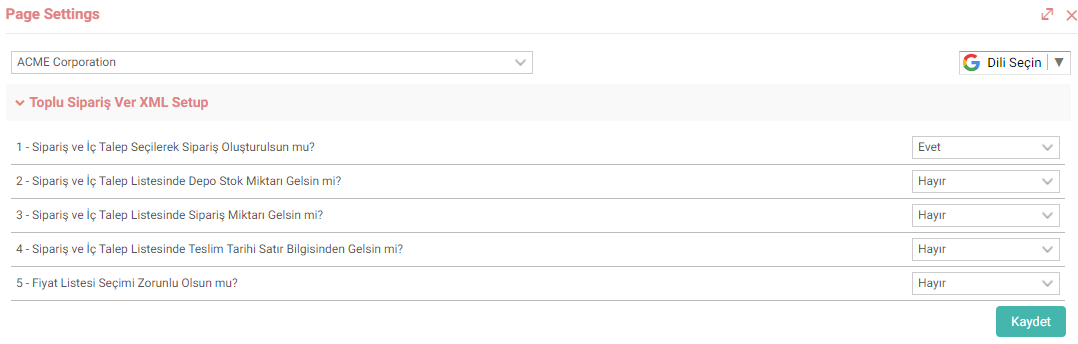
1 - Create an Order by Selecting Order and Internal Request?
The page changes completely depending on the Yes or No selection.
If Yes is selected, the My List page appears and the relevant sales orders and internal demands are listed. Once the selections are made, it is converted into a purchase order. More than one selection can be made.
If no is selected, a single sales order is selected and converted into a purchase order.
5 - Should Price List Selection Be Mandatory?
If Yes is selected, price list selection becomes mandatory.
Feedback
2.2.9.6. Purchase Request
The purchasing module is the module where all purchases of goods and services within the organization are recorded and managed. The "Purchase Request" screen in this module is used to submit a new purchase request to the purchasing department.
Purchase Offer
With Workcube purchase offers, offers can be requested from multiple suppliers through a single offer record. Requested and received offers are tracked from a single center.
2.2.9.1. Purchasing Parametric Definitions
The purchasing module is the module where all purchases of goods and services within the institution are recorded and managed.
Purchasing Management
With the Workcube Purchasing Module, you can manage all purchases within your business more easily and effectively. In addition to improving your relationships with your suppliers, it significantly reduces your purchasing costs. Your employees can see all order details from the date the order was placed to the payment date on a single page.
Health and Safety Procedures
With the Health and Safety Procedures module, internal and external audit procedures and follow-up, health procedures follow-up suitable for the use of the workplace physician, and when the health records, health report and detailed examination results are entered into the system, all health reports and examination history of an employee are displayed on a single screen.