Material Requirements
The quantities of other materials in the product required to produce 1 unit of product are defined beforehand in the product tree. Depending on how many units of product are desired to be produced, the quantities of other products included in that product are automatically calculated by the system.
As a result of this calculation, a material requirement plan is created, taking into account the quantities in stock. As a result of this plan, the required quantities are taken into stock through transactions such as delivery note, warehouse receipt or purchase request.
Path:ERP > Production > Production Planning > Material Requirements
If we have enough of the other products in the product tree to be able to produce the product, we can now send the product to production.
You can also get your material needs in bulk, that is, you can have this calculation made according to the responsible person, supplier, product, product category, purchase price list, listing and warehouse, based on production requests and orders in the desired date range.
As a result of this calculation, it will show you data based on product, need, actual stock, active stock, minimum stock price, reserved from purchase orders, expected production orders, remaining, unit, total price and currency.
More detailed filtering by Request No, Production Order No' or by clicking the "More" button
Type: To view your material requirement list by entering more than one production order, add a comma between the entered production order numbers. For example; UE-15 , UE-16 , UE-17
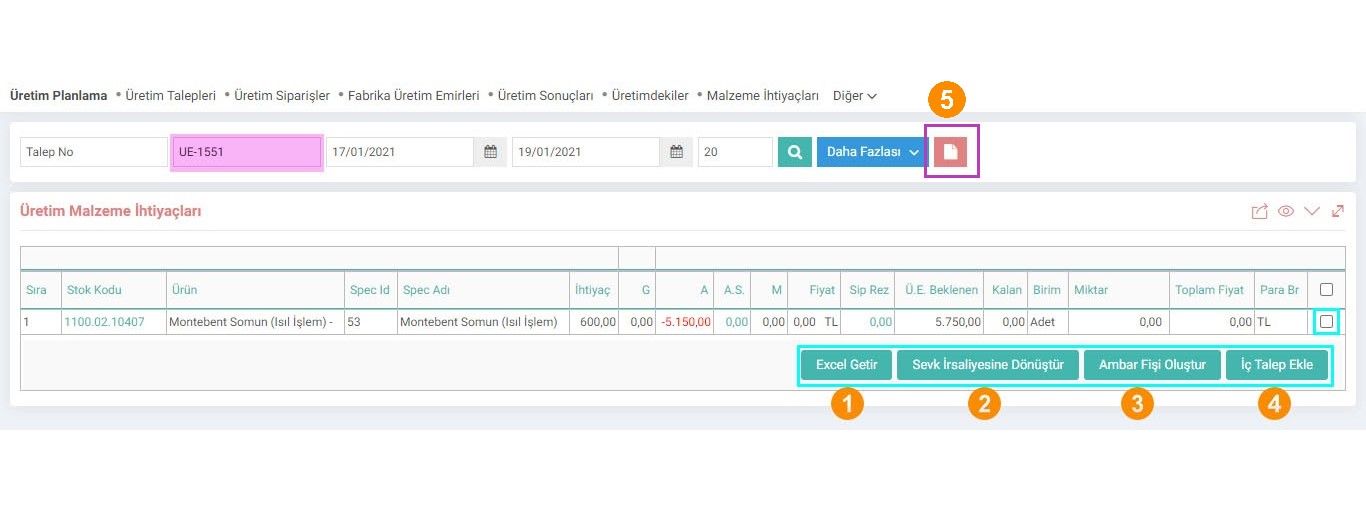
The actual stock quantities of the listed material needs, active stock quantities, reserved order quantities, if any, etc.
You can perform the following operations by selecting the box at the end of the line:
1-Get Excel: By clicking this button, you can download your list as Excel.
2-Convert to Shipment Note: You can convert the materials to shipment note.
3-Warehouse Create Slip: If products need to be moved between warehouses, you can create a warehouse slip.
4-Add Internal Demand: You can select the relevant products and add internal demand. It goes to the purchasing department depending on the relevant internal demand process.
5-CSV Import: You can import your Material Requirement List into the system from this field.
The file extension must be csv and the fields must be separated by semicolons (;). The transfer process starts from the 2nd line of the file, so the field names must be on the first line. There will be a total of 3 fields in the document. The fields are respectively; You can review the "Production Planning Page Settings" document.

Ürün ağacında üretim için gerekli miktarlar tanımlanır. Malzeme ihtiyaçları ne kadar birim ürün üretilmek isteniyorsa o ürünün içeriğinde olan diğer ürünlerin miktarları sistem tarafından otomatik olarak hesaplanmasını sağlar.
Ürün ağacında üretim için gerekli miktarlar tanımlanır. Malzeme ihtiyaçları ne kadar birim ürün üretilmek isteniyorsa o ürünün içeriğinde olan diğer ürünlerin miktarları sistem tarafından otomatik olarak hesaplanmasını sağlar.
x_is_import_file Dosyadan İmport Yapılabilsin
x_is_price Fiyatlar Gelsin
x_is_alternative_stock Alternatif Ürünlerin Stok Bilgisi Gelsin
x_is_dept_location Lokasyon Filtresi
is_materials_frm_remain_amount Malzeme İhtiyaç Listesi Kalan Miktara Göre Hesaplansın
demand_department_id İç Taleplerin Dahil Edileceği Depo Id
real_stock_round_number İhtiyaç Alanı Virgülden Sonra Kaç Basamak Gösterilsin?
is_line_number Sarf ve Fireler Ağaçtaki Sıra Numarasına Bağlı Olarak Gelsin mi?
is_show_need_amount Üretim İhtiyaç Sütunu ve Üretim İç Talep Ekle Butonu Gösterilsin mi?
is_show_need_stock_select İhtiyaç Olmayan Satırlar da Seçilebilsin mi?
Feedback
Production Planning
Production Planning Module is an integrated solution that reduces planning time and can easily respond to changes in the supply chain. It improves your company's speed of response to customer demands and offers decision support to planners.
2.3.2.2. Production Planning Processes and Process Categories
To ensure correct functioning in the Production Planning module, processes and process categories must be defined correctly.
2.3.2.5. Production Orders
Production Orders can be thought of as definitive instructions given to production to produce the relevant material.
2.3.2.4. Production Orders
The production process begins by transferring the product items determined to be produced in the sales order to the Production Orders function under the Production Planning module.
2.3.2.3. Production Requests
In Workcube, you can create an unlimited number of requests by associating them with orders, stations, and products to produce the product or products you want and convert them into production orders.
Material Needs
Added/Edited Function: Improvements were made for javascript situations where the buttons did not work on the ERP > Production > Production Planning > Material Requirements listing page and the select all function did not select all lines.