Process Groups
At the core of Workcube is Business Process Management, which organizes workflows and allocates functions to users according to authority and responsibilities. Processes also fall under this BPM. Processes are the most critical element in Workcube forms. It controls the transaction you will perform, determines the direction it will take, makes warnings, sends e-mails, that is, decides whether you can perform the transaction or not. In a sub-section of the processes, there are stages that regulate the document flow, where logical workflow setups such as approval, rejection, control and warning of different users or departments can be added while a transaction is carried out. Users are added to the stages to perform these operations.
Path: Control Panel > BPM > Process Groups
You can create process groups within the organization to which employees are affiliated. Process groups can be selected from employees working in the same department or can be created with employees working in different branches and departments. The process group is a method that can be used to control the authorizations of users in the system more systematically. Thanks to a change made in the process group, the stages to which the process group is related are changed at once.
Thanks to Process Groups, you can systematically authorize your employees according to their roles within the company. For example; when you add the new person who starts working in the Sales and Marketing department of your company directly to the relevant process group, or you can perform faster authorization for different users in your Accounting unit, thanks to the "Process Groups" that you have previously standardized.
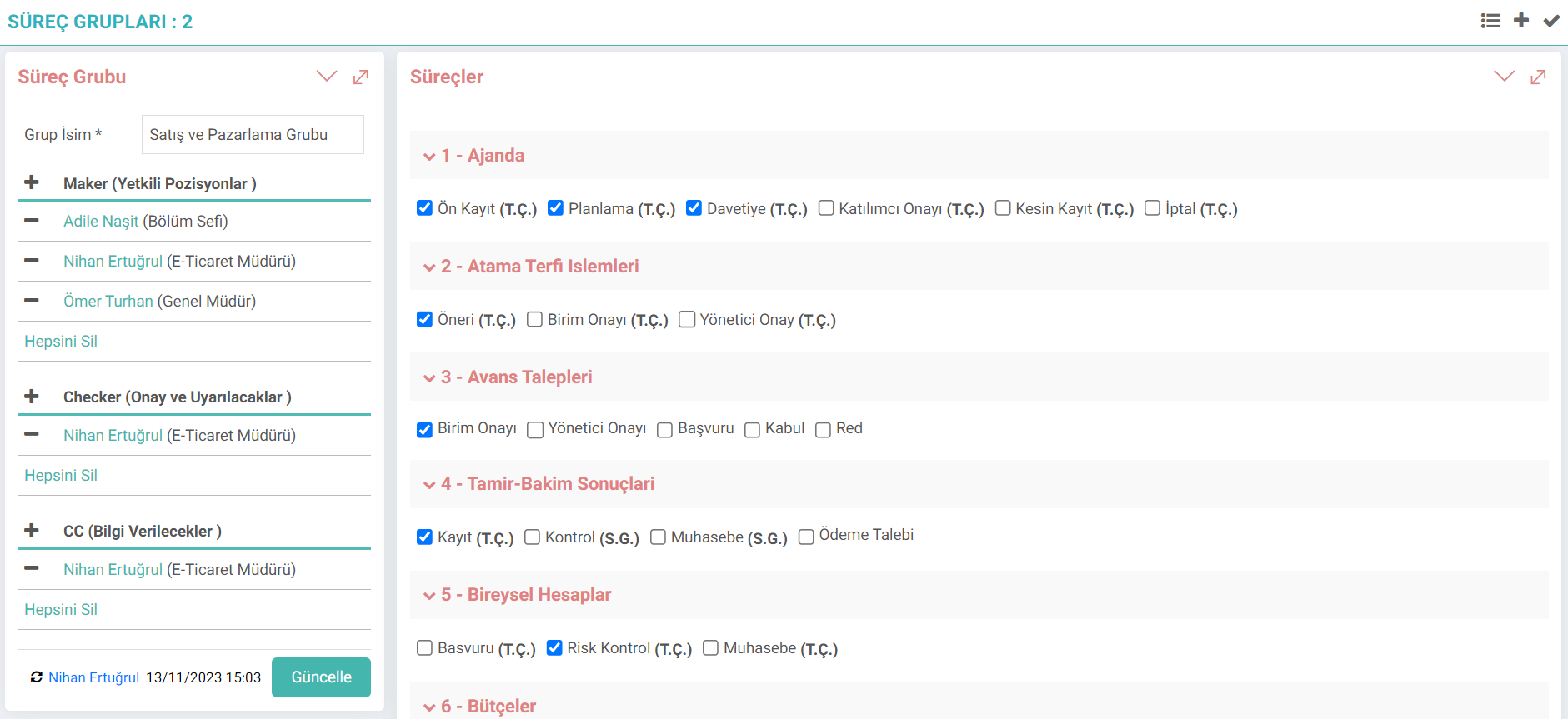
Authorized Positions (Maker): Users who can see the stage, save and update.
Approval and Warning (Checker): Users who will be notified, approved or rejected when the process is moved to the relevant stage.
Information Will Be Given: When the process moves to the relevant stage Users will be informed when withdrawn.
Processes: Users are authorized by marking the stages for which authorization is required within the relevant process.
Associating Process Groups with stages
When the process group is first recorded, its relationship with the stages is established. In fact, transactions are completed within the process group. As a second option, after adding the process group, the relationship with the stages can be established from the process detail.
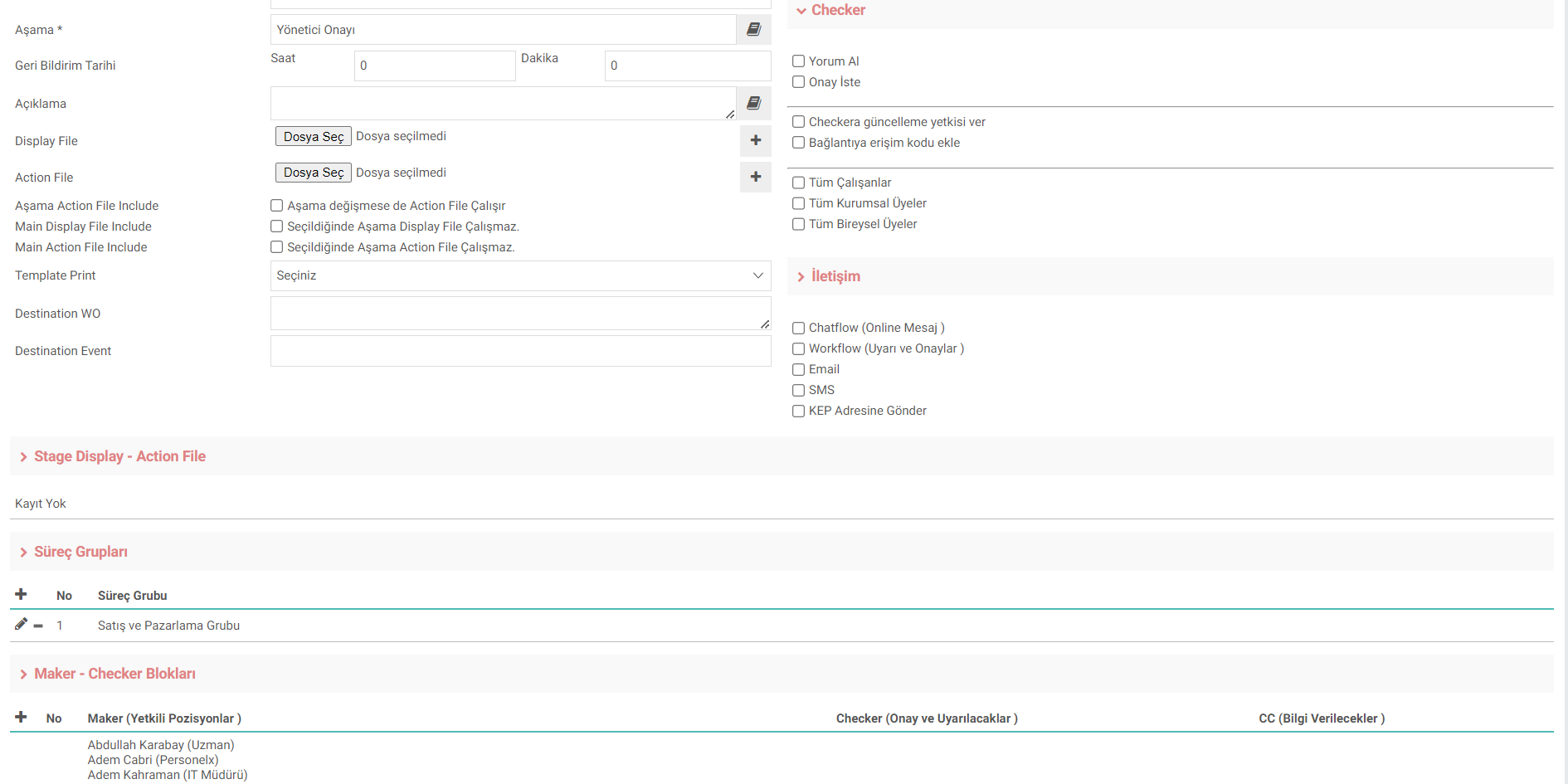
Users can be added from the maker-checker blocks in the stage detail, or they can be added collectively with "Process Groups". After the process group is defined, the recorded process group is selected by going to the process stage and pressing the "+" button next to the Process Group and its relationship is established.
You can disconnect it from the stage using the delete button here or make changes via the update button.
Attention: When an update is made within the process group in the stage detail, it is not valid only for this stage. At the same time, changes are made within the process group. It will affect all process-stages in which this process group is included.

Süreç grubu sistemdeki kullanıcıların yetkilerinin kontrolünü daha sistematik yapabilme noktasında kullanılabilir bir yöntemdir. Süreç-aşamaların içerisinde kullanıcı bazlı yerine grup olarak iş akışlarının düzenlenmesi için kullanılır.
Feedback
1.6.5.1. Process - Stage Operation
The holistic implementation of "QPIC-RS", "Process Stages" and "Warnings and Approvals" sections on Sales Orders is discussed.
Process Stages
Period; It is a basic structure that can be used in one or more business objects and provides the document flow and preliminary control ability to the business object during registration, updating or deletion of business objects, and causes a series of additional actions sequentially when it performs a transaction. All these controls and workflow are provided through the stages included in the process design.
Warnings and Approvals
Workcube has a process-based structure. In these processes, users take part as makers or checkers according to their roles and authorities. The warning - approval mechanism is of critical importance for the healthy progress and completion of the process stages.
Process Management and Workflows
At the core of Workcube is BPM - Business Process Management, which organizes workflows and distributes functions to users according to authority and responsibilities.