Goods Purchase Invoice
Goods Purchase Invoice; It is used to process goods/service purchasing information. After the payment for the product purchased from a customer is made, a "Goods Purchase Invoice" is issued.
Path: ERP > Sales-Distribution > Invoice > Purchase Invoice
What to Pay Attention to?
- If the "Accounting Transaction" box is not checked in the transaction category, the invoice is The warning "No Accounting Transaction is Performed for the Transaction You Selected!" is displayed in the offset.
- If the invoice amount is 0, this warning will be displayed since no accounting transaction will be performed even if the "Accounting Transaction" box is selected in the transaction category selected for the invoice.
- The correct product must be selected. Otherwise, category sales cannot be reported.
- Seller must be selected. Otherwise, seller performances cannot be monitored.
- Payment Method must be entered. Otherwise, payment performances cannot be monitored.
- The 2nd currencies of the lines must be entered, otherwise a report cannot be received according to the transaction currencies.
From the "Transaction Type" section on the new registration screens of the Purchase Invoice, "Goods Purchase Invoice" is selected and after filling in the other necessary information, the transaction is completed. is recorded.
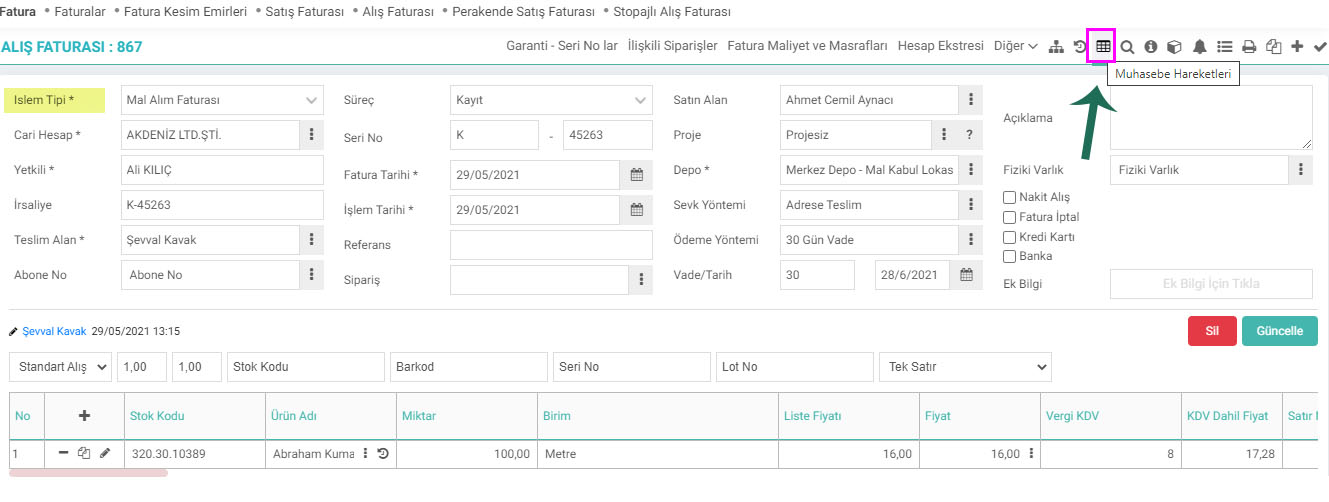
How are the accounting records of the goods purchase invoice created?
The purchase of commercial goods created through the Goods Purchase Invoice constitutes the main activity of the business, and the goods purchased related to its main activity are tracked. Since there is an entry into the company's stocks when commercial goods are purchased, 153 Commercial Goods Account and 191 VAT to be deducted accounts will be debited and 320 Current account will be credited.
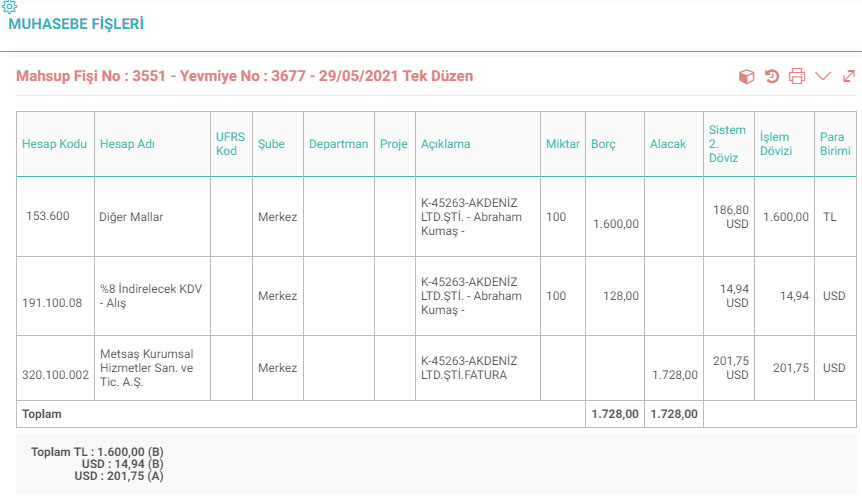
Invoices create accounting vouchers according to the criteria selected in the transaction category and the criteria selected in the document.
If the cash purchase box is checked on the invoice and the cash register is selected, a payment voucher will be created in addition to the resulting offset voucher.
Feedback
2.2.11.5.5. Received Proforma Invoice
Received Proforma invoice is a received quote invoice, also called preliminary invoice. The proforma invoice includes the features of the product to be purchased, sales conditions, type of product, price, delivery, etc. All conditions related to the sale are written, such as. It covers the final version of the invoice before it is issued.
2.2.11.5.4. Service Invoice Received
The service invoice received is the type of invoice given to your company in return for the service received from any of your clients. Services received or provided do not affect stock availability.
2.2.11.5.11. Import Invoice
These are the invoices that companies send you in return for the goods you import from abroad.
2.2.11.5.4. Service Invoice Received
The service invoice received is the type of invoice given to your company in return for the service received from any of your clients. Services received or provided do not affect stock availability.
2.2.11.5.3. Received Progress Invoice
Progress payment is the price paid to the contractor for the amount of work done, at intervals specified in the contract, for the project whose contract has been signed and implementation has started.