Import Invoice
These are the invoices sent to you by companies in return for the goods you imported from abroad.
Path: ERP > Sales-Distribution > Invoice > Purchase Invoice
What to Pay Attention to?
- The declaration has an opening date. However, when doing accounting, the closing date of the customs declaration is taken as basis. Because the closing date is the date on which the import actually takes place. For example; The customs declaration was opened on 31.04.2021, but the import was actually closed on 03.05.2021.
- Foreign currencies written on the invoice or other documents are in force on the date the customs obligation begins. It is converted into Turkish Lira based on the Central Bank's foreign exchange selling rates.
- If "Accounting Transaction" is not selected in the transaction category, a "Accounting Transaction is Not Performed for the Transaction You Selected!" warning appears in the accounting transactions.
- If the invoice amount is 0, even if "Accounting Transaction" is selected in the transaction category selected for the invoice, accounting transactions for transactions amounting to 0 will appear.
- The right product must be chosen. Otherwise, category sales cannot be reported.
- Seller must be selected. Otherwise, seller performances cannot be monitored.
- Payment Method must be entered. Otherwise, payment performances cannot be monitored.
- The 2nd currencies of the lines must be entered, otherwise a report cannot be received according to the transaction currencies.
From the "Transaction Type" section on the new registration screens of the Purchase Invoice, "Import Invoice" is selected and after filling in the other necessary information, the transaction is completed. is recorded.
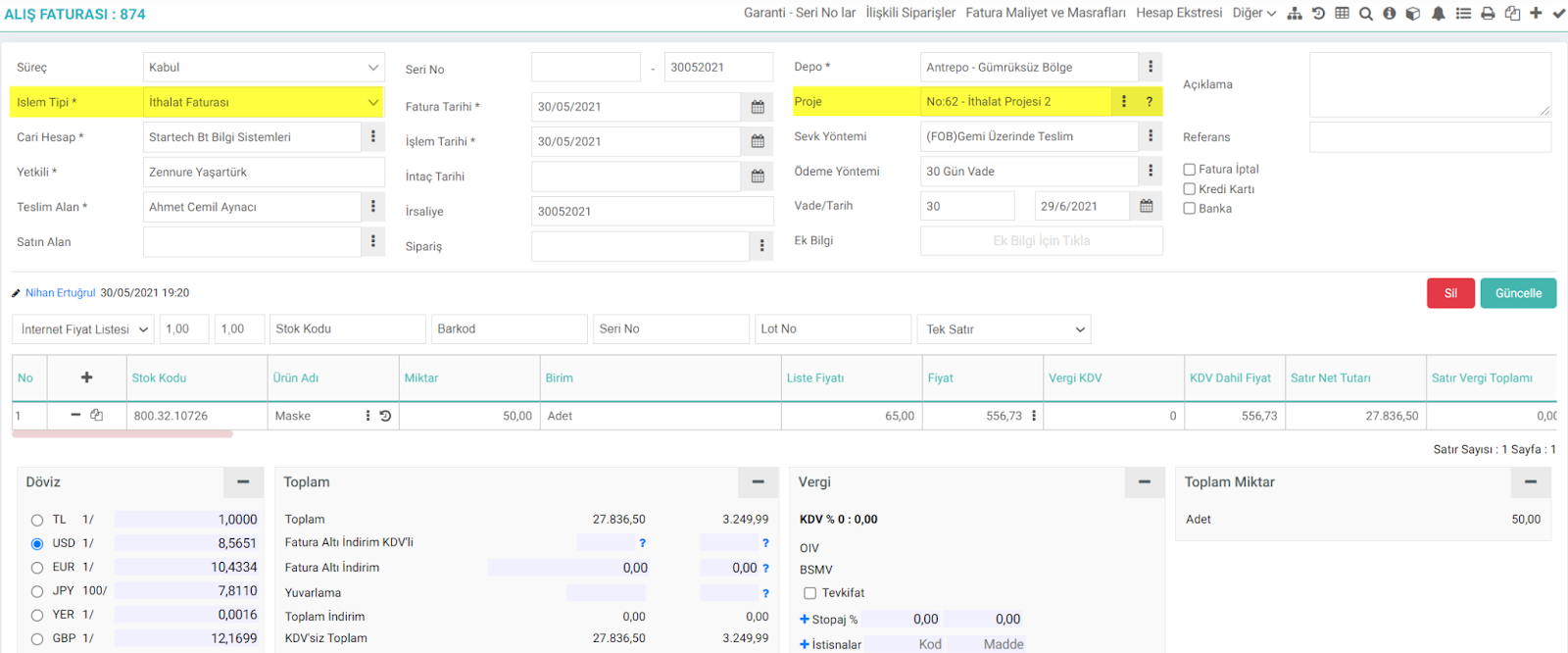
How are Import Invoice accounting records created?
Goods imported from abroad are tracked through the Import Invoice. Since the invoice is associated with a project, account 159 from the project will be debited and account 320 Current will be credited.

If the cash purchase box is checked on the invoice and the cash register is selected, a payment voucher will be created in addition to the resulting offset voucher.
Feedback
2.2.11.5.5. Received Proforma Invoice
Received Proforma invoice is a received quote invoice, also called preliminary invoice. The proforma invoice includes the features of the product to be purchased, sales conditions, type of product, price, delivery, etc. All conditions related to the sale are written, such as. It covers the final version of the invoice before it is issued.
2.2.11.5.4. Service Invoice Received
The service invoice received is the type of invoice given to your company in return for the service received from any of your clients. Services received or provided do not affect stock availability.
2.2.11.5.3. Received Progress Invoice
Progress payment is the price paid to the contractor for the amount of work done, at intervals specified in the contract, for the project whose contract has been signed and implementation has started.
2.2.11.5.14. Wholesale Return Invoice
When a product is sold from one company to another company or a person and the customer returns these sold products, a wholesale return invoice must be created.
2.2.11.1. Invoice Parametric Definitions
Workcube Invoice Module allows you to calculate your invoices accurately, issue them on time and track your invoices effectively. It allows you to present your invoices to your customers online and allow them to track, pay or reject their invoices.