Wholesale Return Invoice
When a product is sold from one company to another company or a person and the customer returns these sold products, a wholesale return invoice must be created.
Path: ERP > Sales-Distribution > Invoice > Purchase Invoice
The customer is a may return either all or part of the goods. Since the return invoice is prepared accordingly, an invoice can be issued in both cases. The return invoice can be issued not only for the return of the services/products received, but also in case of an incorrect invoice.
What Should You Pay Attention to?
- The phrase "Return Invoice" should appear in a visible place on the invoice. If it is e-Invoice, the invoice type should be "Refund".
- If "Accounting Transaction" is not checked in the transaction category, the warning "No Accounting Transaction is Performed for the Transaction You Selected!" will appear in the accounting transactions.
- If the invoice amount is 0, even if "Accounting Transaction" is selected in the transaction category selected for the invoice, transactions with a 0 amount will be accounted for. It does not make any movement.
- The right product must be chosen. Otherwise, category sales cannot be reported.
- Seller must be selected. Otherwise, seller performances cannot be monitored.
- Payment Method must be entered. Otherwise, payment performances cannot be monitored.
- The 2nd currencies of the lines must be entered, otherwise a report cannot be received according to the transaction currencies.
From the "Transaction Type" section on the new registration screens of the Purchase Invoice, "Wholesale Return Invoice" is selected and after filling in the other necessary information, the transaction is completed. is recorded.
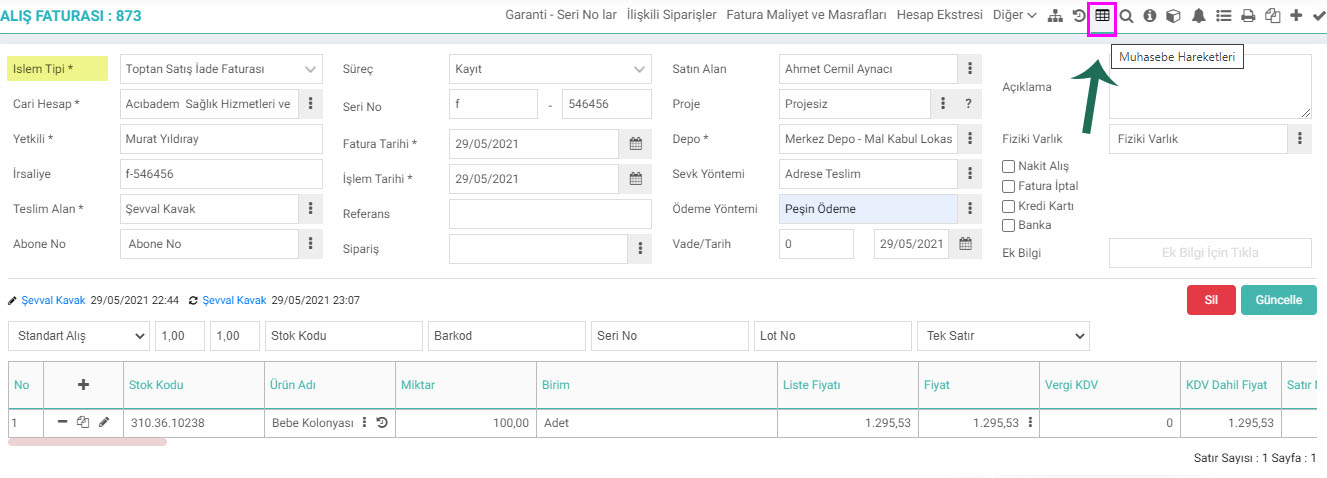
How are wholesale return invoice accounting records created?
The returned goods sold in bulk are tracked through the Wholesale Return Invoice. 610 Sales Returns Account will be debited to 391 VAT Account and 320 Current Account will be credited.
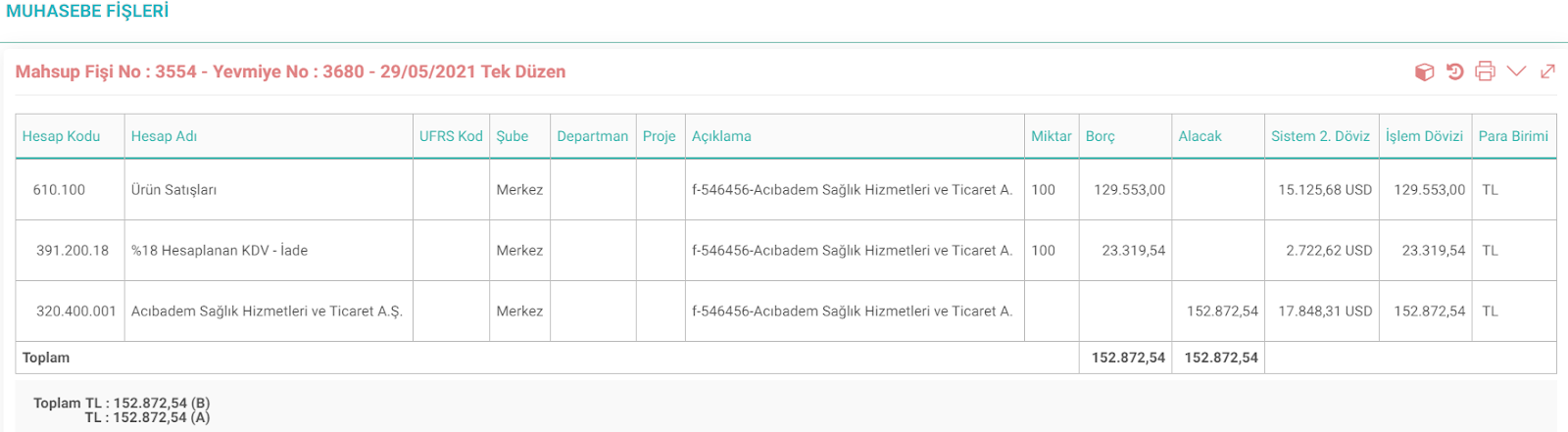
Invoices create accounting vouchers according to the criteria selected in the transaction category and the criteria selected in the document.
If the cash purchase box on the invoice is checked and the cash register is selected, a payment voucher will be created in addition to the offset voucher.
Feedback
Invoice Parametric Definitions
Workcube Invoice Module allows you to calculate your invoices accurately, issue them on time and track your invoices effectively. It allows you to present your invoices to your customers online and allow your customers to track, pay or reject their invoices.
Invoice Issue Orders
Workcube Invoice Module allows you to calculate your invoices accurately, issue them on time and track your invoices effectively. On the Invoice Orders page, invoice orders are given for delivery notes that are not yet issued.
Purchase Invoice
Purchase Invoice is used to enter the invoices issued by the seller in return for the purchased goods or services.