CarbonSuite: CBAM and Product Carbon Footprint Management
Current module flow
- Settings define common mass/emission units, CBAM declarant, facility and verification information.
- Product profiles, emission factors and supplier declarations form the basis of carbon data.
- Emission activities collect production inputs; carbon accounting as a result of production applies the appropriate results to the product profile.
- The producer data package from the carbon footprint results, the official/annual XML from the CBAM preparation and the evidence check are completed.
If you are just starting out: To see the concepts of greenhouse gas, CO2e, direct/indirect emissions, emission factor and CBAM with examples, Carbon Footprint, CBAM and Emission Calculation: Basic You can review the Concepts guide.
CarbonSuite is a carbon management add-on that runs on Workcube. It is used to monitor product-based carbon values, supplier declarations, emission factors, carbon accounts from production and CBAM report preparation in the same flow.
The application is especially designed for companies that want to track product carbon footprint, provide reliable carbon data to customers and manage report preparations within the scope of CBAM through Workcube records.
Usage guides according to scenario
CarbonSuite is used with different flows in different company roles. Depending on the role of your business, you can continue with the following guides:
- Manufacturer Scenario: Product Carbon Account: calculating the finished product carbon value from production results and providing data to the customer.
- Supplier and Exporter Scenario: Carbon Declaration Management: carbon data for buy-sell, supplier declaration, evidence document and customer/CBAM declaration. management.
- CBAM Declarant Scenario: Report Preparation and XML Export: matching of import lines with carbon data, missing data checking and XML/export preparation.
What does CarbonSuite do?
CarbonSuite tracks the direct and indirect emission values of products. These values are managed together with Workcube records such as product card, supplier declaration, production result carbon account and CBAM report lines.
- Shows purchase and sale carbon values on a product basis.
- Associates carbon declarations received from suppliers with products.
- Uses emission factors and official reference values for comparison.
- Allocates carbon values resulting from production to products.
- Missing data control, certificate preliminary calculation, annual declaration data and official QReport XML preparation for the CBAM report.
- Records the documents and evidence on which carbon values are based.
Dashboard
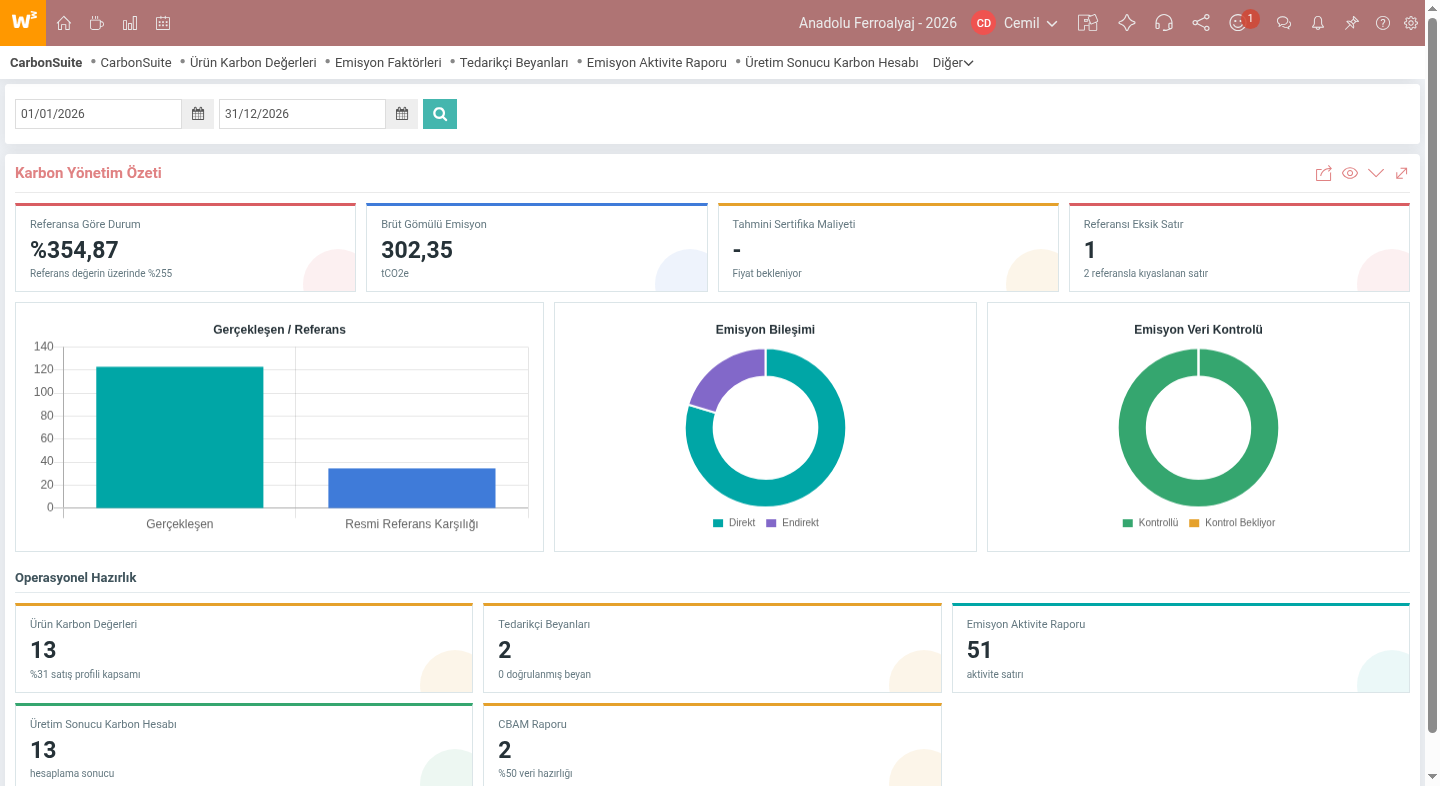
The Dashboard screen summarizes the carbon impact in the selected study period. Indicators such as total emissions, direct/indirect emission distribution, compared net mass, official reference equivalent and estimated certification cost are monitored on a single screen.
Product carbon profiles
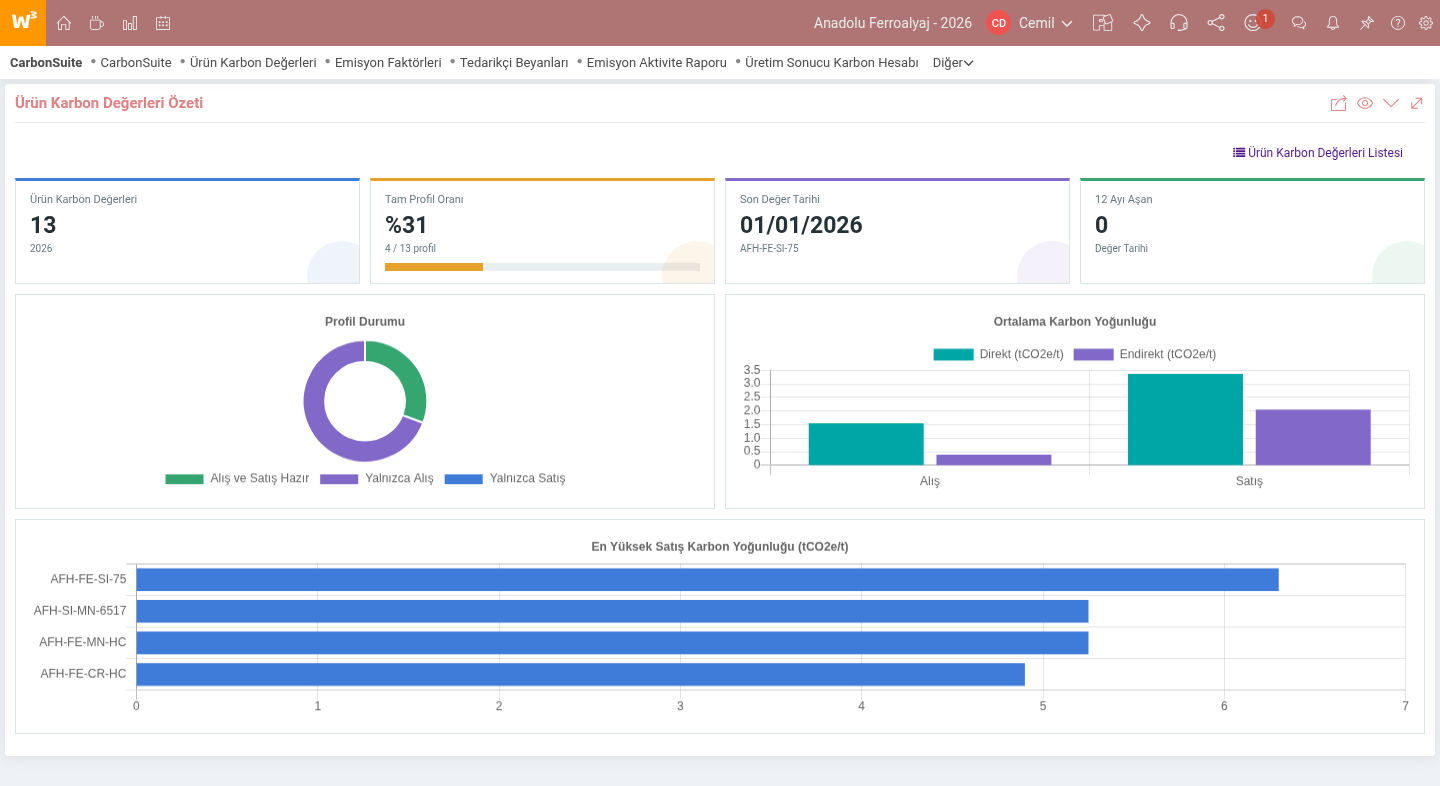
On the product carbon profiles screen, direct, indirect and total carbon values of products for buying and selling are tracked. With the opening carbon import, existing stock, lot or series based carbon values are imported into the system. Thus, current carbon information for purchased raw materials, commercial products or manufactured goods can be monitored on a product basis.
Supplier declarations
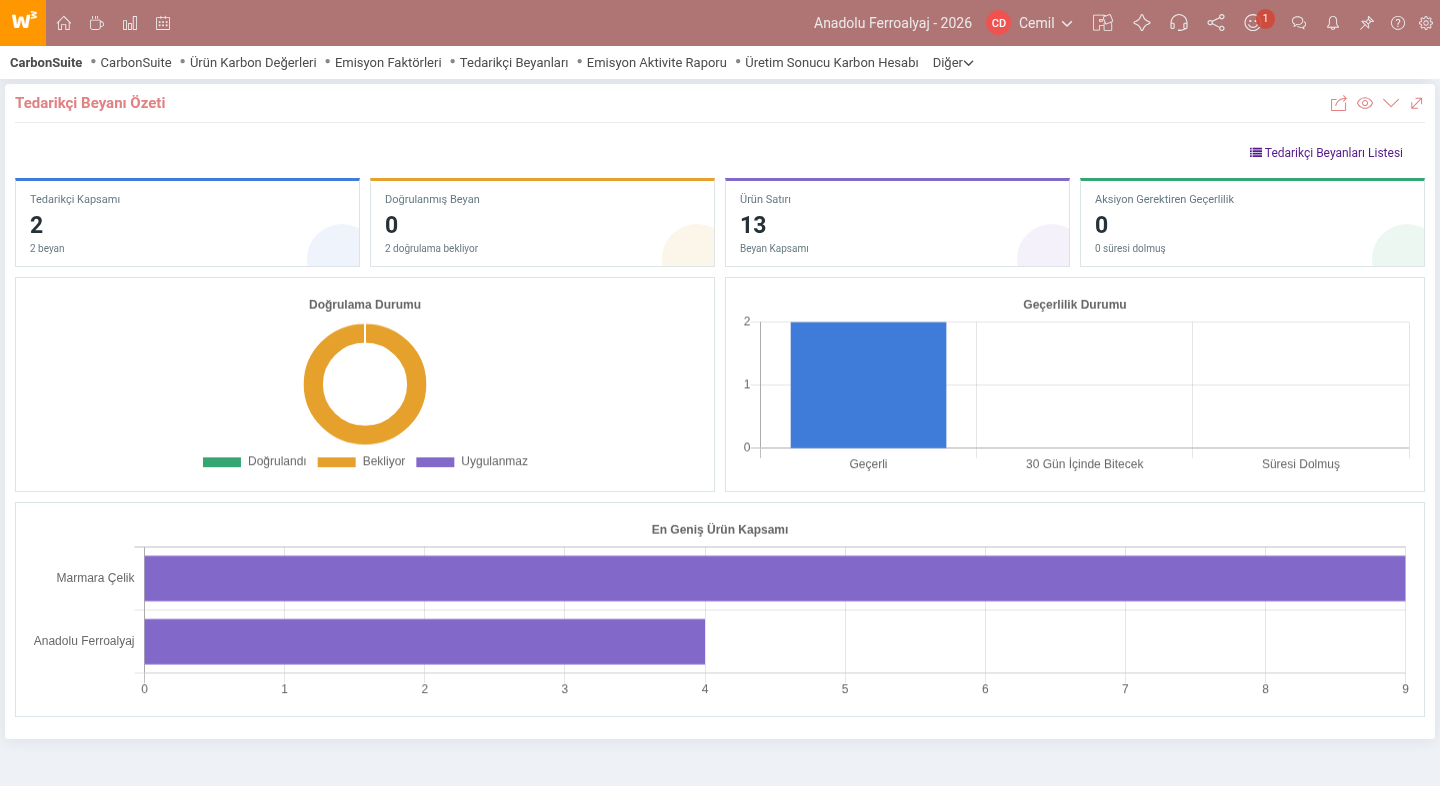
A supplier declaration contains the carbon values a supplier reports for specific products. It is tracked with declaration date, validity interval, number of products and activity information. These records are especially important for the carbon data that importer or exporter companies will transfer to their customers.
CBAM report preparation
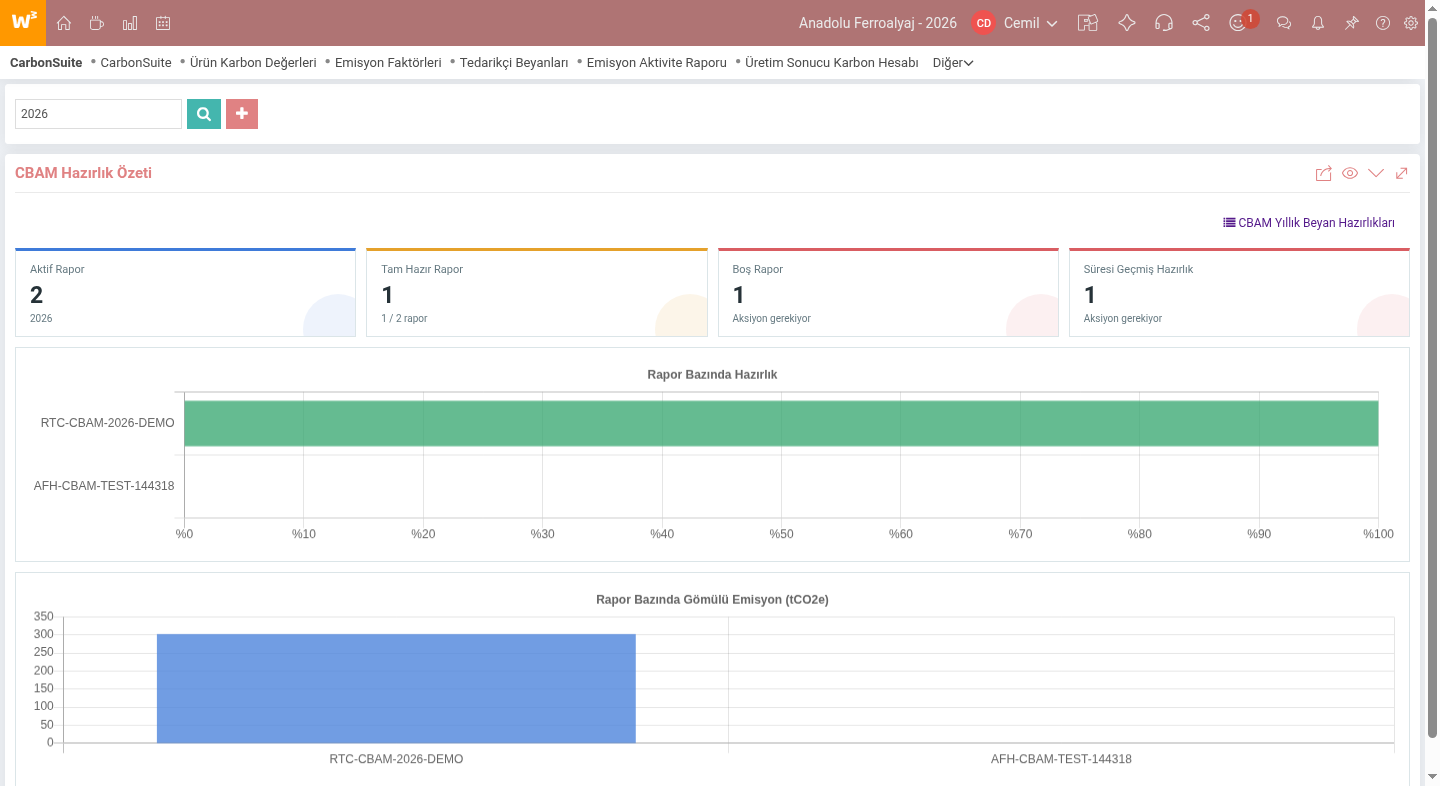
On the CBAM report preparation screen, import records, product information, CN/GTIP codes, origin information, net quantity and emission values are checked together. After checking for missing data, report lines are used for certificate preliminary calculation, annual declaration data and official QReport XML preparation.
Who uses CarbonSuite?
CarbonSuite can be used in different company roles:
- Manufacturers process the carbon values resulting from production into their products and the data to be declared to their customers.
- Supplier or exporting companies manage supplier declarations and product carbon profiles for the products they sell.
- CBAM obligated importers match import lines with carbon data, check deficiencies and prepare reports.
Basic flow
- Products and product carbon profiles are checked.
- In the live transition, opening carbon import is made based on existing stock, lot or series.
- Supplier declarations and emission factors are entered.
- Carbon calculation is run as a result of production in manufacturing companies.
- Carbon footprint results and evidence documents. are monitored.
- Import records within the scope of CBAM are prepared for report preparation.
- After missing data control and certificate preliminary calculation, annual declaration data or official QReport XML output is prepared.
Related CarbonSuite wiki contents
- Carbon Footprint, CBAM and Emission Accounting: Basic Concepts
- CarbonSuite Manufacturer Scenario: Product Carbon Account
- CarbonSuite Supplier and Exporter Scenario: Carbon Declaration Management
- CarbonSuite CBAM Declarant Scenario: Report Preparation and The standard installation of the plugin must be completed. Existing Workcube master data is not recreated; If there is initial carbon data, it is bulk transferred from the file.
- CarbonSuite company settings
- Bulk transfer of opening carbon data — Master Data
- CarbonSuite registration processes and authorizations — Process Stage
- XML transfer of existing supplier declarations — Master Data; at the customer with a file
- Preparation of reference emission matches — Param; At the customer who will use the reference
The process and authorization preparation are completed before the declaration XML transfer. The processes and reference emission catalog that come with the installation are not recreated. These preparations are not required for the customer who does not have supplier These are not listed as implementation steps.

Feedback
CarbonSuite Emission Factors and Reference Carbon Values
Filtering emission factors, reading source descriptions and matching them with system products are explained.
Product Carbon Data Management with CarbonSuite Supplier Declarations
Supplier declaration dashboard, Process area, product scope and manufacturer data package import flow are explained.
Production Input Tracking with CarbonSuite Emission Activity Data
Production inputs, monthly trend, emission distribution and transition to the list are explained in the emission activity dashboard.
CarbonSuite Production Result Carbon Calculation
The production result carbon calculation dashboard, calculation-ready lines, profile changes and the application of the results to the product are explained.
CarbonSuite Carbon Footprint Results and Manufacturer Data Package
The carbon footprint results dashboard, document scope, export preparation and manufacturer data package XML output are explained.
CarbonSuite CBAM Report Preparation and XML Export
CBAM preparation dashboard, annual declaration list, Process tracking, missing data control and XML outputs are explained.
CarbonSuite Evidence Documents and Source Document Control
In the evidence document dashboard, report-based document scope and associating source documents with records are explained.
CarbonSuite Settings: Mass Unit, Emission Unit and CBAM Information
CarbonSuite mass/emission units, CBAM declarant, producer operator, facility and verification settings are described.
Carbon Impact Summary Tracking with CarbonSuite Dashboard
On the CarbonSuite main dashboard screen, company and period-based carbon management summary, data preparation and transition to relevant lists are explained.
CarbonSuite Product Carbon Profiles and Opening Carbon Import
Describes the product carbon profile dashboard, list view, and the opening carbon data import flow in the toolbar.

Shall we talk about Workcube?
Call duration has expired.