Revenue Account Closings
Revenue account closings are the process of, at the end of an accounting period (usually month or year), the balances of all revenue accounts obtained by the business in that period are reset to zero and transferred to the 690 Period Profit or Loss account.
In the accounting system, revenue accounts are in the class of temporary (periodic) accounts. In other words, they must be closed at the end of the period in order to start each new period with a zero balance and to be able to measure the profit/loss situation of that period alone.
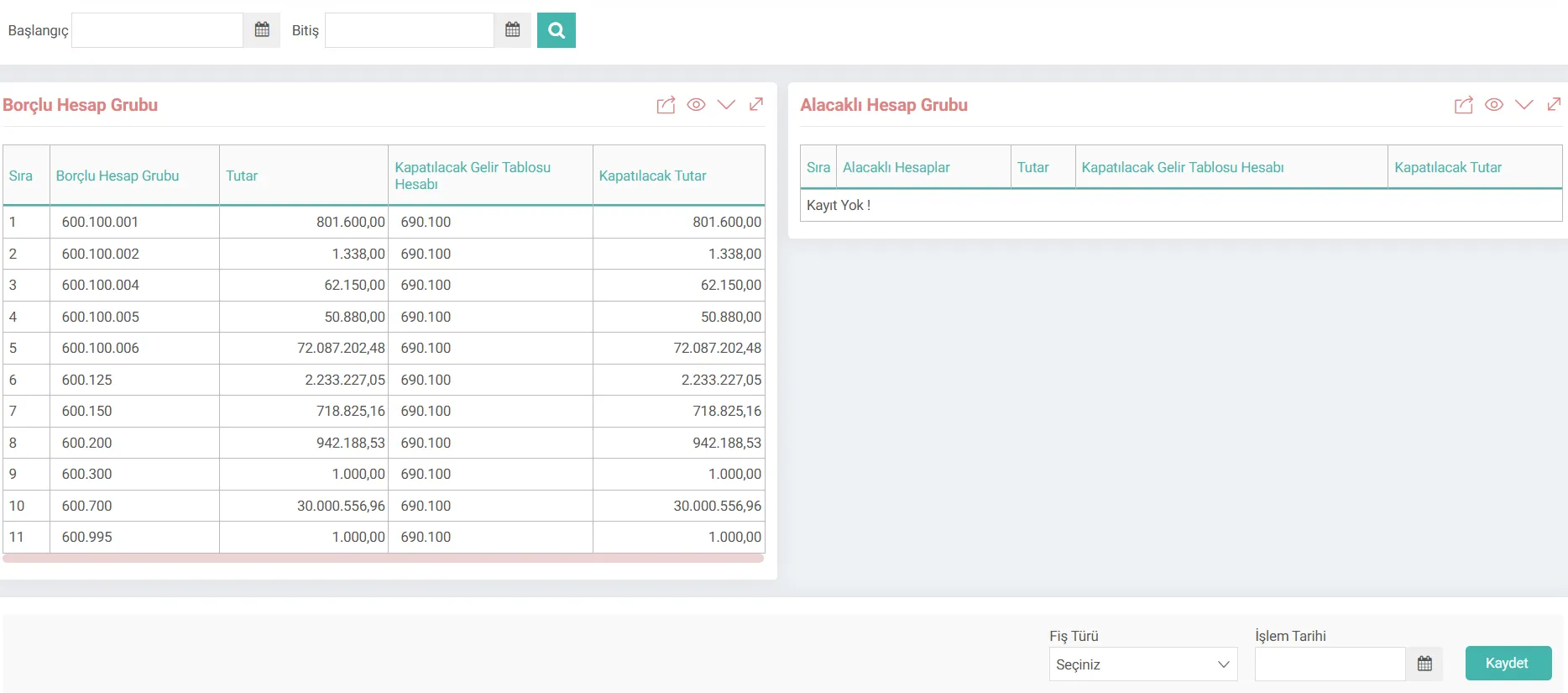
What are Workcube Income Account Closings?
Temporary income and expense accounts (in the Uniform Chart of Accounts) at the end of the financial period in the Finance-Accounting family It is a critical end-of-period transaction screen that enables the calculation of period net profit or loss (690 Period Profit or Loss Account) by resetting the balances (6xx accounts).
In the Workcube architecture, this screen is directly integrated with the general ledger records. First of all, "Income Statement Closing Definitions" must be made. It automatically analyzes the debit and credit balances within the date range specified by the users, lists the debtor and creditor account groups, and produces the accounting voucher (Settlement Voucher or Closing Voucher) with a single click and records the closing entries in the journal. In this way, manual calculation errors are prevented and period closing processes are completed in minutes instead of hours.
The Importance of Closing Income Statement Accounts for a Business
Correct closing of income statement accounts at the end of the financial period is not only a legal obligation, but also vital for the business management to analyze its financial situation correctly:
- Tax and Legislation Compliance: In accordance with the Tax Procedure Law (VUK) and Turkish Accounting Standards (TMS), income and expense accounts must be closed at the end of the period and the net profit/loss of the period must be reflected.
- Operational Speed and Automation: Instead of closing hundreds of sub-accounts one by one with manual vouchers, Workcube automatically prepares the closing voucher by scanning the balances within seconds.
- Financial Statements. Accuracy: Performing the error-free process of zeroing the income statement accounts and transferring them to the balance sheet ensures that the asset-liability balance and equity change table are formed correctly.
- Internal Audit and Control: It completely prevents balance shifts and incorrect account matching that may arise from manual receipt entries.
Closing Income Statement Accounts Life Cycle and Process Flow
The steps of the process from start to finish are shown below, together with the integration points within the system:
Stage | Module / Screen | Process / Document | Description |
|---|---|---|---|
1. End of Period Preparation | General Ledger / Trial Balance | Trial Balance and Account Controls | Before closing, it is checked that all receipts are processed and period-end adjustment records such as depreciation and exchange rate differences are completed. |
2. Determining Date and Filter | Accounting Transactions / Income Statement Closing | Date Range Filter | The start and end dates of the period to be closed are entered and listed. |
3. Withdrawal and Matching of Balances | Income Statement Closing Screen | Debtor / Creditor Account Group Lists | Displays the account balances on the specified dates according to the debit/credit status and automatically selects the account codes to be closed. throws. |
4. Receipt and Date Parameters | Income Statement Closing Screen | Receipt Type and Transaction Date Entry | Type of document to be created (Offsetting or Closing) and official accounting date is selected. |
5. Voucher Creation and Approval | Accounting Transactions / Voucher List | Offset / Closing Voucher (Automatic Recording) | By pressing the 'Save' button, the closing voucher for the relevant period is automatically created by the system. |
What Should Be Considered When Managing Income Statement Closing Procedures?
A. Period-End Adjustment Records Must Be Completed
Before the income statement accounts are closed, all expense accruals, depreciation allocation transactions, exchange rate difference valuations and stock costing (inventory) transactions for that period must be completed and accounted for. Otherwise, the closing slip will be issued with missing balances.
Workcube Tip: Before starting the closing process, check the balances of the 6-group accounts on the Workcube Trial Balance screen. Make sure that the undistributed or incomplete group of 7 cost accounts are reflected in the group of 6.
B. Choosing the Correct Receipt Type and Date Consistency
When selecting the receipt type in the system, the purpose of the operation should be taken into consideration. While Offset Voucher is generally preferred during provisional tax periods, Closing Voucher should be preferred in final closing transactions at the end of the year and completely resetting the accounts. The last day of the period (for example, 31.12.2027) should be selected as the transaction date.
C. Accuracy of Counter Account Matching
The resulting accounts (for example, 690 Period Profit or Loss account) to which the debit and credit accounts will be transferred must be correctly defined in the system. Incorrect account code redirection causes the income statement and balance sheet to produce incorrect results.
Workcube Tip: Check the automatic codes in the 'Income Statement Account to be Closed' column on the screen.
D. Preventing Post-Closing Record Entry
After the closing slip is issued, no document entry or accounting slip for the past period should be cut. If a retrospective entry is made, the closing voucher must be canceled and re-issued because the balances of the closed accounts will change again.
Closing Income Statement Accounts Function in the System
The screen lists the balances of the debit and credit accounts in the end-of-period transactions and makes them ready for the journal entry by matching the counter accounts to be closed. The functional solution of the areas on the screen is as follows:
Screen Area / Component | Examined Sample Data / Parameter | Function in the System and Importance |
|---|---|---|
Start & End Date | 01/01/2027 - 31/12/2027 | Accounting transactions that will be subject to closing will be scanned Specifies the date range. They are generally full fiscal year or quarterly provisional tax periods. |
Debtor Account Group Table | 600.01 Domestic Sales (Those Giving Receivable Balance) | Receivable under normal conditions It shows the income accounts that have a balance and need to be debited in order to be closed, their current balances and the reflection/result account to be closed. |
Creditor Account Group Table | 621.01 Cost of Commercial Goods Sold (Debit Balance). Issuers) | Lists the expense accounts that normally give a debt balance and need to be credited in order to be closed, their current balances and the counterpart account to be closed. |
Voucher Type Selection | Offsetting Voucher or Closing Voucher | Determines the type of accounting voucher to be created. Generally, Offsetting Voucher is preferred for in-period reflections, and Closing Voucher is preferred for final closings. |
Transaction Date | 31/12/2027 | The official accounting of the journal voucher to be created. is the date of registration. |

Hesap dönemi sonunda maliyet hesaplarında bulunan giderler yansıtma hesapları aracılığı ile gelir tablosu hesaplarına yansıtılır.