Robotic Tasks
Robotic Tasks are commands that run at predefined times or within specific time intervals. It allows users to receive reports or send and receive data at specified periods.
Path: Control Panel > System > General Settings > Robotic Tasks
Robotics Tasks are divided into two.
- Standard Missions
- Special Missions
Standard Missions
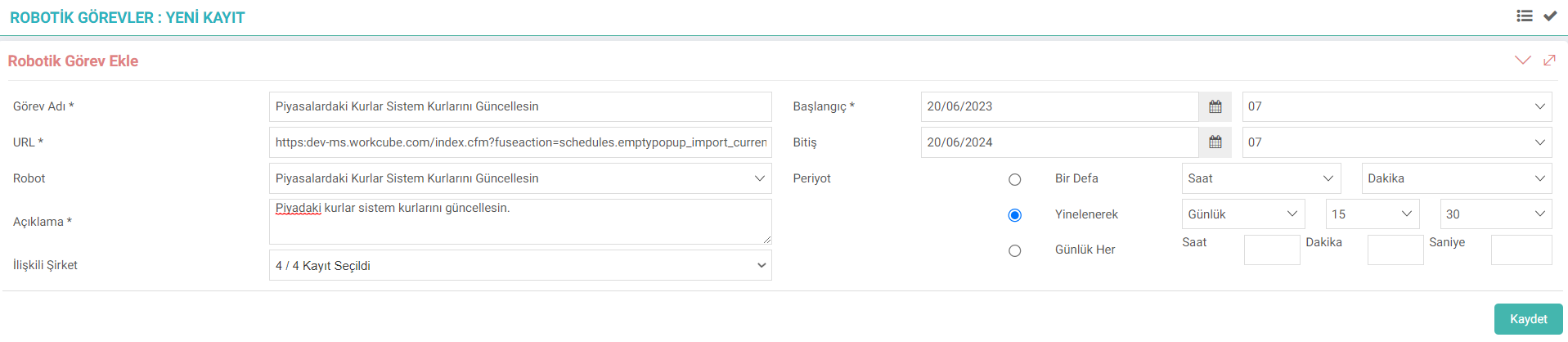
For standard missions, selection must be made from the "Robot" field. WOs whose WO type is selected as Robot appear in the Robot field.
- Let the Exchange Rates in the Markets Update the System Rates;
In the specified periods, the exchange rates are automatically withdrawn from the CBRT and transferred to the system.
Type: When you want to make an active transaction with the buying rates in the system, go to the address given in the "Let the Rates in the Markets Update the System Rates" option. The &is_purchase_act=1 parameter must be added. After this, language set arrangements should be made in the relevant places in the system. - Show Rates in the Markets;
The Agenda page allows you to see the active exchange rates of the CBRT in the Markets object. It works in collaboration with "Let Rates in Markets Update System Rates". - Let Future Dated Rates Update System Rates;
The exchange rates entered using the forward/backdated exchange rate option on the Finance Exchange Rate Information screen will update the exchange rates in the system when their validity dates and times come.
XML of the robots in the standard Its settings are associated with the XML Path field in the robot's WO. If the XML Path is defined, you can edit the settings of the robot you have selected from the gear icon next to its field.

Tip: Check the ready-made services in it to be up to date.
After determining the task name and description, select which companies the task created in the "Related Company" section will be valid for.
Start and end date are selected. When the date is selected, it is mandatory to enter time information.
In the Period section;
- Once: The task runs only once. For example; Let it run once at 7 o'clock.
- Repeatedly: The task runs repeatedly. For example; Let it run at 5 past 3 o'clock every day.
- Every Daily: The task runs every specified time daily. For example; Let it run every 1 hour, 30 minutes and 5 seconds.
Note: In order to avoid the need to define the WO fuseaction of Robots selected from the Robot field in the URL field, WOs whose type is selected as "Robot" can be placed directly in the File Path field. It was made executable with the associated file.
Note: In standard tasks, if you manually define the URL of the task you will run, the URL of the relevant robot must be given in the fuse_link field in the system parameter settings. If it has been given before, it does not need to be added again.
Special Tasks
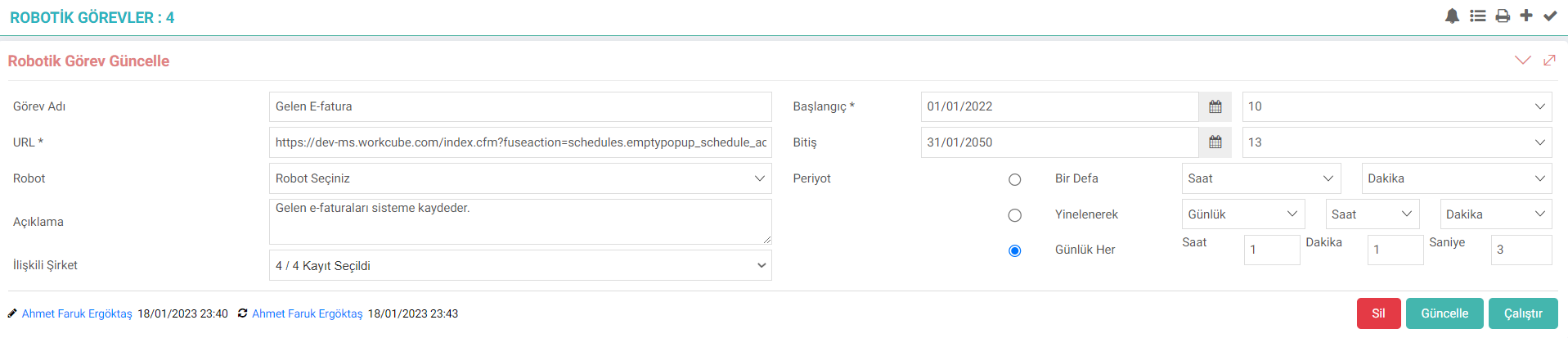
Robotic tasks are not used only for exchange rate information or tasks included in the standard. It can also be defined for any task that will be run at specified times by establishing a connection with Special Reports.
If it will be associated with a special report, the "Robot" field is not selected. Because it is not tied to any task. After filling in the other fields, the prepared file is added to the system as a special report.
You can go to the BI Report > Special Reports page and go to the details of the special report prepared.
By clicking the “Calendar” icon at the top right, the box for the created task is checked.
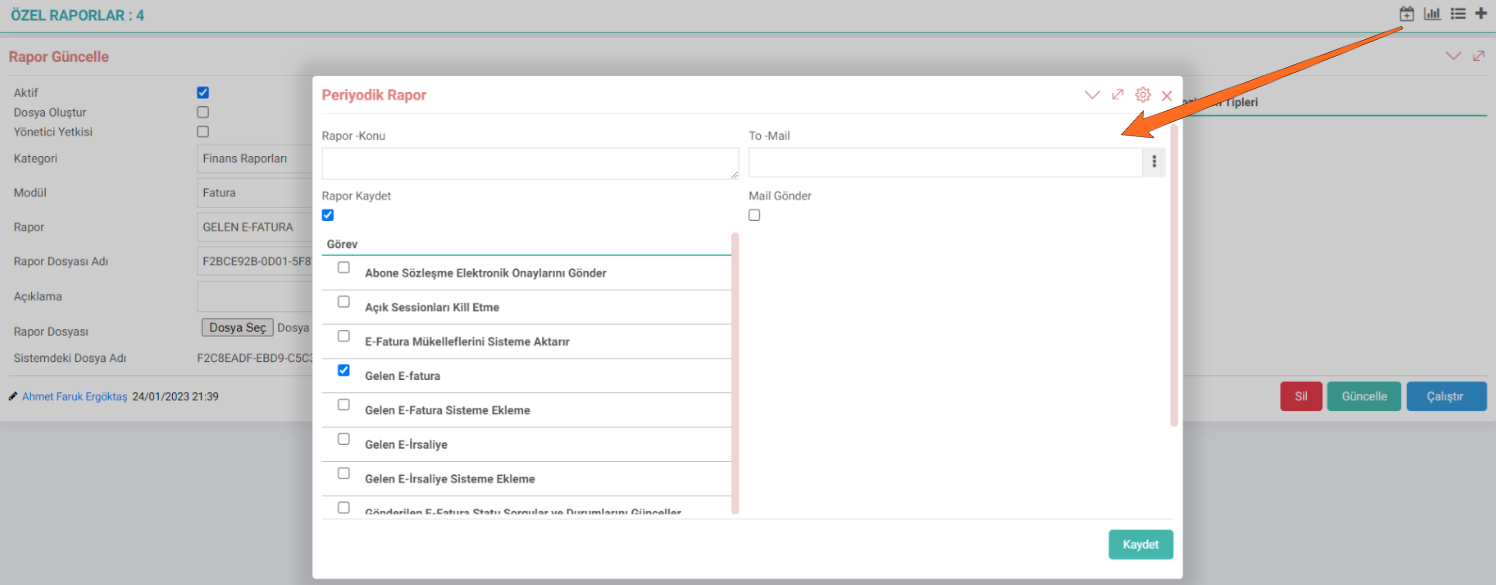
Attributed special report; It works in line with the period entered in robotic tasks. If you want the report to be sent by e-mail every time it runs, the "Send Mail" box is checked and the e-mail address of the relevant person is entered in the "To-Mail" section. Email address can also be selected via popup. If you want to send an e-mail to more than one person, "," can be entered separated by commas. You can complete the process by clicking the "Update" button.
Hint: Every time the special report runs, an e-mail will be sent to confirm that it is running. If detailed information is desired, the codes of the report can be written accordingly.

Raporlama araçları ve entegrasyon sağladığı BI araçları ile kullanıcıların farklı veri kaynaklarını kullanarak konsolide ve yüksek performanslı raporlar üretmesine olanak sağlar. Raporlar robotik görevlere dönüştürülerek periyodik rapor haline getirilebilir. Periyodik raporlar yöneticilerinize, müşterilerinize vb. otomatik çalıştırılması veya gönderilmesi sağlanır.
Feedback
14.2.10.2. Killing Open Sessions
The Killing Open Sessions report is a report that is run to remove active users from the system at specified time intervals.
Sequential Processes (Background Processes)
Sequential Transactions enable cost, accounting and budget transactions in invoices to run in the background at a specified time or period.