Service Operations
Service Management;maintenance, repair, technical support, etc. related to after-sales products and services. It covers the processes. With the Workcube Service Module, you can see which type of service was provided to which customers regarding which product or solution, which service ended in what situation, etc. You can control the situations.
PATH: CRM > Service-Warranty > Service > Service Operations
NOTE: Before all operations, all parametric definitions related to the Service must be made in Control Panel > System > Parameters.
Service Operations Listing
You can list the applications using the filtering fields on the Service Transactions page. If you click the "More" button, the filtering options will expand.
Recording and Updating Service Operations
When you make a selection from the field at the top of the page and press the search button, the screen where you can record the service operation will appear. You cannot access the page without filtering. For example; By selecting a Client, you can list the products of that client that will be exchanged or refunded, make the relevant selections and save them, and then issue the delivery note.
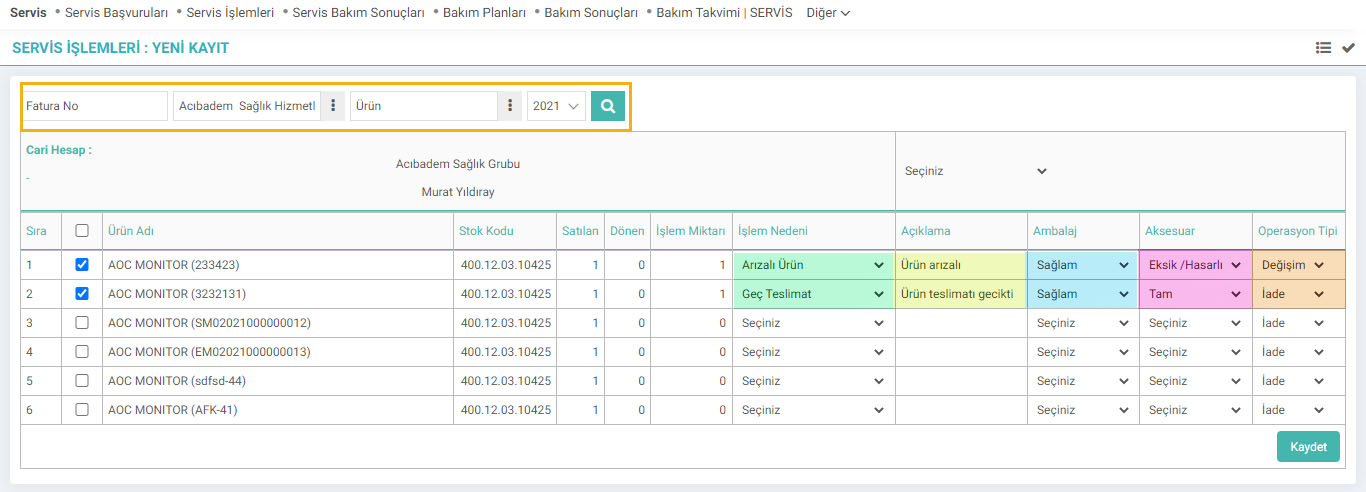
After the selection, the products for which delivery notes will be issued are listed at the bottom of the page. Marked fields must be predefined within the parameters.
Reason for Action; You can select the reason for the service from this field.
Description; You can write a description about the process in this field.
Packaging; You can choose whether the packaging of the product is sturdy or not.
Accessory; You can choose whether the product's accessory is complete or missing/damaged.
Operation Type; You can choose the type of service operation.
After completing all the operations, click the "Save" button.
The process will be completed and the update screen will open. You can also go to the update screen by clicking the "Update" icon at the end of the line after listing the service operations.
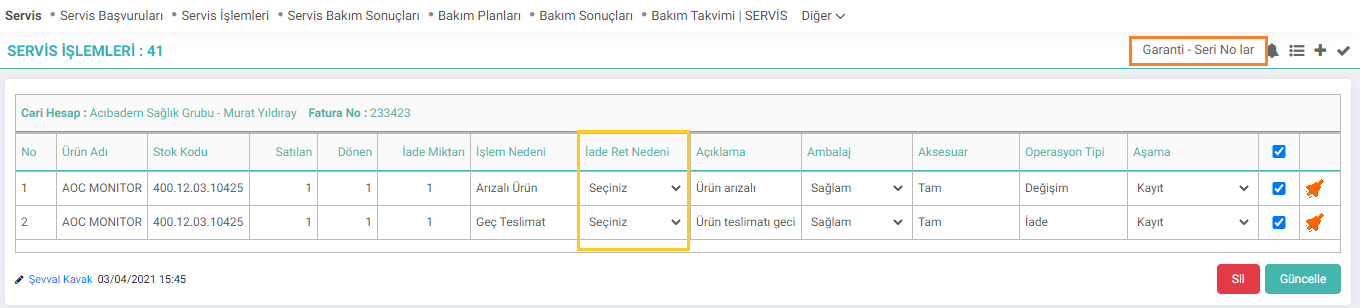
If a refund is to be rejected on this page, "Reason for Refund Rejection" is selected. Rejection Reasons are set in Control Panel > System > Parameters. You can update it after making the changes.
Warranty Serial Numbers: By clicking this area, you can access the "Series and Lot Transactions" screen.
After determining the transactions to be performed regarding the product, you can edit the delivery note by selecting the Client on the listing screen.


Verilen ürün/hizmete göre iade kategorileri farklılık gösterir. Buradan gelen iade taleplerinin tanımları girilir.
Verilen ürün/hizmete göre iade kategorileri farklılık gösterir. Buradan gelen iade taleplerinin hangi neden ile reddedildiğinin tanımları girilir.
Satış sonrası ürün ve hizmet ile ilgili bakım, onarım, teknik destek vb. süreçleri kapsar. Ürün ile ilgili ne tarz bir servis hizmetinin verildiğini, hangi servisin ne durumda olduğu gibi kontroller yapılır. İade ya da arıza işlemler vb. düzenlemeler yapıldıktan sonra kullanılan parçalar ile ilgili sayfa üzerinden servis irsaliyesi kesilebilir.