Schema Compare
Schema Compare is the process of finding structural differences (schemas) between different versions in Workcube databases. Schema comparison is a basic database management practice used to ensure structural consistency between different versions or environments of the system, to prevent possible errors and to make development processes more efficient.
Path: Control Panel > System > Dev Tools > Schema Compare
Why schema comparison Is it important?
Comparing a database schema provides many benefits in software development and system management processes:
Error Reduction: It eliminates the possibility of a change to be taken live (production environment) disrupting the existing structure.
Fast Deployment: Easy transfer of changes made in the development environment to test and live environments. provides.
Version Control: Makes it possible to track changes in the database structure over time and access retroactive versions.
Team Collaboration: It helps multiple developers easily manage differences that occur while working on the same database.
Schema comparison In order to perform the process, the data sources to be compared must be defined on the Data Sources screen; The wiki article "14.8.3. Data Sources" should be read. When comparing schemas, company schemas should be compared with company schemas and period schemas should be compared with period schemas.
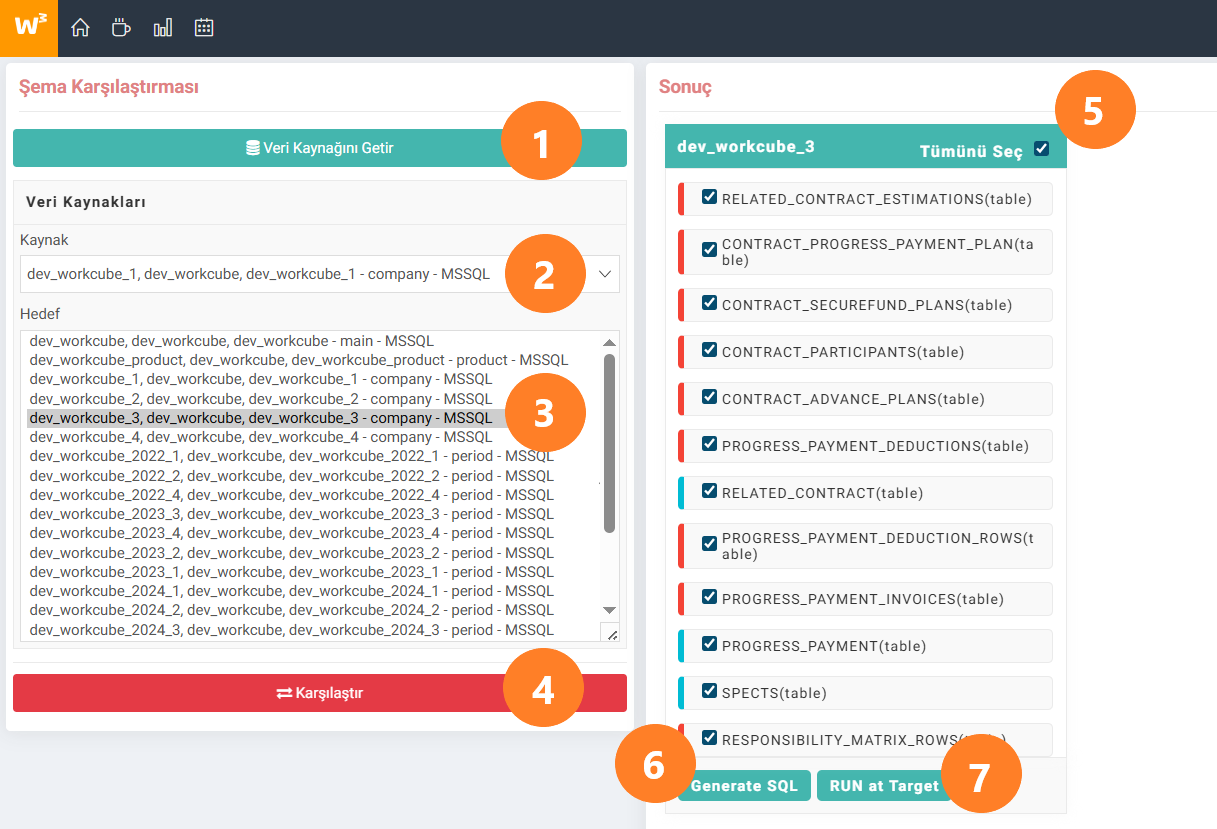
- Get Data Source: Used to list the schemas defined in Data Sources.
- Source: Select the schema to be used as the source Compare the source schema and target schema and find the differences. will be found
- Target: The scheme to be used as the target is selected. The source schema and the target schema will be compared and the differences will be found
- Compare: Starts the process of comparing the schemas. Do not leave the screen until the comparison process is completed!
- Select All:Allows the bulk selection of the differences detected as a result of the comparison.
- Generate SQL: Creates the SQL query to resolve the selected differences.
- RUN at Target: Resolves differences by running the generated SQL query.

Veritabanlarını schema seviyesinde tablo ve kolon seviyesinde karşılaştırarak fakları bulur, farkları eşitler.