Watalogy Product Details
Watalogy; It is a combination of software platform, integration and logistics services that integrates businesses working with Workcube with marketplaces. There are adjustments and definitions that need to be made in the product card before the Watalogy Plugin can be used. Not all edits made to the product card are mandatory. However, the more detail is given, the more interaction is received.
Path: ERP > Sales-Distribution > Product and Stocks > Products
Product Detail
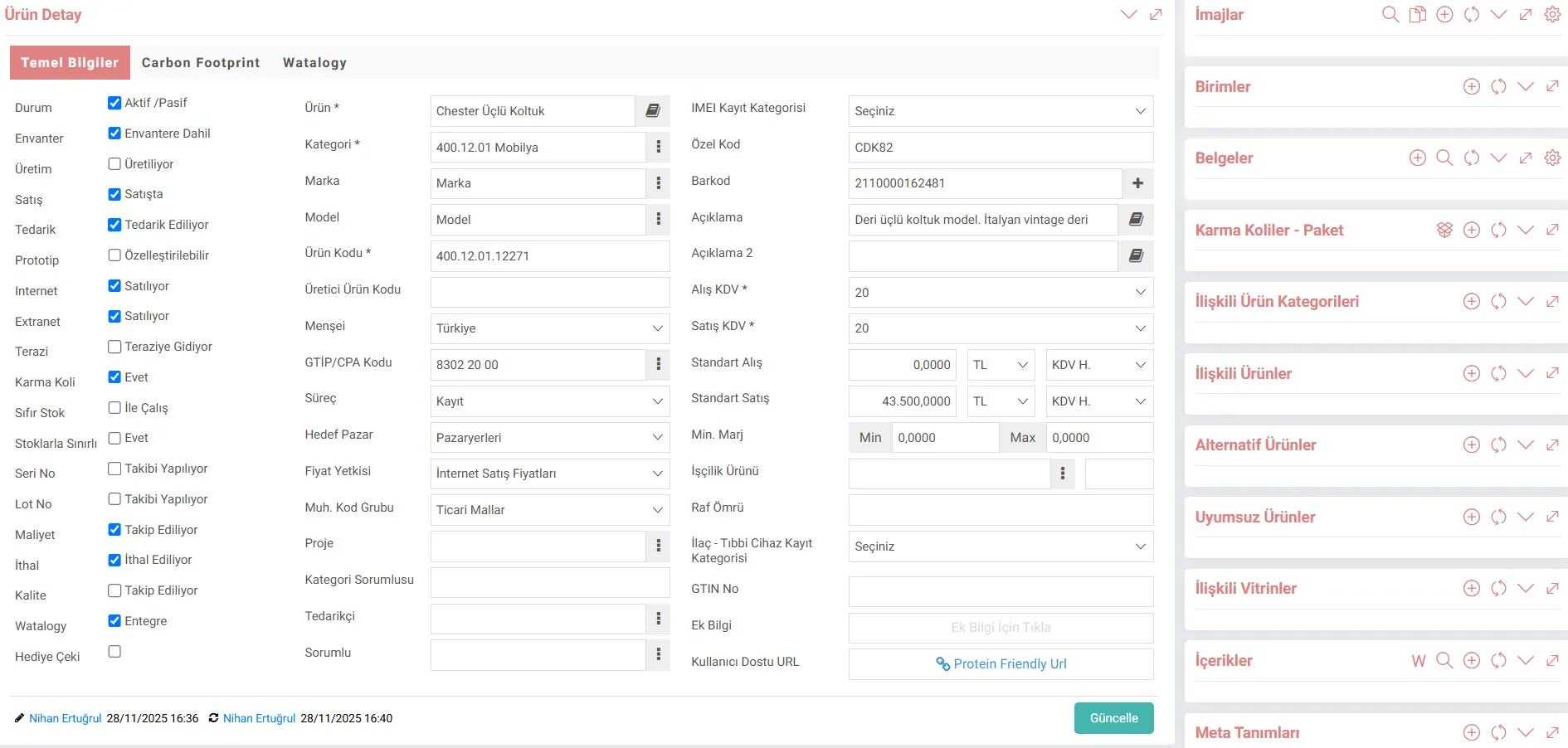
Product Card Information
For the product to appear on Watalogy, the active, on sale and internet boxes must be ticked.
- Product Name: The product name and different language equivalents can be entered using the dictionary next to it.
- Special Code: It draws the product's stock code information from the code information defined in this field.
- Barcode: If the product barcode is desired to be displayed, a barcode can be created automatically with the + button here or a barcode can be created manually. can be entered.
- Description and Explanation 2: If a brief description about the product is to be made, the requested information is written here.
- Brand and Model: If these fields are to be displayed on the site, they are first defined in the Parameters and then selected in the product detail.
- Origin: Countries defined in the parameters are listed here. and the relevant Origin selection is made.
- Marketplace Links: Watalogy Partner definitions defined in the parameters are reflected here and the relevant marketplace selections are made.
Product Detail Information
Detailed information about the product and describing the product, such as images, units, related or alternative products, are on the right side of the product card. It is entered through the section below.
- Images: Images related to the product are added in this area. More than one image of the product and in different sizes is added. In order to appear in the marketplace, "Show on the Internet" must be selected in the image field.
- Units:Product measurement and weight information is transferred from the data entered in the product main unit.
- Documents: Detailed documents about the product are added via digital archive. The "Show on the Internet" box for these added documents must also be checked.
- Mixed Parcels-Package: Products defined as mixed parcels on the product card are transferred as set products. From here, the content of the mixed parcel, that is, the set, is determined.
- Related Products: If a product is related to another product, for example; It may be a double or armchair associated with a three-seater sofa. If defined here, the product will appear in the related products field in the detail.
- Alternative Products: If the selected product is not in stock, the definitions made in the alternative products field come into play. It is ensured that other products are offered that can be chosen as alternatives to this product.
- Incompatible Products: Products can be taken individually from different categories and combined optionally. Or an add-on can be made to a product. In this case, if the selected product does not match the purchased product, purchasing the wrong product can be prevented by defining it here.
- Content: If it is desired to use rich content, predefined contents are associated with the product card. Separate content must be entered for each foreign language.
- Meta Definitions: The meta field is critical for the SEO optimization of the product. Keywords and meta descriptions are entered here.
General Information
- Price: There is a Price Detail field at the top right of the product card. Standard, promotional and discounted price information can be obtained here. Different price lists can be created. In order to make a definition here, the product must have the authority to give prices.
- Stock: The amount of stock to be sent to e-commerce platforms is the "salable stock" amount defined for the relevant warehouse.
- Cargo Cost: It is automatically calculated by multiplying the product's decimal value with the cargo-package prices defined on the Parameters screen. For this reason, it should be ensured that the parameters used in the cargo calculation are up-to-date.
- If the mandatory fields are left missing, the product cannot be sent to the marketplace.
- If a multi-language structure is used on the site, language equivalents must be entered from the dictionary fields.