Production XML Settings
Product production highlights value-increasing activities performed on a physical asset. It is the process of transforming raw materials or semi-finished products into final products by making value-increasing changes. Before commissioning the production module, XML settings must be made to determine how the screens will work.
If specific settings have been made for a page, the XML settings of the page are created in Workcube. Depending on the XML settings, there may be differences such as fetching data, calculating, and displaying results on the page. You can check the xml settings when you want to analyze the page or understand how it works. It is the most important rule set in shaping the page. The XML Settings of each page are on its own page.
Path:You can access the XML Settings by following the ERP > Production > Control Panel > System > Page Settings path.
Production Orders List Page
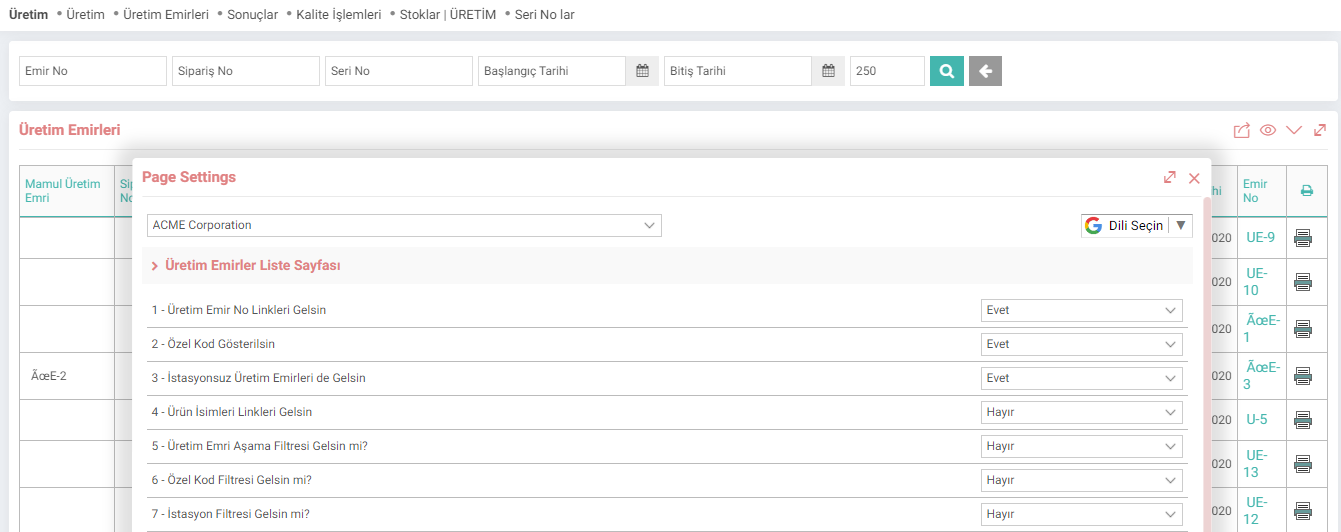
- Get Production Order Number Links:
Enables links to be displayed for all production orders in the list. In this way, the relevant production order can be accessed. - Show Special Code:
Allows the special code of the product defined in the product detail to be displayed. - Show Production Orders Without Stations:
It lists the records that do not have a station along with the stations to which the person is authorized. - Product Names Links. Come:
Allows you to receive links to the products in the list. In this way, when the product is clicked, you can go to the product detail. - Shall the Production Order Stage Filter appear?:
If yes, the production order stage filter appears. - Shall the Special Code Filter appear?:
If yes, the special code filter appears. - Should the station filter be displayed?:
If Yes is selected, the station filter will appear. Listing can be done according to whether the station is full/empty. - Should the sorting filter be displayed?:
If Yes is selected, the sorting filter will appear. In this way, filtering can be done as Ascending/Descending. - Should the Spec Filter Be Appeared?:
If Yes is selected, the spec filter will appear. - Should the Related Production Order be Shown According to Order Status?:
If Yes is selected, if there is a related production order under the related production order field and the production result is not entered for this related production order(s) in a sub-breakdown. It ensures that the production order at the top is not listed for as long as it is.
Quality Transactions Let:
When the purchase delivery note transaction type is selected, the remaining amount appears in the list.
When the production result transaction type is selected, the remaining amount appears in the list.
When Yes is selected, the no column in the list.
When Yes is selected, the control number column appears in the list.
When Yes is selected, the barcode column appears in the list.
Feedback
2.3.2.7. Production Results
While finalizing the production, the actual consumption and losses of the product are updated in the table automatically created from the production order. You can automatically create a production exit voucher, consumption voucher and inter-warehouse delivery note from the production result.
2.3.3.2. Production Processes
With the Production Module, you can modify your production to meet the changing conditions and needs of your business and follow the production process of your orders coming from different points.