Serial Number Warranty Tracking via Delivery Note
Serial number and product warranty tracking can be done from the prepared purchase and sales delivery notes. When the products with the “Serial Number Tracking” box selected in the product detail are added to the product basket on the purchase and sales delivery notes, the barcode icon showing the warranty information for that product is displayed at the top right of the screen.



Serial Number Creation Page
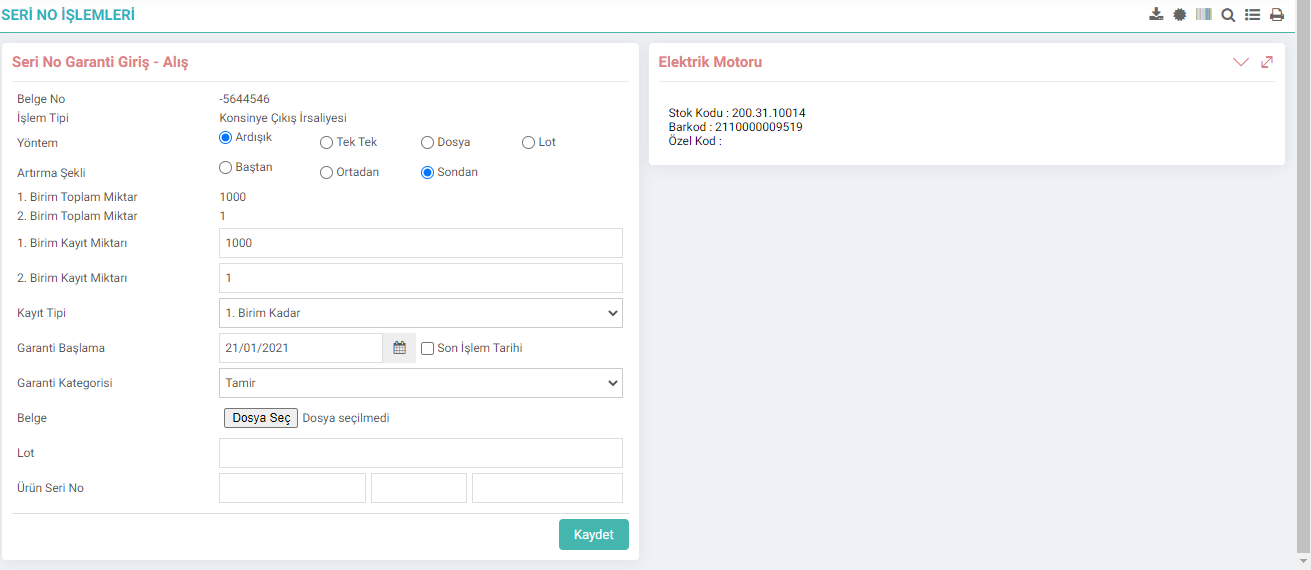
This screen contains the detailed information required to create the serial number. This information is explained below;
1-Document Number: From which process the product was registered to the system, the document number on this process
is displayed.
2-Transaction Type: From which process the product was registered to the system, this process information is displayed.
3-Method: For the serial number to be created. represents the method. There are 3 different options to choose from here.
- Sequential: If this option is selected, the serial number to be created will be increased sequentially.
- One by One: If this option is selected, a box will open at the bottom of the screen for you to enter the serial numbers manually.
- File: If If you select this option, you can automatically transfer a document containing your serial numbers to the program by clicking the "Browse" button on the right side of the document section below. In other words, it is used to record your serial numbers on a document.
4-Increment Method: This is the section where you will select where you want to increase the serial number that you will specify manually below. It is possible to increase the serial numbers from the beginning, middle and end.
5-Total Amount: It comes automatically, it shows how many records there are.
6-Record Amount: By default, it comes in the same number as the record quantity, you can specify this number for how many products you want to give serial numbers to. section.
7-Warranty Start Date: Indicates the warranty start date of the product.
8-Warranty Category: It is used to give the warranty category, the appropriate warranty amount is selected.
9-Document: As explained above, serial numbers will be taken when file is selected as the method. This is the section where the file is specified.
10-Lot: This is the field where you can give the lot number.
11-Product Serial Number: This is the field where you can specify the serial numbers in 3 levels. As explained above, depending on the increment method you choose, the values you enter here will be incremented from the beginning, middle or end.
After entering all the information, serial numbers will be created automatically when you click the “Save” button.

Serial numbers created in this field is displayed. You can update serial numbers. To do this, click in the relevant area, make the changes you want, and click somewhere other than the area you updated. The number will be updated.


?
4.3.2.3. Serviceberichte
Workcube führt mit dem Service- und Garantiemanagementmodul die Nachverfolgung von Produktgarantien sowie Service- und Supportanfragen von Kunden durch. Serviceberichte enthalten Seriennummern für die Produktverfolgung und Berichte über Servicetransaktionen zur Nachverfolgung des Kundendienstes.
2.2.7.25. Serienliste
Serienliste; Es wird verwendet, um die Seriennummern, die den Produkten in Transaktionen wie Produktionsergebnissen, Kauf-/Verkaufslieferscheinen, Wareneingängen, Servicetransaktionen usw. zugewiesen sind, kollektiv zu verfolgen.
2.2.2.1.15. Seriennummer und Chargenverfolgung
Die Chargennummer wird verwendet, um den Lebenszyklus eines Produkts in den Produktions-, Einkaufs-, Verkaufs- und Serviceprozessen zu verfolgen und zu überwachen, und die Seriennummer wird verwendet, um jedes Produkt eindeutig zu kennzeichnen.