Rounding Settings
The number of decimal places, i.e. rounding, can be adjusted in many areas on the Workcube. By adjusting rounding settings, you can tell the system to replace a number you enter with the nearest shorter, simpler number. Pages where rounding settings are made;
- Company Flow Parameters
- Basket Templates
- XML Settings
1-In cases where the basketball template does not exist and is not set in XML , the rounding settings are "Company Flow Parameters"
Path: Control Panel > System > General Settings > Company Flow Parameters
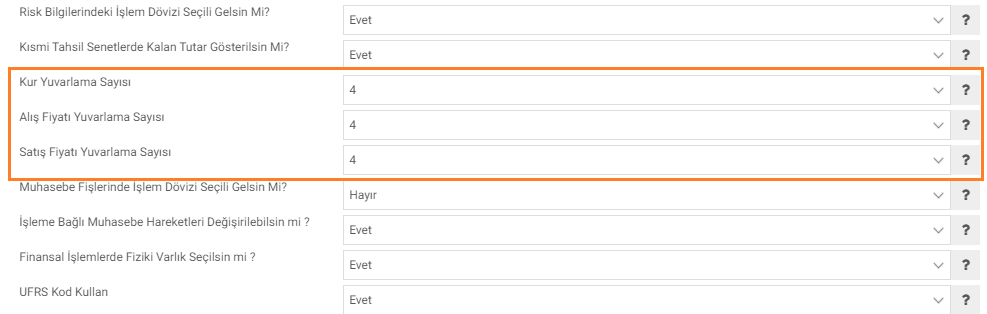
- Rate Rounding Number: This field is the decimal place where the rates will be displayed.
- Buying Price Rounding Number: This field specifies the number of decimal places that will appear in the buying prices.
- Selling Price Rounding Number: This field specifies the number of decimal places that will appear in the selling prices.
2- Rounding settings if there is a basket template on the page used. It is done within "Page Designer". For example; Purchase-Sales invoice etc.
Path: Control Panel > System > Page Designer > Basket Structure > General Information
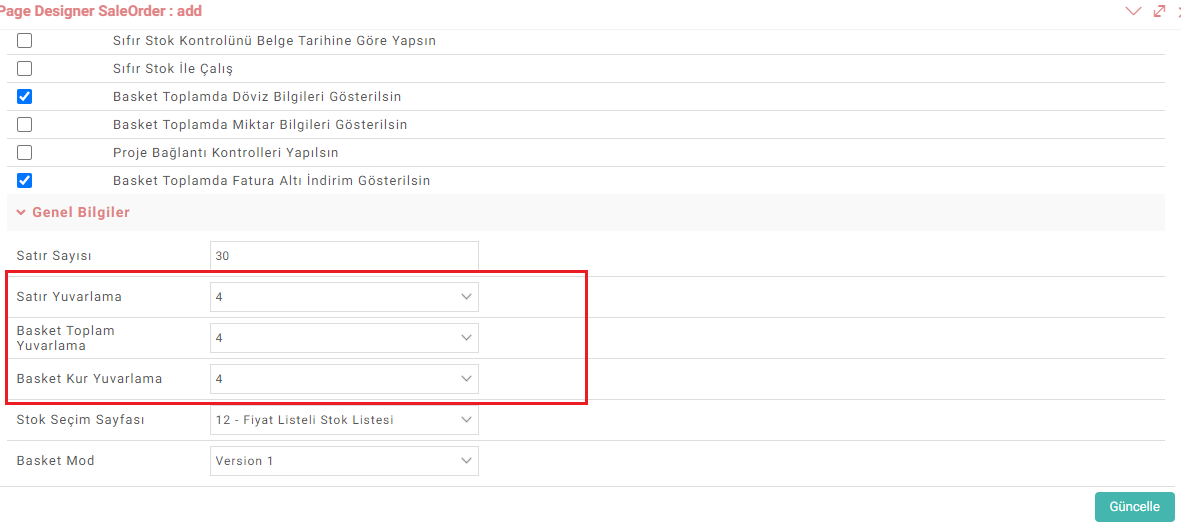
Hint: For the calculation to be accurate, the number of decimal places for line rounding and basket rounding must be the same.
3- On the Expense and Income Slips screens, rounding settings are set in XML .
Path: Control Panel > System > Page Settings > XML

- Rounding Number of Amounts in Rows: How many digits after the comma of the amounts in the rows will be displayed?
- Rounding Number of Amounts in the Grand Total Field: Determines how many digits after the comma of the calculated amounts in the grand total field will be displayed.