Meter Definition
Meters are devices that measure the used amount or mechanical effects of gas, electricity, water, etc. The counter can be defined during Subscriber Management in Workcube. For example; When you register a subscriber from whom you supply electricity to the system, you can define the meters from the Subscriber detail, and then follow these meters from the Meter Reading screen.
Before using the meters, you must introduce your Subscribers to the system and make the relevant settings. you should be.
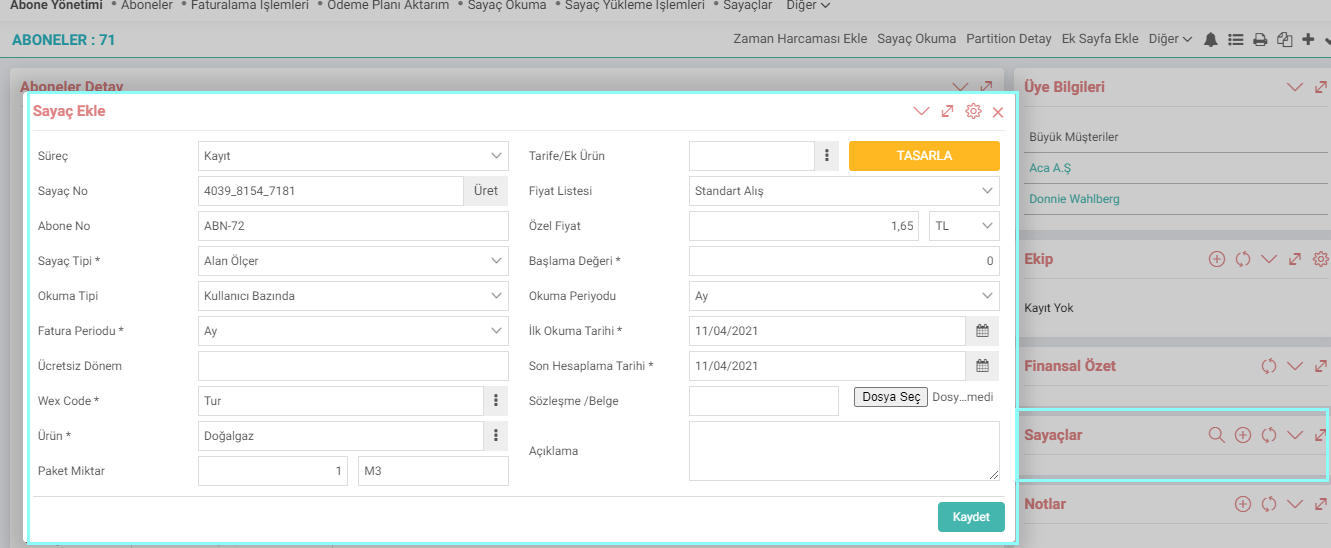
Process: You can determine at what stage the counter operation is from this field.
Counter Number: You can enter the counter number from this field. If you click on the "Generate" button, the system will automatically generate a counter number for you.
Subscriber Number: It comes automatically from the subscriber.
Counter Type: You can choose the counter type. You can define Counter Types from Control Panel > System > Parameters > Counter Types page.
Reading Type: It is divided into three as System Based, User Based and Transaction Based. You can make your selection according to the reading type of the meter.
Invoice Period: You must define the period in which the invoice was issued in this field.
Wex Code:WEX (Workcube Exchange); It is a secure data exchange layer that sends and receives data to third-party servers. For example; A GPRS modem was installed on an electricity meter, the meter was read every 10 days and sent to the meter in Workcube. You can buy that electricity with WEX.
Product: The product subject to the meter is selected.
Package Quantity: It depends on the unit of the selected product.
Tariff / Additional Product: The Design button will direct you to the Tariffs screen.
Price List: Price list is selected from this field.
Special Price: You can enter a special price.
Initial Value: The initial value at the time the meter is defined is entered.
Reading Period: The reading period of the meter is selected.
First Reading Date: The first reading date of the meter. The reading date is determined.
Last Calculation Date: The last date on which the meter is calculated is determined.
Contract/Document: You can add contracts and documents related to the meter to the system from here.
Description: You can enter a description.
After saving, you can enter the meter at the end of the line. Two icons appear, named "Install" and "Read". If you click on the upload icon, the "Meter Upload Procedures" popup opens. You can top up the meter from here.

If you click on the Read icon, the Meter Reading popup opens. In case of any problem with the meters, the Meter Reading System can instantly verify the last value received by comparing it with the current data. In this way, billing is done without error.
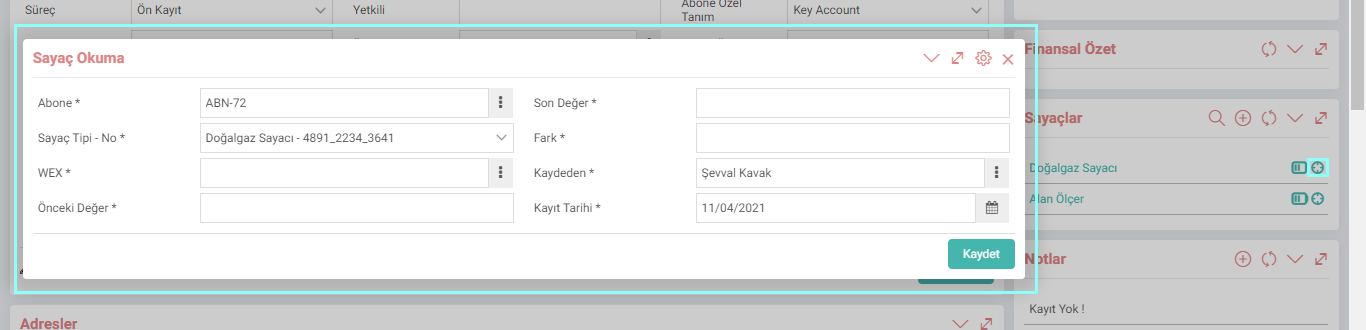
Rule sets are defined when adding a meter to a subscriber. For which product, at what intervals, what will be checked, in what periods will it be invoiced, etc.
The relationship of the meter with WEX in the system is selected. The rule set is defined. Then, checks are made according to the rule sets of the relevant meter by the WEX with which the relationship is established.
For example; When an e-invoice counter is created for a subscriber, the reading type transaction base is selected, the invoice period and reading period month is selected, and the start/end dates are entered, the WEX connected to the subscriber will increase the counter by +1 on a transaction basis each time this subscriber sends an e-invoice. When the period comes, it will calculate the total meter value and automatically create the invoice for the subscriber according to the billing period (month/year whatever is selected).