Chart
You can view and intervene in the schedule of your production orders, daily, weekly, monthly, and desired station, department and branch statuses between the dates you specify. With the help of the schedule, you can track your production in real time and give deadlines to your customers instantly.
Path: ERP > Production > Production Planning > Schedule
With the charts screens, the current status of the workstations, delays, overload and occupancy can be visually tracked, and if desired, work orders can be easily transferred to different stations by drag-and-drop method on the visual screens.
Scheduling opportunity suitable for branch, department and workstation structure
Viewing the working date ranges of the station according to the work schedule
Following and planning demand, production and orders collectively or individually
Analyzing production orders from different angles with the automatically generated scheduling page
Daily, 2-day, 3-day, weekly or monthly schedule display according to date ranges
Production order schedule tracking according to created work schedules
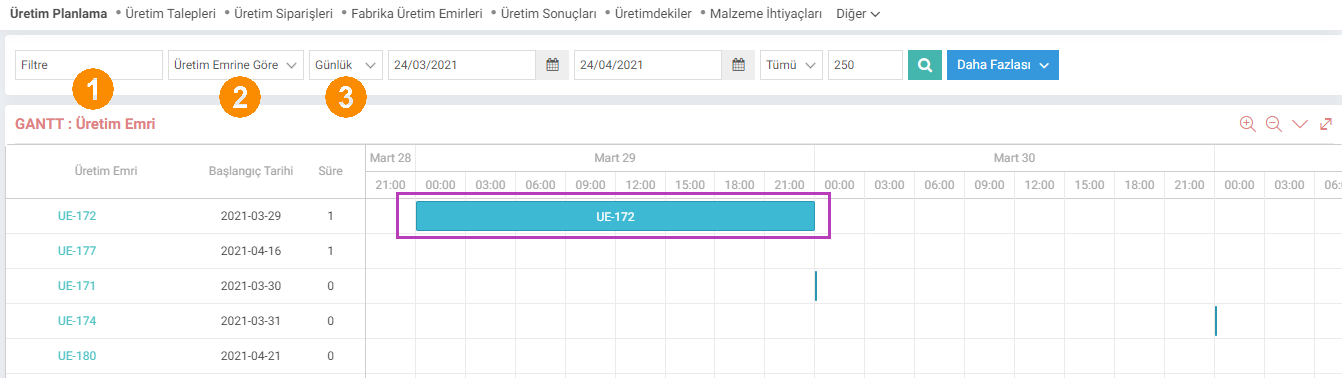
1-Search by filtering from the Filter field
2-The chart will appear according to the option selected here. Options; It is divided into 4 groups: By Production Order, By Order, By Product and By Station.
3-Display daily, weekly and monthly in the chart from this field.
Attention:On the chart screen, filtering options should be selected as branch > department > station > substations. A department cannot be selected without selecting a branch, a station cannot be selected without selecting a department, and a sub-station cannot be selected without selecting a station. As selections are made, relevant subunit options appear.
After determining the relevant dates, when you click on the "Search" icon, a chart will appear depending on your selections. You can access the details of the relevant production order by touching it in this chart;
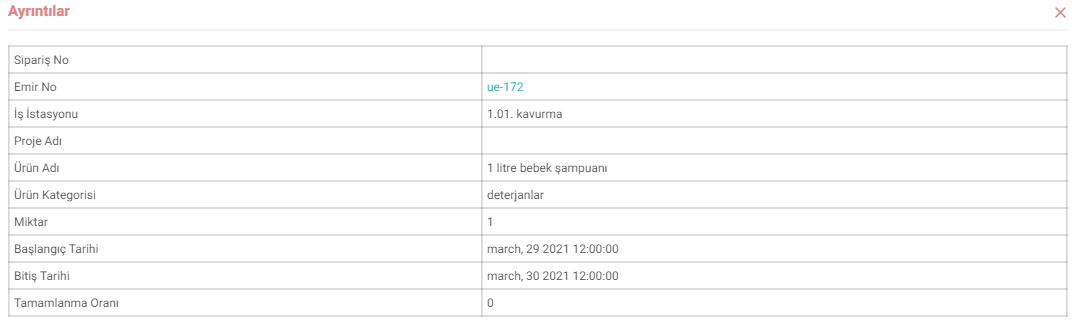
You can connect the production order to another production order with the round icon in the corners of the production orders, and you can increase or decrease the production time with the triangle icon next to them;

With its ease of use and flexible structure, the spreadsheet offers great convenience to production planning employees and allows them to make rapid changes with mouse movements.
Feedback
Production Planning
Production Planning Module is an integrated solution that reduces planning time and can easily respond to changes in the supply chain. It improves your company's speed of response to customer demands and offers decision support to planners.
2.3.2.3. Production Requests
In Workcube, you can create an unlimited number of requests by associating them with orders, stations, and products to produce the product or products you want and convert them into production orders.
2.3.2.4. Production Orders
The production process begins by transferring the product items determined to be produced in the sales order to the Production Orders function under the Production Planning module.
2.3.2.5. Production Orders
Production Orders can be thought of as definitive instructions given to production to produce the relevant material.