Digital Archive - TV
Workcube TV, which is a part of the digital archive, functions as a video storage medium. You can separate your videos according to document types and categories, and list them with different filtering options.
Path: Intranet > TV
Workcube TV is a function of the Digital Archive module. TV is essentially a storage tool that allows videos to be shared within the organization (intranet) or outside the organization (extranet). Videos can be separated according to their categories and document types.
Tip
Documents added to the digital archive are not added only by using the intranet module. If a document is added in the relevant form when recording a transfer, registering a product, or creating a personnel leave request, it will be displayed on the digital archive. You can view the screenshot of the added related document on the digital archive if it is a Word file or PDF file type. Again, digital archive documents of a product are not added only via the intranet.
Before You Begin
Parameters >
- Digital Asset Categories
- Content and Document Types must be defined.
Digital Archive - TV List
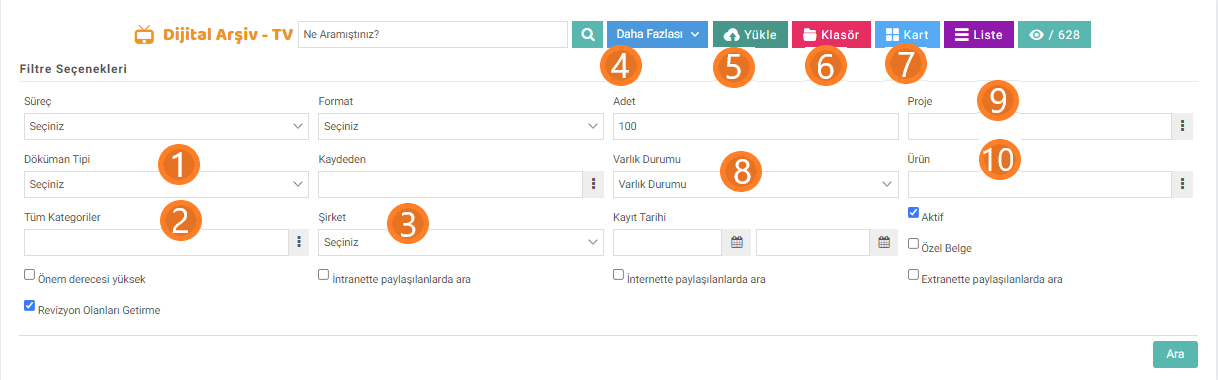
The images above are the filtering options used for the TV page. You can get an idea about the function of the page by examining these filtering options.
- Document Type: These are the document types used for digital archives. Document types must be defined through parameters. In digital archives, the same document types are used for images, audio recordings and videos.
- All Categories: Used to filter digital archive categories. It is defined through parameters.
- Company: Companies for which you are authorized are listed. Digital archive - TV recordings of companies for which you are not authorized cannot be listed or viewed.
- Quantity: The number of records to be listed on the page is determined.
- Upload: Used to upload any file to the digital archive. It will be discussed in detail later in the article.
- Folder: It is mainly used to view, add and organize digital archive categories. When you click on the folders, you can see which digital archive category occupies the file size on the server, in Kilobytes.
- Card: Allows the documents saved in the digital archive to be listed as cards.
- Asset Status: Asset Status is selected.
- Project: You can filter the video recordings associated with the project.
- Product: Document records related to the images added in the product details are listed.
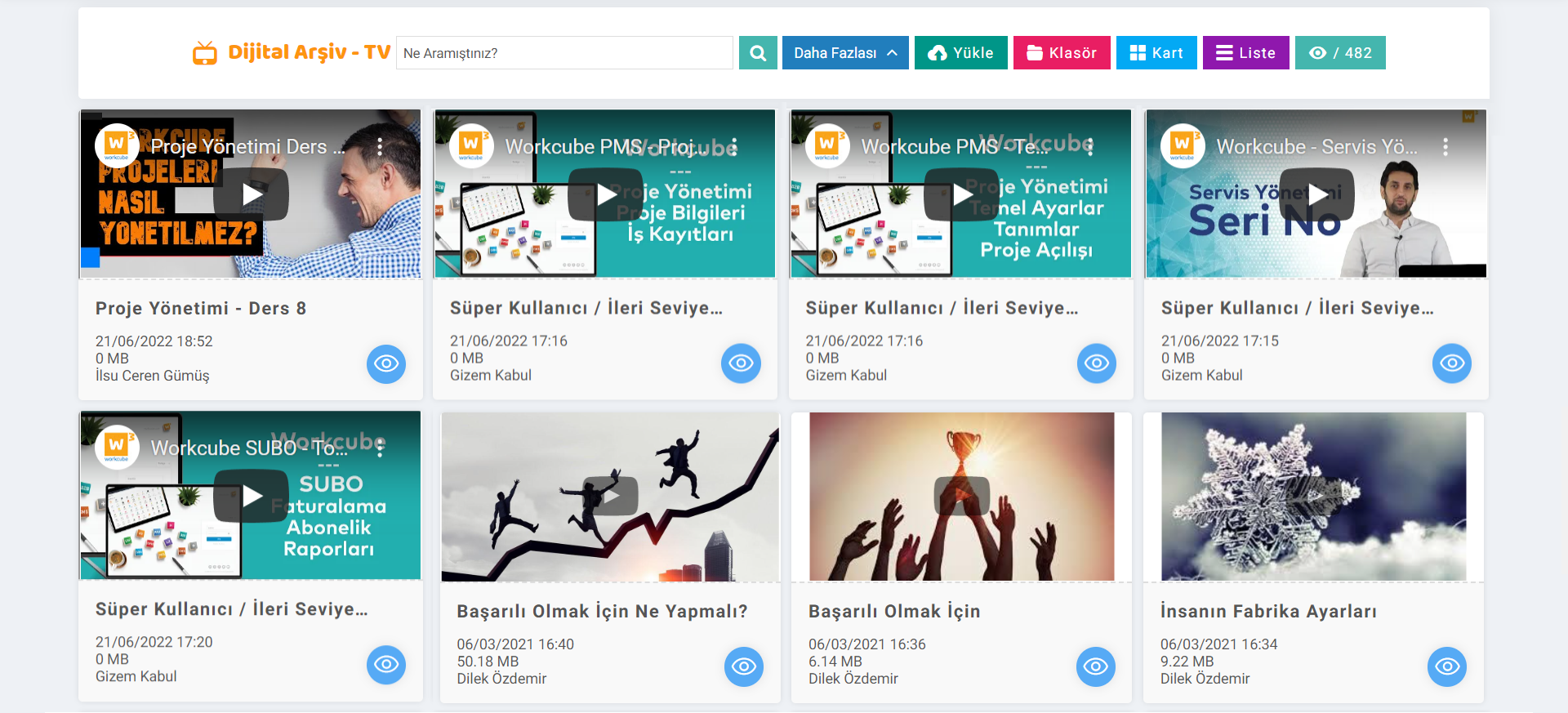
Documents recorded on the TV will be listed as follows.
Attention
Digital Archive - Documents can be created as files and by giving a link to TV. Youtube, Loom, Vimeo and etc. when adding a new document via "Upload". If a URL is given, the document is added to the TV with a referral link. Videos added via URL can also be watched on the listing page. At the same time, if a link is given via Url, it will be displayed with the thumbnail images seen on the video provider site via the given URL. is listed.
Upload
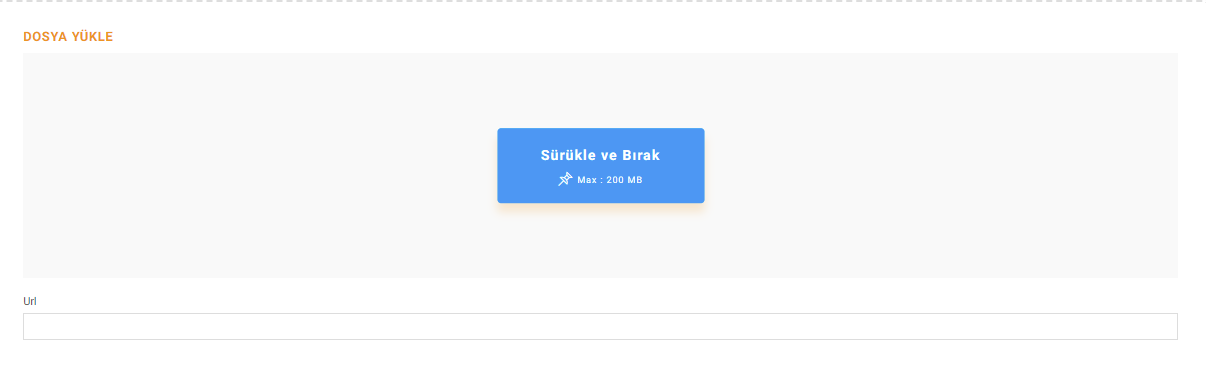
Documents on the upload screen by drag and drop method or by selecting the file directly. can be loaded. Youtube, Loom, Vimeo and etc. in the URL section. video link can be given. After adding the drag and drop wait, the "Add Image" option becomes active. The added image is used as the Thumbnail of the relevant document.
Tip
You can determine the maximum size of the files of the documents added to the Digital Archive on the system.

File in General Settings > Company Flow Parameters. Check Size?" With the option, the maximum file size can be specified in MegaBytes.
Detailing Document Access Permissions

Feedback
الأرشيف الرقمي
باستخدام تطبيق الأرشيف الرقمي داخل Workcube Intranet، يمكنك الوصول إلى جميع معلومات الشركة ومستنداتها ومقاطع الفيديو والصور وما إلى ذلك. ويتم تخزين جميع المحتويات رقميًا وفرزها وتسليمها مركزيًا للمستخدمين حول العالم. باستخدام الأرشيف الرقمي، يتم عرض أصولك الرقمية على منصة مشاركة وتخزين آمنة داخل Workcube.
الإنترانت
بغض النظر عن حجم الشركة، فمن خلال تطبيق Workcube للشبكة الداخلية، يمكن للموظفين متابعة رؤية الشركة عبر الإنترنت على نفس المنصة، وإجراء المعاملات ومساعدتها في اكتساب هوية اجتماعية ببنيتها المشتركة.