Correspondence
With the Workcube Correspondence screen, correspondence such as information and evaluation is carried out with company employees, corporate members and individual members.
Path: Intranet > MyPortal > Contact > Correspondence
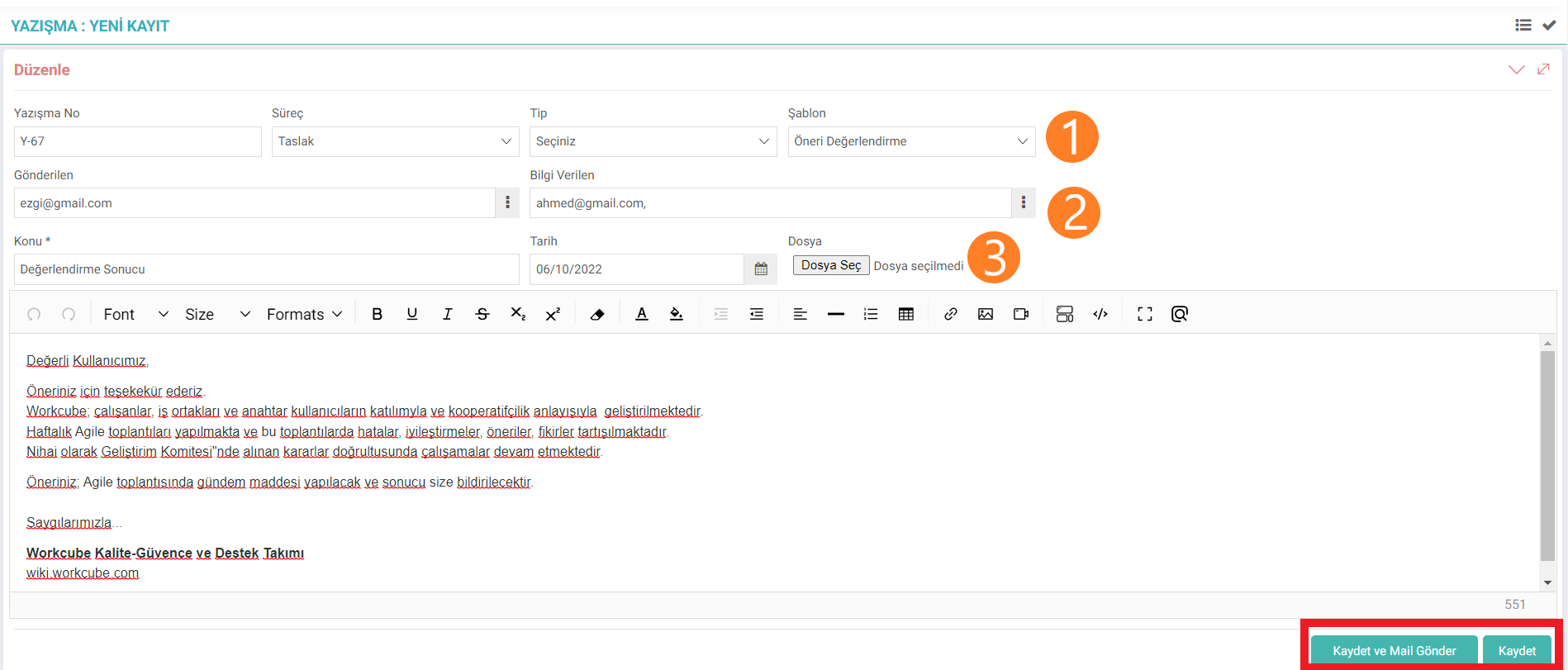
- The correspondence number is written for the correspondence. The process of correspondence is determined. Note: Process definitions are added via Control Panel > BPM >Processes. A selection is made from the templates prepared for correspondence. Attention: New templates are added via Intranet > MyPortal > Contact > Correspondence Templates.
- Yconversation screen works like e-mail. Email addresses added to people's address information are selected. You can read our "Address Book" document for the answer to the question of how to create address information.
- Subject is a mandatory field. If you want to add documents or photos for correspondence, they can be added with the "Select File" icon. Instead of ready-made templates for correspondence, the user can edit the content of the correspondence from here.
The process of the correspondence can also be saved as a draft. After approval, correspondence can be sent.
You can go to the listing screen with the listing icon on the top right.
Correspondence List Screen
Correspondence is filtered according to active - passive, templates and processes. can be listed.

is_show_document_no Belge no Gösterilsin
show_all_cor_position_id Tüm Yazışmaları Görecek Pozisyon ID'leri
Feedback
Intranet Parameters
You can work more effectively by defining parameters related to the screens via the intranet. Parametric definitions of the Agenda, My Information, Forum, Contact and Literature screens are made in detail on these pages.
Incoming and Outgoing Document and Cargo Transactions
Workcube groups your company's cargo and documents and saves them with the Incoming, Outgoing Documents and Cargo Transactions screen.
Address Book
With the Workcube Address Book screen, the address information of company employees, individual members and corporate members is recorded in the system.
My Portal
The My Portal business family falls under Intranet. Information on the intranet is managed and transactions are carried out through the modules under this job family.
Projects and Correspondence
Collective correspondence can be made to the project leader, sponsor or project team in the project details. Other than the correspondent, TO, CC, correspondence cannot be seen by anyone other than the project leader and the position code given in the XML settings.