Intranet Parameters
You can work more effectively by defining parameters related to the screens via Intranet. Parametric definitions of the Agenda, My Information, Forum, Contact and Literature screens are made in detail on these pages.
Path:Control Panel > System > Parameters > Intranet
The unique functioning of the businesses is also made on the Agenda, My Information, Forum, Contact and Literature screens. In order to implement it, parametric definitions for these screens must be made correctly.
Attention: Parametric definitions must be made by Workcube experts. Parametric definitions made by users who do not know the functioning and domains of the pages may have negative consequences.
Intranet parameters consist of Agenda, My Information, Forum, Contact and Literature sections.
Agenda
Agenda module is designed to increase employee productivity and ensure order during working hours. For detailed information about the module, you can take a look at the "Agenda" document.
There are two parameters in the Agenda module.
Agenda Definitions
The parameters entered in this field determine the sections that will automatically appear on the screen whenever an event is added to the agenda. It is useful for situations where the same event entries are made frequently. No matter how the agenda definitions are made, arrangements can be made in different ways during the event entry.
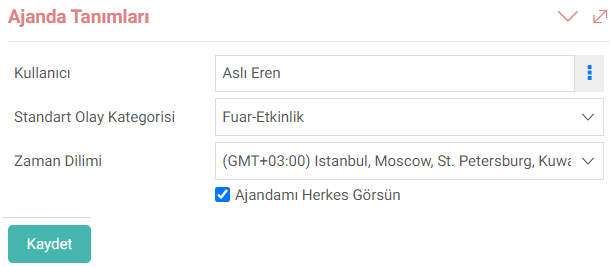
For example; If the agenda definitions are filled as above, the relevant user is "Aslı Eren", the standard event category is "Fair-Event" and the time period is entered in the event entry. It is selected as (GMT+03:00).
Event Category
Categories of events to be added to the agenda are created from this screen.

My Information
My Information, users' CV, position, team, time spent. It is a quick access area where you can view information such as and carry out HR transactions. It can be accessed by clicking on the username at the top right on each screen.
There is a parameter definition for this field.
Time Spending Categories
The categories that must be selected when making time expenditure entries to the system are defined on the Time Spending Categories Screen. It is designed to make time expenditure records more organized and understandable.

Note: For detailed information on the subject, see the "Time Management" document. You can review it.
Forum
Forum module is an environment where users share the questions in their minds and exchange ideas. For detailed information about the module, you can review the "Forum" document.
There is one parameter definition in this module.
Forbidden Words
This parameter ensures that unwanted words are prohibited. In this way, a more respectful and safe working environment is created.

Communication
The communication module covers e-mail and other forms of communication in the system.
Two parameters are defined in the communication module. is available.
Mail List Categories
Whatever the common subject title of the e-mails sent through the system is provided by this parameter.

Correspondence Templates
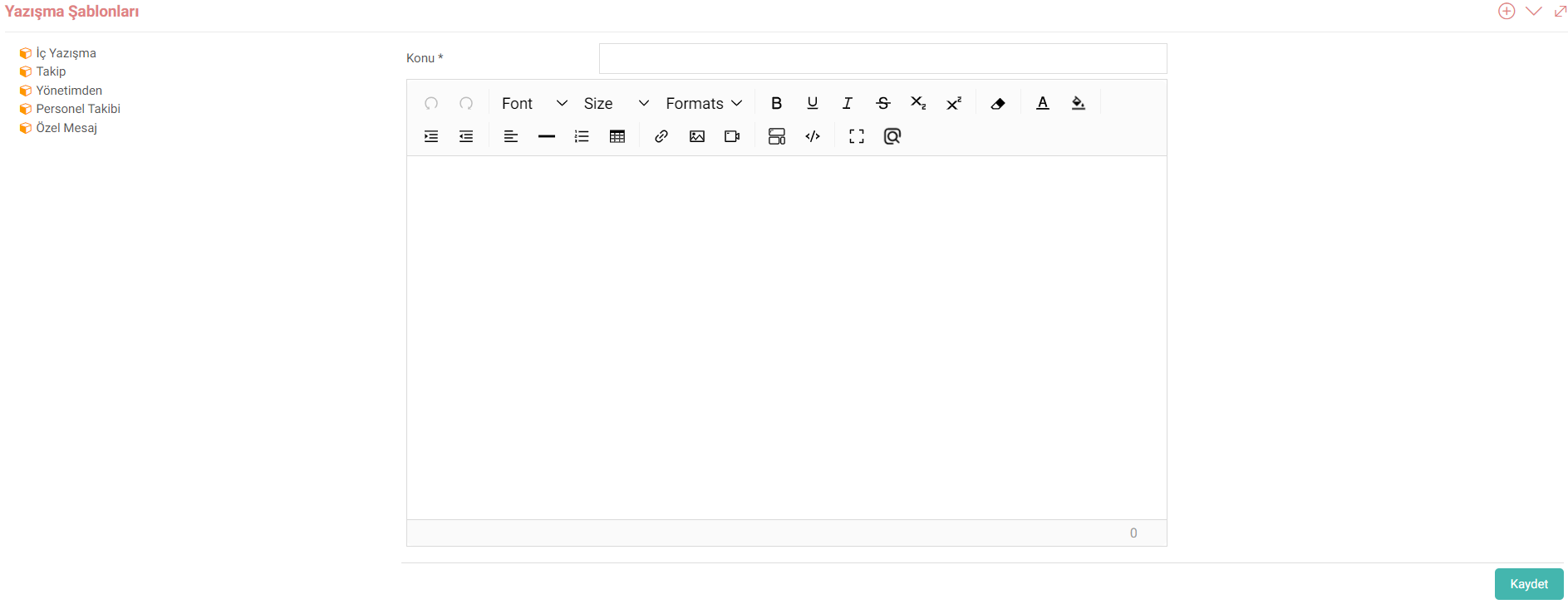
Correspondence Templates are screens that enable standard texts, especially those related to repetitive tasks, to be turned into templates. In this way, users can work much faster by selecting the relevant template during tasks such as sending e-mails.
Note: For detailed information on the subject, see the "Correspondence" document. You can review it.
Literature
The Literature module collects your content and library under its own structure.
Note: For detailed information about the module, see the "Literature" document. You can review it.
There is one parametric definition in this module.
Library Categories
By creating categories for the books in your library from this screen, you can access the books faster and organize them in your library.

Note:For detailed information about the page, you can review the "Library" document.
Feedback
Correspondence
With the Workcube Correspondence screen, correspondence such as information and evaluation can be made with company employees, corporate members and individual members.
14.7. Parameters
Parameters are one of the main features of Workcube. The definition options on the pages can be increased with parameters. Thus, definitions can be made in accordance with the sector in which the company operates.
agenda
Using a calendar is of great importance as it increases the level of productivity. Agendas, which are ideal for periodic planning, can also be used for many other purposes.
Forum
Forum application; It enables you to create a strong collaboration by bringing together employees, users and customers. In the forum section, discussion topics are created for current business or project ideas. Information flow is ensured by posting questions and answers on the subject in the forum. By creating a forum, the quality of work or projects is increased.
Literature
The Literatür application, located within the Intranet, which we can define as a private network or private web within the company that provides communication and communication, enables you to reveal the company culture and values and to convey the priorities and company policies to your employees, partners and customers quickly and effectively.