WAI (Workcube Artificial Intelligence)
AI, Artificial intelligence, are systems that enable machines to perform human-like tasks, learn from experience, and adapt to new inputs. Workcube AI (WAI) works integrated with Google Gemini.
Path: Control Panel > System > General Settings > WAI Settings
WAI Settings
When WAI General Settings are made, WAI works in accordance with these settings. If personalization is made via the brain icon in the WAI detail, the personalized settings are used. If no update is made on personalization, General Settings will work.
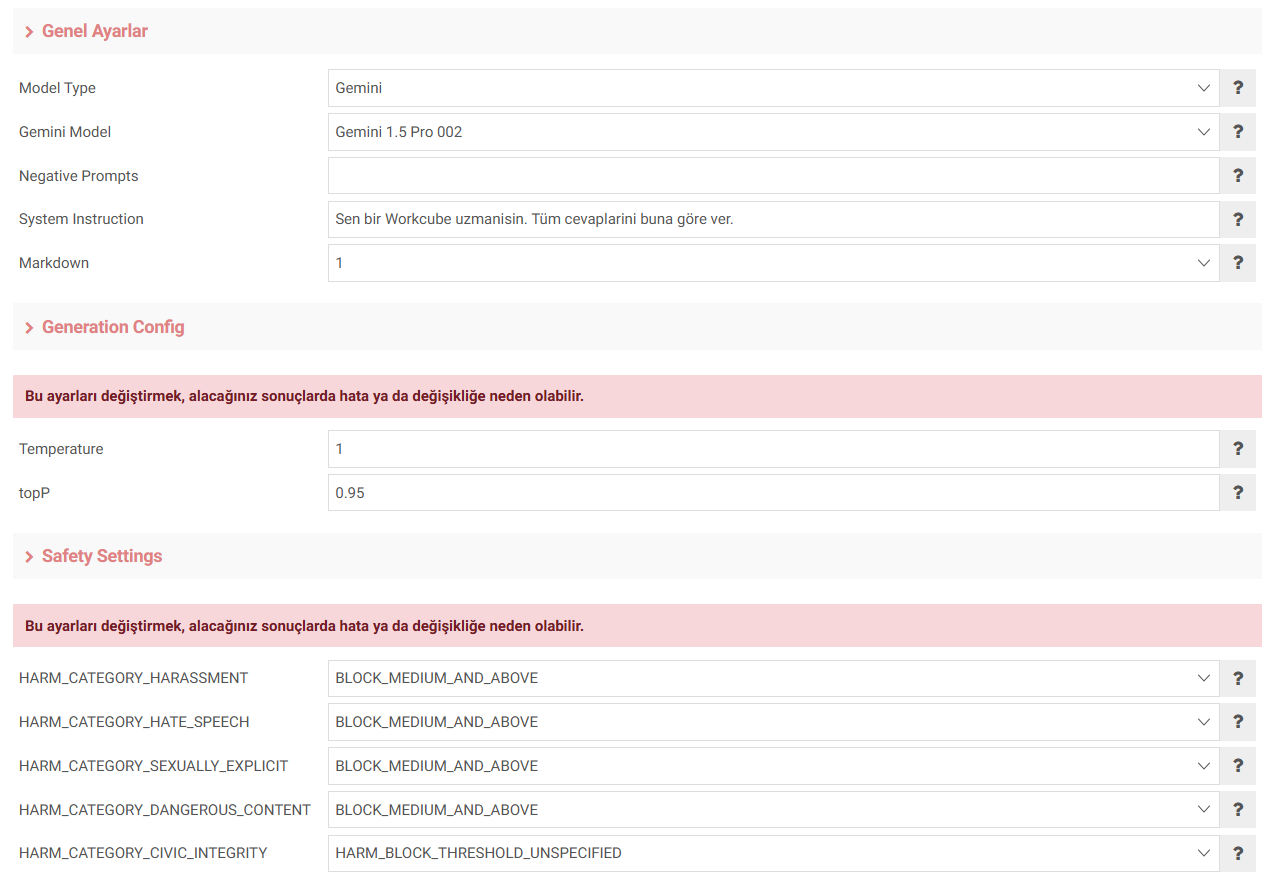
General Settings
- Model Type: Select which AI tool to use
- Gemini Model: The Gemini model to be used for WAI select
- Negative Prompts: Write words that you do not want to be used in the results (case sensitive) separated by commas.
- System Instruction: WAI expert knowledge For example; You are a Workcube expert.
- Markdown: Determines whether the results will be returned formatted. That is, whether it will be titled and itemized.
Generation Config
- Temperature: Controls whether the output is random or not.
- topP: Maximum cumulative tokens to be taken into account during sampling. possibility.
Safety Settings
- HARM_CATEGORY_HARASSMENT: Harassment content
- HARM_CATEGORY_HATE_SPEECH: Hate speech and content
- HARM_CATEGORY_SEXUALLY_EXPLICIT: Obscene content.
- HARM_CATEGORY_DANGEROUS_CONTENT: Dangerous content
- HARM_CATEGORY_CIVIC_INTEGRITY: Could be used to harm civil integrity contents
Feedback
1.25.2. How to Use WAI?
AI, or artificial intelligence, are systems that enable machines to perform human-like tasks, learn from experience, and adapt to new inputs. Workcube AI (WAI) works integrated with Google Gemini Ultra.
WAI (Workcube Artificial Intelligence)
AI, or artificial intelligence, are systems that enable machines to perform human-like tasks, learn from experience, and adapt to new inputs. Workcube AI (WAI) works integrated with Google Gemini Ultra.