Assignments
Assignment, case study, action project, etc. These are practical tasks given to measure the competencies, problem-solving skills and work disciplines of employees or job applicants.
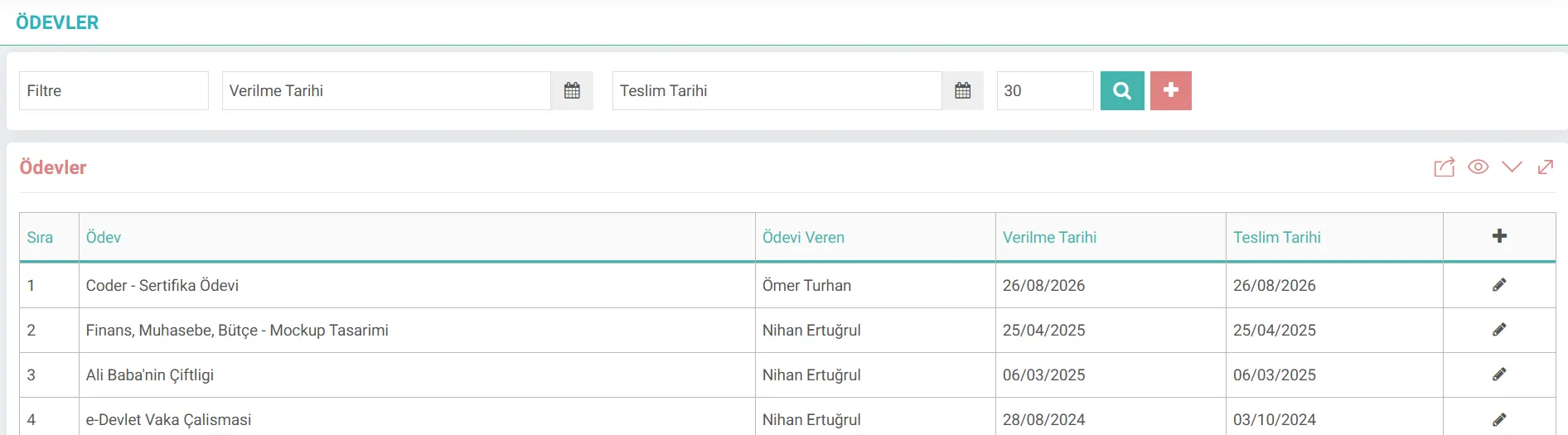
What is Workcube Assignment Management?
It is a business object at the heart of the LMS module, ensuring that training processes are reinforced not only with theoretical explanations but also with practical applications. It allows instructors (employees, partners or external consultants) to define specific assignments and projects for training classes, set due dates and upload relevant documents.
It has a highly integrated architecture in the Workcube ecosystem. It works fully integrated with the CRM portal, where HR, business partners and dealers are trained, and the Digital Archive, where source files are securely stored.
The Importance of Training Assignment Management for a Business
Measuring the effectiveness of training activities and tracking the development of staff/participants with concrete data is critical for corporate success. In this regard, the main benefits of the system to the business are as follows:
- Training Effectiveness Measurement: The success rate and knowledge level of the training are measured with concrete criteria (scoring and delivery quality) through the assignments assigned to the participants.
- Time and Process Discipline: With deadline management, the time management skills of the participants are monitored and the delay of the projects is monitored.
- Wide Instructor Ecosystem Support: The authority assigning assignments is not only an internal employee; Being defined as a partner (dealer/business partner) or external consultant makes the management of corporate academies flexible.
- Information Storage: Assignment instructions and source documents are stored directly in the system, preventing information loss and ensuring full compliance with ISO training standards.
Assignment Management Life Cycle and Process Flow
From the creation of an assignment in the training process to The process flow until completion follows these steps:
Stage | Module / Screen | Transaction / Document | Description |
|---|---|---|---|
1. Description | LMS / Adding an Assignment | Creating an Assignment | The instructor enters the assignment title, details and deadline into the system. |
2. Assignment Association | LMS / Class Operations | Class Assignment Mapping | The created assignment is associated with an active training class, course, or curriculum. |
3. Notification and Distribution | LMS / Participant Portal | E-mail & Notification Delivery | Automatic assignment assignment notification is sent to the participants in the class with the information of the instructor who assigned the assignment. |
4. Tracking & Search | LMS / Assignment List | Filtering & Tracking | Coordinators filter and check assignments based on due dates and keywords. |
5. Revision & Deletion | LMS / Assignment Update | Update / Deletion | When necessary, the delivery date is extended, the assignment content is updated or completely deleted. is terminated. |
What Should Be Considered When Managing Homework Procedures?
A. Choosing the Person Giving the Assignment
The role of the instructor giving the assignment in the system (Employee, Business Partner, Consultant) should be determined very carefully. If the instructor is an external consultant, a corporate/individual account must be selected.
B. Delivery Date and Timeframe Rules
The delivery date should not be set to a day after the end date of the training class. Otherwise, technical disruptions may occur in the assignment submission processes for classes that have become inactive in the system or archived.
C. Attached File and Document Security
Documents to be added to the assignment instructions are uploaded to the system via direct file upload method. In order to protect server security and performance, files with executable (.exe, .bat, etc.) extensions should be blocked and documents should be compressed and uploaded in PDF or ZIP format.
D. Performing Mandatory Field Checks
Assignment title, assignment details and deadline are fields that cannot be left blank. In order not to exceed the functions, it must be ensured that all values are correct before submitting an assignment
Assignment Functions and Screen Architecture
The technical and operational equivalents of the data on the assignment creation and editing screens in the system are in the table below. detailed:
Screen Area | Sample Data Examined | Function and Importance in the System |
|---|---|---|
Assignment Title | Coder - Certificate Assignment | The short and clear name of the assignment that will appear system-wide, in lists and calendars. |
Assignment Details | Text prepared with FCK editor | It is an HTML rich content area where the scope of the assignment, scoring criteria and expectations are explained. |
Delivery Date | 25/12/2027 | Determines the date by which the assignment should be uploaded to the system at the latest. It is the key parameter for latency tracking. |
Assigner | Ömer Turhan | This is the field where the instructor who will evaluate the assignment is selected. (Employee, Corporate, Individual Account) |
Attached Document | case_study | Template, case study, or guide for participants to review to complete the assignment |