Product XML Settings
Product management module is the module where information records are kept and managed for the final products and/or services sold within a business and the inputs supplied such as finished products, semi-finished products, spare parts, raw materials and services. Module Sales, purchasing, production, stock, agreement, service, campaign etc. It works directly integrated with other Workcube modules.
XML Settings determines page-specific working rules.
On the product screen, you can access the Setup

1 - Show All Barcodes
If Yes is selected, all barcodes along with the sub-stocks belonging to the product will be shown.
2 - Should Price Lists Be Received According to Position Type?
If Yes is selected, the price depending on the authorized position type in the price list filter. lists appear.
3-Fields to Search in Product Filtering
Specified numbers come as default in the search filter.
1.Product Name, 2.Barcode Number, 3.Special Code, 4.Product Description, 5.Manufacturer Code, 6.User-Friendly Url, 7.Product Code, 8.Product Detail, 9.Member Stock Code, 10.Member Product Name
4 - Show Extra Detail Area
Provides filtering through product properties by enabling the Product Properties button.
Product Addition and Detail XML Setup
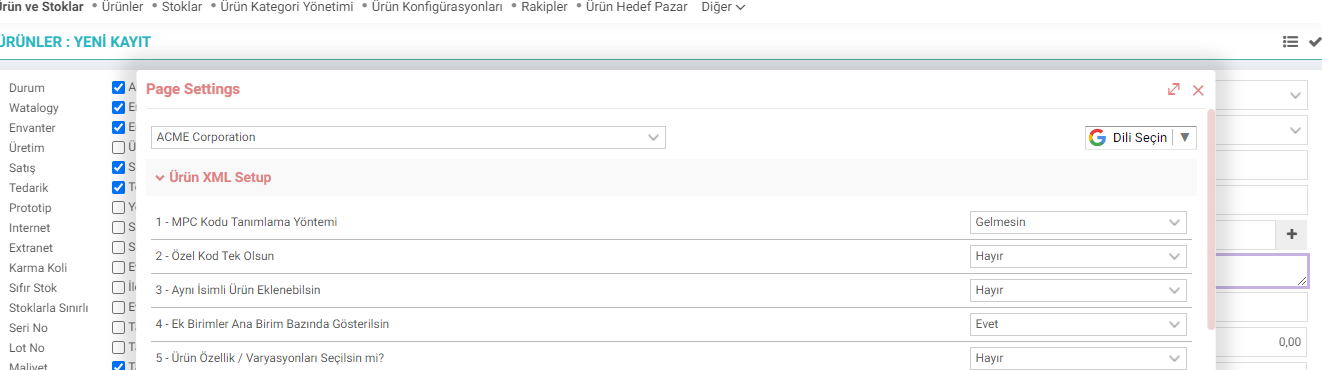
1 - MPC Code Definition Method
MPC code consists of Product Features.
If popup is selected, a popup opens in the special code field and the user determines the special code himself.
If Detail is selected, after the product features are defined, it creates the MPC code in the product detail according to these features and assigns it to the special code.
2 - Only One Special Code
The same special code cannot be used for another product.
3 - A Product with the Same Name Can Be Added.
You must select yes to add more than one product with the same name.
4 - Additional Units Based on Main Unit Show
If Yes is selected, additional units defined in the Units field in the product detail will be shown on the basis of the main unit.
5 - Select Product Features / Variations?
If Yes is selected, product features appear.
6 - Should the Model be Selected Depending on the Brand?
If No is selected, all models will appear in the model selection. If yes, models of the selected brand will appear.
7 - Should Automatic Barcode Creation work in EAN8 format?
EAN (European Article Number) is a barcode standard widely used in Europe and Türkiye.
EAN 8: It is the code given specifically to the products and consists of 8-digit numerical information.
8 - Can the same barcode number be given to different products?
If yes, the same barcode number can be given to more than one product.
9 - Should the Production Option Depend on the Product Tree?
If yes, if the product has a tree, the production box will be redonly. In this way, the spec/non-spec transaction of a produced product is prevented by removing the "produced later" box.
10 - Should the Spec Name be Updated?
If the product is not customizable, when the product name is updated, it also updates the spec name.
11 - Show Special Consumption Tax.
If No is selected, the SCT Type field will not appear.
12 - Should the Special Communication Tax be displayed?
If No is selected, the OIV field will not be displayed.
13 - Should the Bank Insurance Transaction Tax be displayed?
If No is selected BSMV field does not come.
Feedback
2.2.2.1.21. Products Listing
This is the screen that lists all products registered in the system by filtering them in the desired ways.
2.2.2.1.9. Basic Product Descriptions
The product management module is the module in which information records are kept and managed for the final products and/or services sold within a business and the inputs supplied such as finished products, semi-finished products, spare parts, raw materials and services. Module Sales, purchasing, production, stock, agreement, service, campaign etc. It works directly integrated with other Workcube modules.
Products and Stocks
Managing products in Workcube is much more than stock codes or stock cards. Workcube, product hierarchy, images, contents, type, qualities, pricing, variations, cost, shelf life, warranty, production processes, etc. It allows you to manage all kinds of detailed data about your products and services together and centrally.
2.2.2.1.1. Product Parametric Definitions
The Product Management module is the module in which information records are kept and managed for the final products and/or services sold within a business and the inputs supplied such as finished products, semi-finished products, spare parts, raw materials and services.
Recruitment
It is the module where recruitment and hiring processes are managed. In the Recruitment module, notes, evaluations, correspondence and documents related to each application are managed from a single center.