Subscriber Parametric Definitions
The subscription system offers all the components you need to effectively manage subscription agreements, subscriber information, billing of your subscription-based services and products, and all processes from shipping to support services.
Before using the subscription module, Create all parametric definitions to be used within the company regarding Subscription in the Control Panel > System > Parameters > SUBO
Defining Subscriber Categories
Companies may want to keep track of their subscribers by dividing them into different categories. For example, an electricity distribution company can divide its subscribers into different categories such as corporate subscribers, individual subscribers, and factories.
A certain product can be associated with the Subscriber Category. Companies may want to categorize their subscribers according to the product they are associated with. For example, if a Milk Processing Facility wants to categorize its subscribers as “Daily Milk Subscribers”, it can add daily milk to the Product field.

Subscriber Cancellation Categories
With this parameter, you can add categories related to subscription cancellation and edit the categories.

Note: The defined cancellation categories are selected when canceling the subscription from the Subscriber Detail > Other > System Cancellation page in case of membership cancellation.
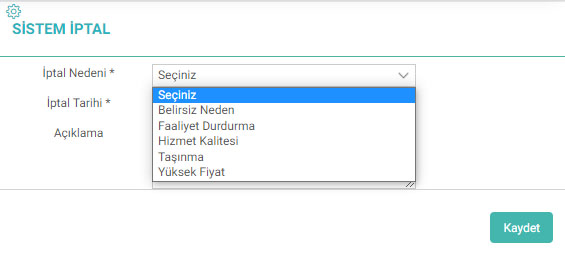
Subscriber Special Definition
With this parameter, you can add subscriber special definitions suitable for your business. These definitions are selected on the subscriber addition and update pages.

Subscriber Reference Status
You can add subscriber reference status with this parameter. In this way, you can filter out subscribers who come by reference and those who come directly. These definitions are selected on the subscriber addition and update pages.

Service Special Definition
You can add a special definition on any subject in accordance with your operation with the Service Special Definition parameter. For example; If you want to add a customer definition when registering for the service, you can add a custom definition from this field.

Member Relationship Types
You can define the relationship type with this parameter. These definitions are used in the "Subscriber Relationship" section on the Subscriber Detail page when associating a subscriber with another subscriber.

Additional Information
Additional information can be defined from this parameter. The additional information area is used when there is a need for space other than the definitions on the pages.
Additional information definitions are made on a page-by-page basis. By selecting the page to be used, the desired fields are created for this page. In these definitions, the name of the field, its mandatory status, and its type (Selectbox, text, etc.) are specified. Data can be entered into the defined additional information field via the additional information button on the page or through the "Additional Information" icon in the page update.

Type: Control Panel to use the additional information field. > System > General Settings > Company Flow Parameters page, click "Should I get additional information object?" box must be selected.
Meter Types
If you are going to do meter integration and meter-based subscription billing, you can categorize your meters. For example, an electricity distribution company may classify its meters as three-phase four-wire (three-element) meters and three-phase three-wire meters.
