Call Center Parametric Definitions
Workcube allows Call Center employees to quickly access customer, service, warranty and support accounts, etc. It offers a special interface that allows users to access information, save sales opportunities, take orders, answer questions and problems, record errors/problems, and develop cross and vertical sales.
Attention: Before using the Call Center, under the Service-Warranty heading in the Control Panel > System > Parameters > CRM, all parametric information to be used within the company regarding the Call Center is provided. definitions need to be made.

Interaction Categories
You need to define an Interaction Category when recording an interaction on the CRM > Sales and Marketing > Sales Opportunities > Interactions page. With this parameter you can determine what your interactions will be about. For example; If you want to get information about the content of a product, you can select the category as "Information Request" when opening the interaction and fill in the remaining fields accordingly.

You can add, update or delete the definition with the help of the icons at the end of the line.
Complaint When registering an application on the Categories
CRM > Service-Garanti > Call Center > Call Center Applications page, a selection is made between the categories defined here. These categories not only make it easier for the customer to submit an application, but also make it easier for the business to understand and solve the application and save time. You can define complaint categories appropriate to your business.

For example; The customer will choose a complaint category when opening an application in the Call Center due to an error in the product he/she purchased. If "Product Error" is defined from this parameter, the customer will be able to select the category appropriately.

Complaint Sub-Categories
You can detail the process by opening subcategories to the complaint categories you have previously defined.
When determining subcategories, you should associate them with the Parent Category.

For example; If the customer submits an application as a product error and this error is caused by the packaging of the product, he/she should be able to select a related category as a subcategory. Likewise, if the product failure is caused by the malfunction of the product, a subcategory such as "Defective Product" can be selected.
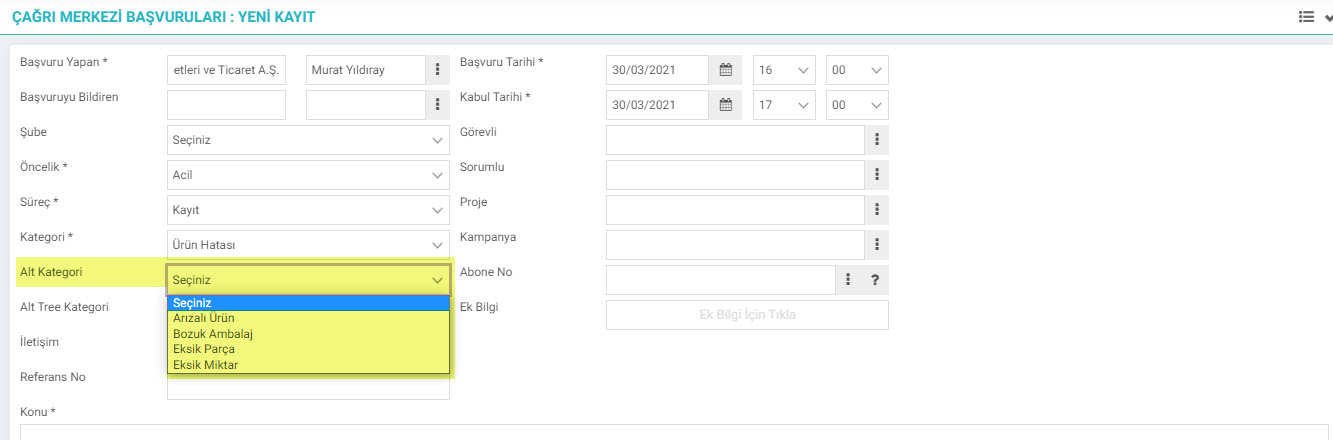
Complaint Sub-Tree Categories
Complaint Sub-Tree Categories are the sub-tree of Complaint sub-categories. Detailed categorization of the complaint is made in this area. You can perform your action by selecting the parent category of the complaint.

For example; If the customer is applying because the cover of the product is broken, he can select the subcategory of the application opened with the category "Product Defect" as "Defective" and then select the option "Cover Broken" from the sub-tree category.

Priority Categories
With the help of this parameter, the priority of the incoming call is determined and the resolution speed is controlled accordingly.

Communication Method
With the help of this parameter, you can define communication methods suitable for your business. In this way, the method of communication with the customer is determined.
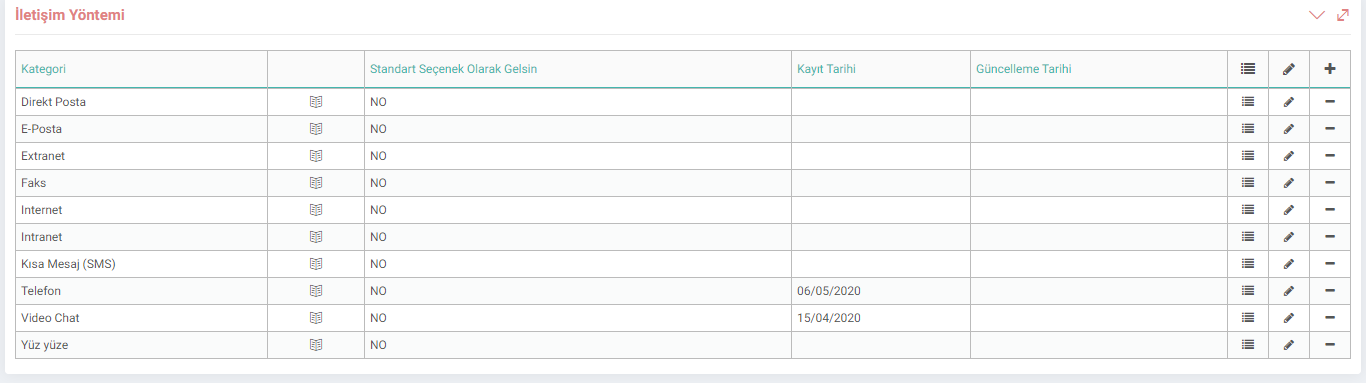
Document-Form Templates
By designing Document-Form Templates, automatic responses can be created for feedback on interactions and applications.

Workflow Design (Processes)
Stages regulating the document flow where logical workflow constructs such as approval, rejection, partial approval, control, warning can be added by different users or departments while a transaction is being performed. must be created.

Product Return Categories
Parameter settings for product returns can be viewed from this screen.

Product Return Rejection Categories
Parameter settings for the rejection reasons for product returns are on this screen. can be done.
