Contact Search
Customer/Member module functions are used to register potential customers and suppliers with which an institution wants to have a relationship, to recognize interlocutors, and to track all relationships and communications with customers and suppliers.
These contacts saved in the system can be searched on the "Contact Search" page;
PATH: CRM > Service-Garanti > Call Center > Contact Search

You can filter in the field at the top of the page. Members are listed according to their active-passive status, address, telephone, name and surname, etc. You can filter by information. If you click on the "Search" button without making any selection, all contacts will appear.
At the bottom of the page, members are listed depending on your search selection. Members; Name-Surname, Position, Company, Member Category, City, Phone, Mobile Phone, Member Type, Tax Number, E-Mail and Status fields are listed together.
If there is no record when searching by entering the customer name, the system will give a "No Record" warning. In this case, the "Save as Corporate Member" and "Save as Individual Member" options will appear to enable you to save the relevant customer.
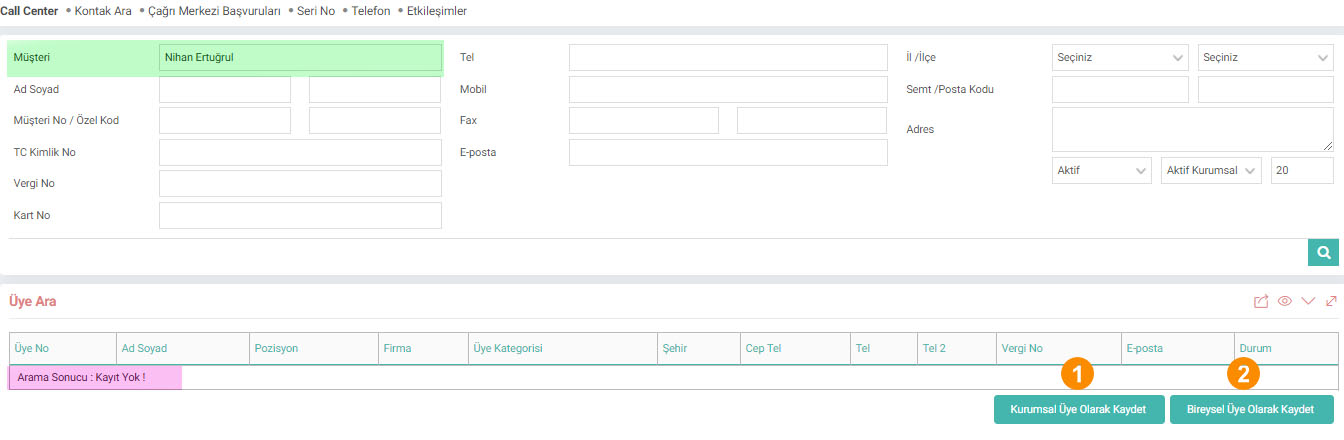
1-Save as Corporate Member: When you click on this button, the system will direct you to the Corporate Account registration screen. The information you enter in the filtering field (EX: Customer Name) will be filled automatically.
2-Save as an Individual Member: When you click on this button, the system will direct you to the Individual Account registration screen.
Contact Search Page
If Yes is selected, the card number field appears in the filter field and allows filtering according to this field.
is_company Firma
xml_customer_card_filter Kart No'ya Göre Filtre Yapılsın
Feedback
Call Center
Call Centers are interaction centers consisting of software, hardware, human resources and workflows through which institutions communicate with the people or institutions they are in contact with.
4.3.1.4. Call Center Applications
Call center is the department that evaluates and resolves complaints, suggestions and requests coming to businesses and forwards them to the relevant units.
4.3.1.1. Call Center Parametric Definitions
Workcube allows Call Center employees to quickly access customer, service, warranty and support accounts, etc. It offers a special interface that allows users to access information, save sales opportunities, take orders, answer questions and problems, record errors/problems, and develop cross and vertical sales.