List of Operations
Operations are the processes that are performed on workstations and ensure that the product is ready. While defining the operation, you can define the operation code, operation cost, how many minutes it takes, station capacity/hour, and give a production order thanks to these definitions. All operations are included in the Operations List. You can just list it or you can update it depending on your selection criteria.
Path: ERP > Production > Production Planning > Operations List
When you make a list by selecting "Entered" in the filter field in the operations list, you will see the entries entered as a result of the operation. The duration of these operations, the station, the person performing the operation, etc. When you want to make a change, make the change, then check the box at the end of the line and click the "Update Selected Operations" button.
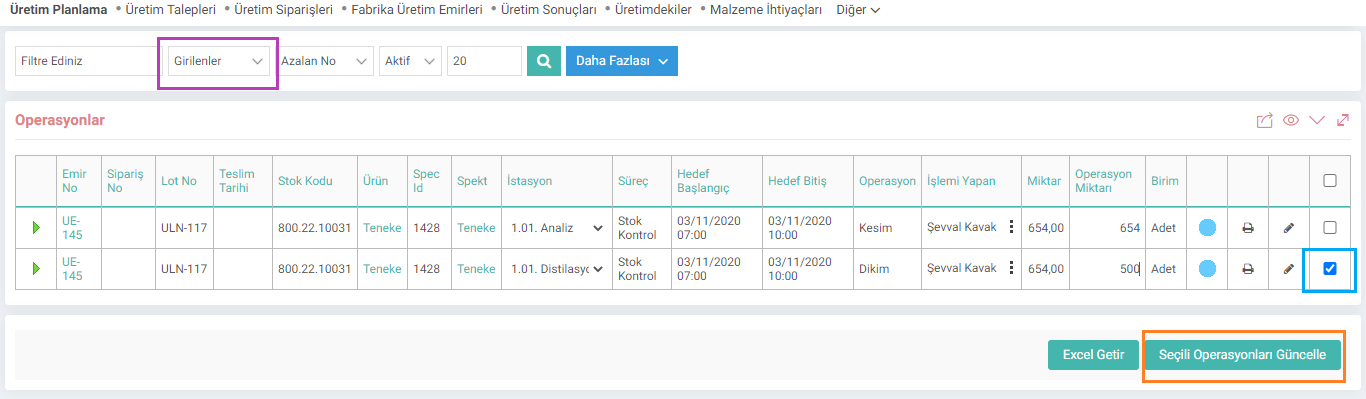
When “Not Entered” is selected, the operations that were not entered as a result of the operation are listed. You can stop these operations by selecting the boxes at the end of the line and using the "Stop Selected Operations" button. You can download the operations in Excel form with the "Get Excel" button.
